
With the recent generally available Entra ID functionality into Bicep while I was on vacation, I couldn’t wait to get back and try it out. Specifically, I wanted to see if using this functionality would allow for some level of Infrastructure as code (IaC) to good ol’ Active Directory when combined with Group Writeback using Entra Cloud Sync. So, hold on to your hats, this post is a little ‘out there’ but it could proof beneficial for certain scenarios.
Bicep for Entra ID Groups
Covering the full extent on how great a declarative way is to define resources is beyond the scope of this blogpost, but traditionally so far, you’ve had to orchestrate deployments to Azure between two mechanisms:
- Bicep template files for Azure resources
- Microsoft Graph PowerShell for Microsoft Entra ID resources
With the Microsoft Graph Bicep GA release, it’s now possible to declare Entra ID resources in the same Bicep file as Azure resources. This makes things less complex and introduces declarative methods to Entra ID!
Typically, you may use this when you’re deploying Azure resources and need to assign appropriate permissions to users in Entra ID. For example, you could deploy an Azure Function and assign specific users to it by creating a group alongside it.
Another way this can be beneficial is by being able to define your groups (and memberships/owners) in files outside of Entra ID. This allows for the use of a source control system (such as Git) to be used to maintain history tracking and allows for change management. This also allows the environment to be easily and rapidly recreated, for example, in a test environment or after someone accidentally deleted a group (or worse, a threat actor deleted hundreds).
These benefits also extend to configuration drift, and in the case of group memberships, permission drift too. If someone is added to a group manually outside of the source-controlled files, the next time the Bicep templates are deployed, the membership is revoked until they’re added to the appropriate membership source-controlled file.
Group Writeback using Entra Cloud Sync
The second half of the equation involves Group Writeback. This existed originally as part of Entra Connect Sync (originally Azure AD Connect Sync) but has since been deprecated and no longer supported. Strangely, that was called Group Writeback V2, so don’t get confused when you see that terminology. I suppose V3 now exists as part of Cloud Sync.
Good news for those running Entra Connect Sync instead of Cloud Sync though, you can safely run both at the same time! This way, Cloud Sync can be used for officially supported Group Writeback while still using Connect Sync for users.
Note! Migration is required if Entra Connect Sync Group Writeback V2 is currently used in your environment. Have a look at the documentation here.
Using Group Writeback allows for Entra ID based Cloud groups to be created in Active Directory, including their memberships (as long as those users are synchronized from Active Directory). This way, the groups can also be assigned to on-premises resources. The benefit this provides is that we can combine it with the new Bicep functionality that essentially gives us a declarative method to define AD groups and memberships.
The proof is in the pudding
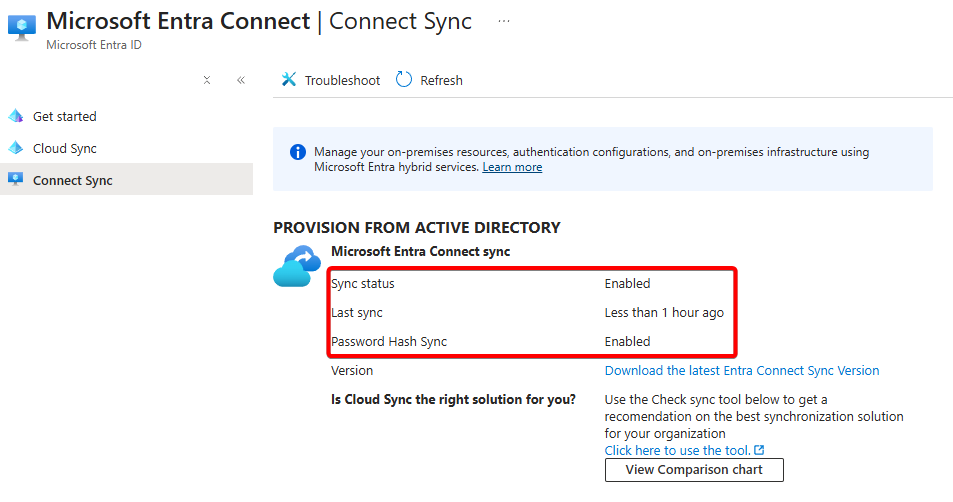
To test this, I’ve setup my lab environment with an Active Directory DC that has both Entra Connect Sync and Entra Cloud Sync running on it. Connect Sync is handling the user synchronization while Cloud Sync is configured for Group Writeback:
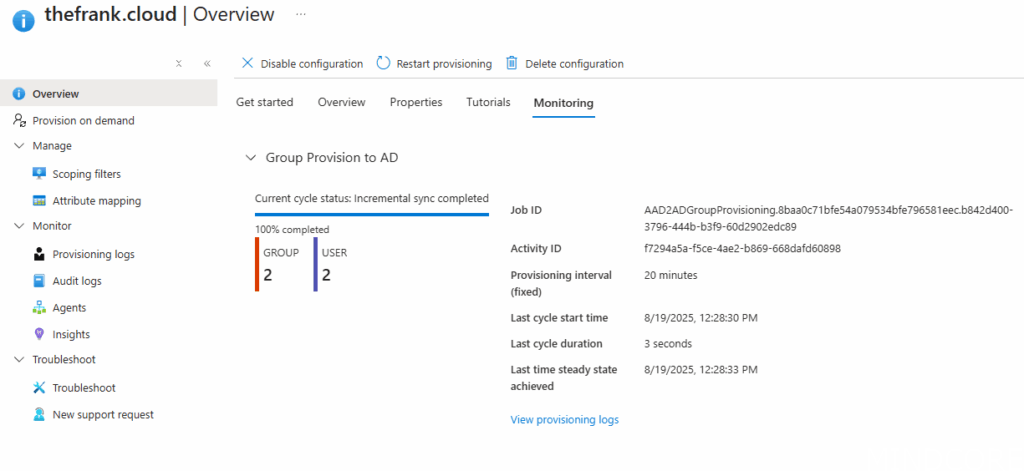
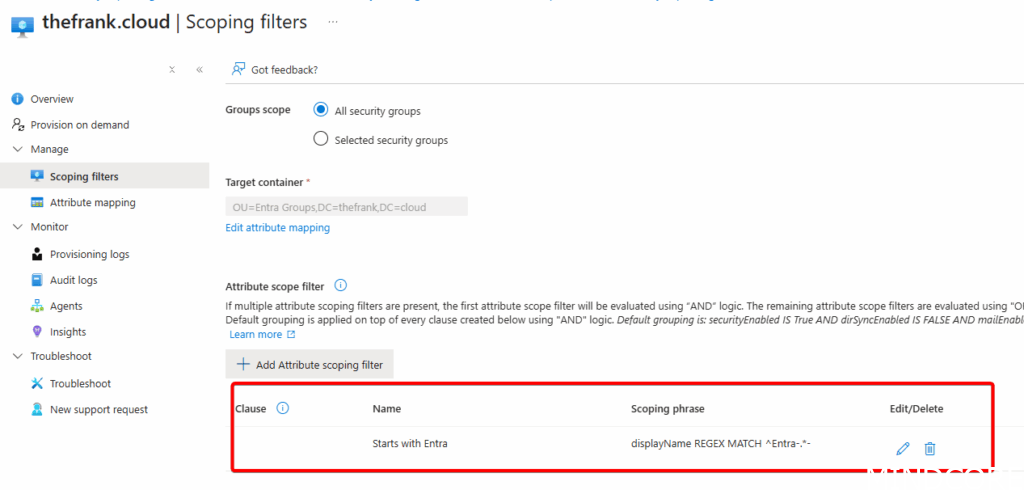
Within the Scoping Filters for Entra Connect, I’ve also defined a REGEX match to ensure I only match the groups created by the Bicep template based on Display name. This ensures I don’t end up synchronizing all groups present within Entra ID that are probably not needed in Active Directory:
I’ve created the following Bicep template that defines two groups with two User List text files defined, one for the members, and one for the Owners:
// Enable the extension - this is also enabled within bicepconfig.json
extension microsoftGraphV1

///////////////////////// PARAMETERS /////////////////////////

param date string = '2025-19-08'

//////////////////////// User Member list parse ///////////////////////
// File name/path must be a compile time constant, so this cannot be a param
var MemberuserListFilename = 'Memberuserlist.txt'

// Load a text file with a list of users separated by newlines
var MemberupnListFromFile = loadTextContent(MemberuserListFilename)
var MemberupnList = split(MemberupnListFromFile, '\r\n')
var MemberupnListLength = length(MemberupnList)

// create a users object list, looking up by the list of UPNs
// Referencing a user resource that doesn't exist results in a "NotFound" error and deployment failure.
// Check the name and scope of the resource you're trying to reference.
// See https://learn.microsoft.com/azure/azure-resource-manager/bicep/existing-resource
resource MemberuserList 'Microsoft.Graph/users@v1.0' existing = [
  for upn in MemberupnList: {
    userPrincipalName: upn
  }
]

//////////////////////// User Owner list parse ///////////////////////

// File name/path must be a compile time constant, so this cannot be a param
var OwneruserListFilename = 'Owneruserlist.txt'

// Load a text file with a list of users separated by newlines
var OwnerupnListFromFile = loadTextContent(OwneruserListFilename)
var OwnerupnList = split(OwnerupnListFromFile, '\r\n')
var OwnerupnListLength = length(OwnerupnList)

// create a users object list, looking up by the list of UPNs
// Referencing a user resource that doesn't exist results in a "NotFound" error and deployment failure.
// Check the name and scope of the resource you're trying to reference.
// See https://learn.microsoft.com/azure/azure-resource-manager/bicep/existing-resource
resource OwneruserList 'Microsoft.Graph/users@v1.0' existing = [
  for upn in OwnerupnList: {
    userPrincipalName: upn
  }
]

// Define an array of group configurations
param groups array = [
  {
    displayName: 'Entra-Coolstuff-A'
    baseName: 'Entra-Coolstuff-A'
  }
  {
    displayName: 'Entra-Coolstuff-B'
    baseName: 'Entra-Coolstuff-B'
  }
]

// Loop through the array to create multiple groups
resource entryGroups 'Microsoft.Graph/groups@v1.0' = [
  for group in groups: {
    displayName: group.displayName == null ? '${group.baseName}-${date}' : '${group.displayName}-${date}'
    uniqueName: uniqueString(group.baseName, date)
    mailNickname: uniqueString(group.baseName, date)
    mailEnabled: false
    securityEnabled: true
    members: {
      // defaults with append semantics
      // for replace semantics add: "relationshipSemantics: 'replace'"
      relationships: [for i in range(0, MemberupnListLength): MemberuserList[i].id]
    }
    owners: {
      // defaults with append semantics
      // for replace semantics add: "relationshipSemantics: 'replace'"
      relationships: [for i in range(0, OwnerupnListLength): OwneruserList[i].id]
    }
  }
]
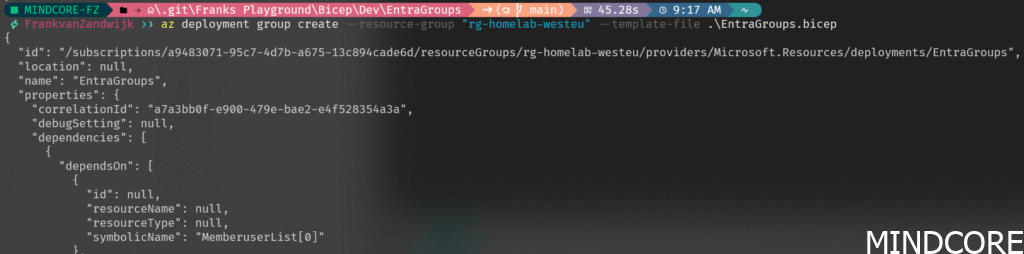
Deployment of the template can be done manually like so:
With the resultant groups showing up with Entra ID after a few seconds:

Including the defined memberships:
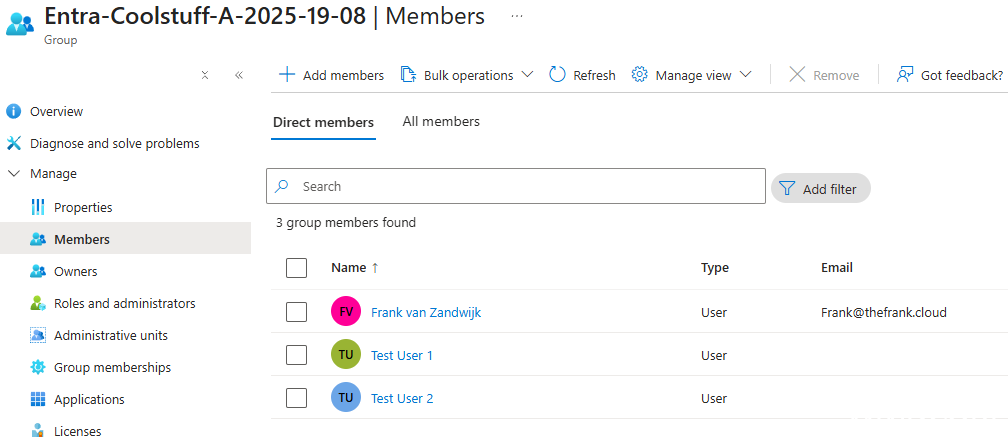
Note that the first user account shown here is a cloud-only user, while the two test users are AD-synced users.
Now checking Active Directory (after waiting ~20 minutes for the sync cycle to complete):
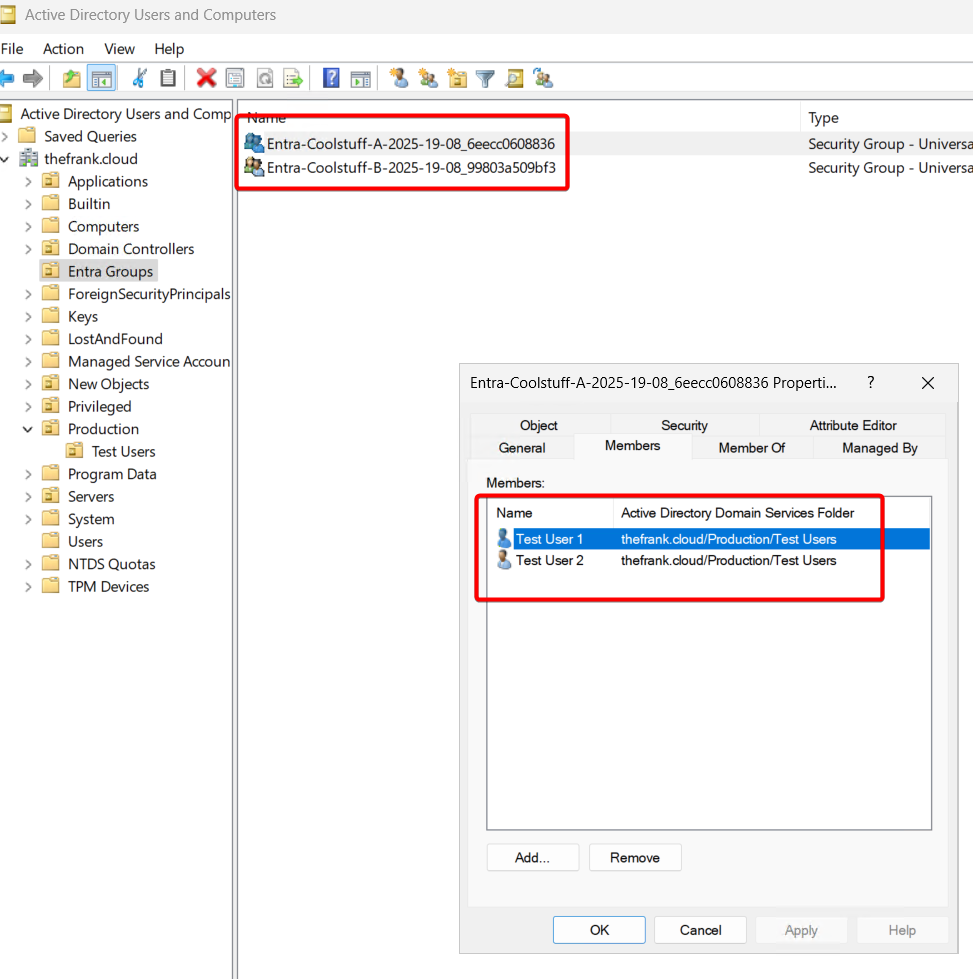
The groups have been successfully created and the memberships are synced. Notice that the cloud-only user is not present since it does not exist within the Active Directory domain.
Conclusion
Using Bicep to handle creating groups and keeping group memberships up-to-date using IaC methods is a big step in the right direction for both Microsoft and organizations that choose to adopt the approach. With some clever group writeback it is also possible to extend this down to on-premises Active Directory environments. Combined with the new Group Source of Authority (SOA) functionality, it’s possible to transition groups safely from on-premises to the cloud and begin taking advantage of greater flexibility, modern governance and streamlined administration.
Off course, there’s way more to consider when it comes to adopting this approach. Naturally, the Bicep files should be stored in a version control system (Github, Azure DevOps, or many others) and the execution should be done as part of deployment pipelines to get proper governance and control.








