Windows Server

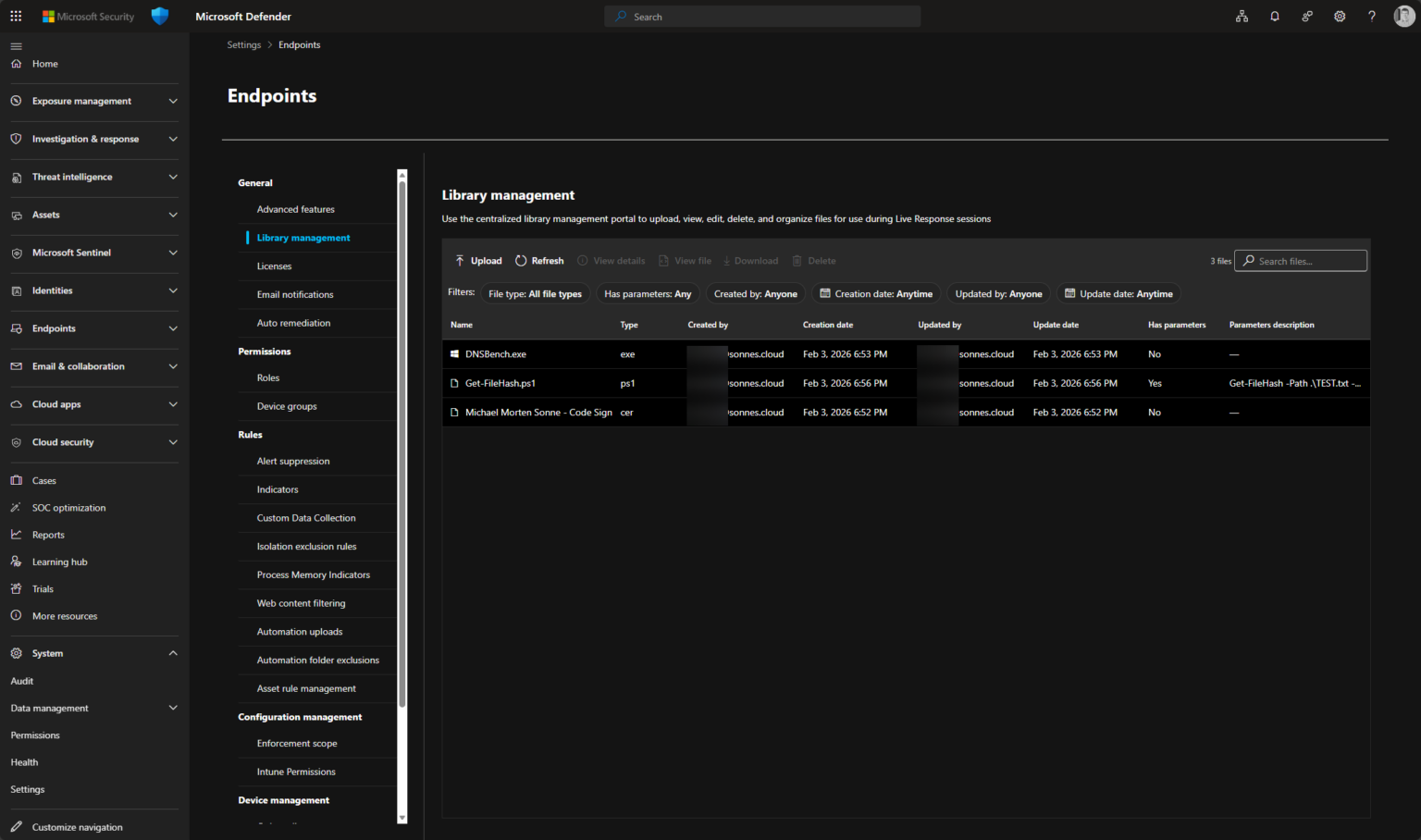
Defender for Endpoint – New feature is out: Live response file library!

Introduction Like always, it’s great to try new things early and share feedback and feature requests with the team behind them at Microsoft before everything goes public. This time, I’ve been looking at the Live response file library in Defender for Endpoint – and it’s a very welcome addition – a new small feature!  Microsoft Defender

Continue to read »

Introducing the Active Directory Domain Page in Microsoft Defender

Introduction Managing and securing your on-premises Active Directory (AD) environments has traditionally required deep expertise and direct access to domain controllers and all parts arount it. With the new Active Directory Domain Page in Microsoft Defender, that experience is now significantly streamlined – in the same place your cloud assets are (Endpoints,

Continue to read »

Microsoft Defender’s New Password Protection Experience

Introduction Imagine this: a compromised password from a single account quietly makes its way into the hands of attackers. In minutes, what seems like a small leak can become a full-blown security incident. That’s why we built the new Password Protection experience in Microsoft Defender to help security and identity teams stop

Continue to read »

Licensing grace period

When playing around with RDS in your LAB, you might run in to the problem that you have exceeded your grace period. The RDS server will show the message: Remote desktop licensing mode is not configured. Remote desktop Services will stop working because this computer is past its licensing grace

Continue to read »

Windows Profile versions

When using roaming profiles and Windows 10 you will notice that it creates V5 (version 5) profiles by default (.V5 extension) You might ask why version 5 but there is a good explanation: Windows 8 and Windows 8.1 could create V3 and V4 if a hotfix were used and a

Continue to read »

Windows 7 and Windows 2008 R2 KMS keys

Still working with Windows 7 and Windows 2008 R2 Not that long ago I needed the KMS keys for Windows 2008 R2, but realized that I only had posted the keys for Windows 2012 and Windows 8.1 on this blog. http://larslohmann.blogspot.dk/2013/10/windows-81-and-windows-2012-r2-kms-keys.html Time to change this. The default KMS keys used

Continue to read »

How long has this system been running

I often need a quick way to see how long a Windows box has been running, or actually when it was last restarted One way is to use the command net statistics workstation and find Statistics since: And of course PowerShell is nowadays also an option: Get-CimInstance -ClassName win32_operatingsystem |

Continue to read »

Windows Server Update Services (WSUS) installation fails

When you try to install Windows Server Update Services (WSUS) on Windows server 2012 R2 you might get the error The request to add or remove features on the specified server failed. The operation cannot be completed, because the server that you specified requires a restart. Restarting the server does

Continue to read »

The trust relationship between this workstation and the primary domain failed

You might not be able to logon to your computer and Windows will sat that The trust relationship between this workstation and the primary domain failed. Typical this will mean that the secure channel with the domain is broken, as explained in this post: http://blogs.technet.com/b/asiasupp/archive/2007/01/18/typical-symptoms-when-secure-channel-is-broken.aspx Nowadays we are able to

Continue to read »

Install Printer driver

Some times I need to install a printer driver silently, this could for example be in a SCCM Task Sequence. One way around this is to use the build-in tools in C:WindowsSystem32Printing_Admin_Scripts Lets try to install the HP Universal Printer Driver this way, by using the command: cscript “C:WindowsSystem32Printing_Admin_Scriptsen-USprndrvr.vbs” -a

Continue to read »

Remote Server Administration Tools for Windows 8.1 (RSAT)

Microsoft has released new version of RSAT for Windows 8.1. Remote Server Administration Tools for Windows 8.1 enables IT administrators to manage roles and features that are installed on computers that are running Windows Server 2012 or Windows Server 2012 R2 from a remote computer that is running Windows 8.1.

Continue to read »

Windows 8.1 and Windows 2012 R2 KMS keys

The default KMS keys used for volume licensing editions of Windows 8.1 and  Windows Server 2012 R2 has been updated. KMS Client Setup Keys Operating system edition KMS Client Setup Key Windows 8.1 Professional GCRJD-8NW9H-F2CDX-CCM8D-9D6T9 Windows 8.1 Professional N HMCNV-VVBFX-7HMBH-CTY9B-B4FXY Windows 8.1 Enterprise MHF9N-XY6XB-WVXMC-BTDCT-MKKG7 Windows 8.1 Enterprise N TT4HM-HN7YT-62K67-RGRQJ-JFFXW Windows

Continue to read »

Windows 8.1 and Windows 2012 R2 KMS keys

The default KMS keys used for volume licensing editions of Windows 8.1 and  Windows Server 2012 R2 has been updated. KMS Client Setup Keys Operating system edition KMS Client Setup Key Windows 8.1 Professional GCRJD-8NW9H-F2CDX-CCM8D-9D6T9 Windows 8.1 Professional N HMCNV-VVBFX-7HMBH-CTY9B-B4FXY Windows 8.1 Enterprise MHF9N-XY6XB-WVXMC-BTDCT-MKKG7 Windows 8.1 Enterprise N TT4HM-HN7YT-62K67-RGRQJ-JFFXW Windows

Continue to read »
Search blog posts
Search
Authors
Modern Workplace consultant and a Microsoft MVP in Enterprise Mobility.

Modern Workplace consultant and a Microsoft MVP in Windows and Devices.

Infrastructure architect with focus on Modern Workplace and Microsoft 365 security.

Cloud & security specialist with focus on Microsoft backend products and cloud technologies.

Cloud & security specialist with focus on Microsoft 365.

Cloud & Security Specialist, with a passion for all things Cybersecurity

Cloud and infrastructure security specialist with background in networking.

Infrastructure architect with focus on design, implementation, migration and consolidation.

Infrastructure consultant with focus on cloud solutions in Office365 and Azure.

Modern workplace and infrastructure architect with a focus on Microsoft 365 and security.

follow us in feedly
Categories
  • Follow on SoMe