
Introduction
Like always, it’s great to try new things early and share feedback and feature requests with the team behind them at Microsoft before everything goes public. This time, I’ve been looking at the Live response file library in Defender for Endpoint – and it’s a very welcome addition – a new small feature!
Microsoft Defender has added Library Management to live response, addressing a long‑standing SOC pain point around script and tool readiness during investigations. Instead of uploading artifacts ad hoc during an active session, analysts can now centrally manage Live Response scripts and files directly in the Defender portal, outside of incident context.
From a technical and operational standpoint, this enables:
- Pre-staging of response tooling (PowerShell scripts, batch files, binaries) so assets are immediately available when a Live Response session is initiated
- Centralized governance of investigation artifacts, reducing script sprawl and analyst-to-analyst inconsistency
- Inline script inspection within the Defender UI, allowing analysts to review logic and validate behavior prior to execution.
- Lifecycle hygiene through easy removal of outdated or redundant tools, supporting auditability and least-privilege principles.
A key addition is Security Copilot integration (not tested), which analyzes scripts stored in the library and provides:
- High-level behavior summaries
- Security-relevant context and intent
- Execution risk considerations
This is particularly valuable in environments where scripts are shared across teams or inherited over time, helping reduce execution errors and analyst uncertainty during high-pressure investigations. Overall, Library Management improves incident response readiness, shortens time-to-action during Live Response, and strengthens control over custom response tooling across SOC teams.
This post is not a big one, but it have the core of this new add – now lets look a bit more into it!
What is the Live response file library?
The Live response file library is a centralized repository under Microsoft Defender for Endpoint where security teams can upload and manage files that are used during Live Response sessions on your endpoints.
Instead of uploading tools or scripts every single time you connect to a device, you can now prepare them once and reuse them across all your investigations!
Here’s what stands out in this first iteration:
- Centralized file storage
Upload files once and make them available for all Live Response sessions. This works great for common tools, scripts, or certificates you frequently rely on. - Support for multiple file types
The library supports common formats such as:- Executables (
.exe) - PowerShell scripts (
.ps1) - Certificates and other supporting files
This covers most real-world Live Response use cases. - And more file types as I see it
- Executables (
- Metadata and visibility
Each file includes details like:- Who uploaded it
- Creation and update timestamps
- Whether parameters are required
This makes auditing and collaboration much easier, especially in larger teams.
- Parameter-aware scripts
PowerShell scripts can define parameters, allowing more flexible and reusable tooling without hardcoding values. - Basic management actions
Files can be uploaded, viewed, downloaded, and deleted directly from the portal, keeping everything controlled.
How to get started
Getting started with the Live response file library is straightforward:
Open the Microsoft Defender portal
Navigate to Settings > Endpoints > Library management.
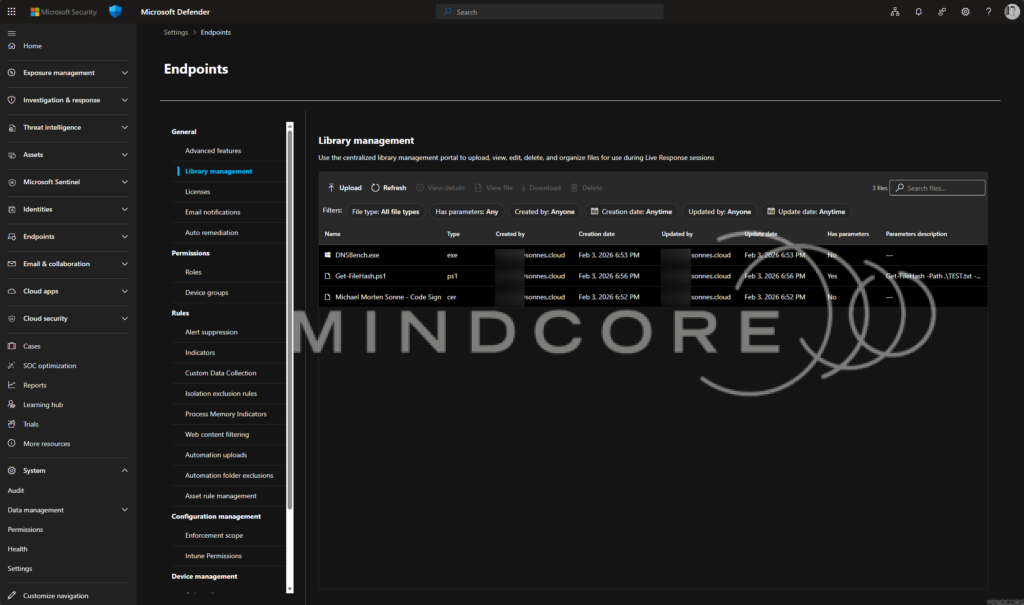
- Upload your files – Use the Upload action to add executables, PowerShell scripts, or supporting files you commonly use during investigations.
- Review metadata and parameters – Check that uploaded scripts show the expected parameters and that ownership and timestamps are correct.
- Use files during Live Response – Start a Live Response session on a device and access your uploaded files directly from the library – no need to upload them again per session.
Keep the library tidy
Periodically review and delete outdated tools or scripts to maintain a clean and trusted response toolkit.
Here, we are talking to the https://mde-rsp-apilr-prd-weu3.securitycenter.windows.com/api/cloud/live_response/library/upload_file?liveResponseBaseUrl=https:%2F%2Fmde-rsp-apilr-prd-weu3.securitycenter.windows.com%2Fapi%2Fcloud%2Flive_response&useV3Api=true URL (regions and so on will reflect) – but its coded around the MDE API.
Why this matters
Before this feature, Live Response workflows often involved repetitive uploads or external tooling management. The new file library:
- Saves time during active investigations
- Encourages standardized, reusable tooling
- Reduces operational friction when responding to incidents
- Improves consistency across analysts and shifts
It’s a small feature on the surface, but it has a big impact on day-to-day SOC efficiency.
What Microsoft says about library management
Microsoft recently published an official announcement about the new library management experience for Live Response in Defender. The core idea is very much aligned with what we’re seeing in the portal:
- It’s designed for proactive investigation readiness – letting SecOps teams prepare and organize scripts and tools ahead of time instead of having to upload them during a live session.
- The UI now supports centralized script and file management directly in the Defender portal, improving visibility and control over your live response toolkit.
- You can view script contents inline, which is handy for quick validation or peer reviews before running anything during an active investigation.
- Outdated or unused scripts can be cleaned up easily, helping keep your library lean and audit-ready.
- Microsoft even calls out Copilot integration to help summarize and understand scripts’ intent and risks – a nice addition for onboarding new analysts or reducing mistakes.
This announcement confirms the direction we’ve been playing with – making file and script management a first-class part of the Defender for Endpoint experience, not an afterthought stuck inside active sessions.
Early thoughts and feedback
As an early look, the foundation is solid. Going forward, it would be exciting to see:
- Versioning for scripts and tools
- Role-based access per file
Overall, this is a strong step forward for Live Response usability. Definitely a feature worth exploring and stress-testing early – and, as always, sharing feedback with the product team while it’s still fresh.
Conclusion
The new Live response file library in Defender for Endpoint is one of those features that quietly improves daily SOC life in a big way. By moving tool and script management out of live investigations and into a centralized, well-structured library, Microsoft is clearly focusing on preparedness, consistency, and operational efficiency.
Between the hands-on experience in the portal and Microsoft’s own announcement, it’s clear this feature is built to help teams respond faster, reduce friction, and standardize how Live Response is used across analysts. There’s still room to grow – especially around versioning, governance, and automation – but the foundation is solid and genuinely useful.
References
Introducing library management in Microsoft Defender | Microsoft Community Hub








