
Back in September Microsoft has recently teaset App Management Policies in Microsoft Entra ID UI, which let you set tenant-wide restrictions on how applications and service principals can be configured from the UI – for example restricting certificate lifetimes, blocking new passwords/secrets, enforcing valid URI formats, etc. (as it looks like for now – the global policy):
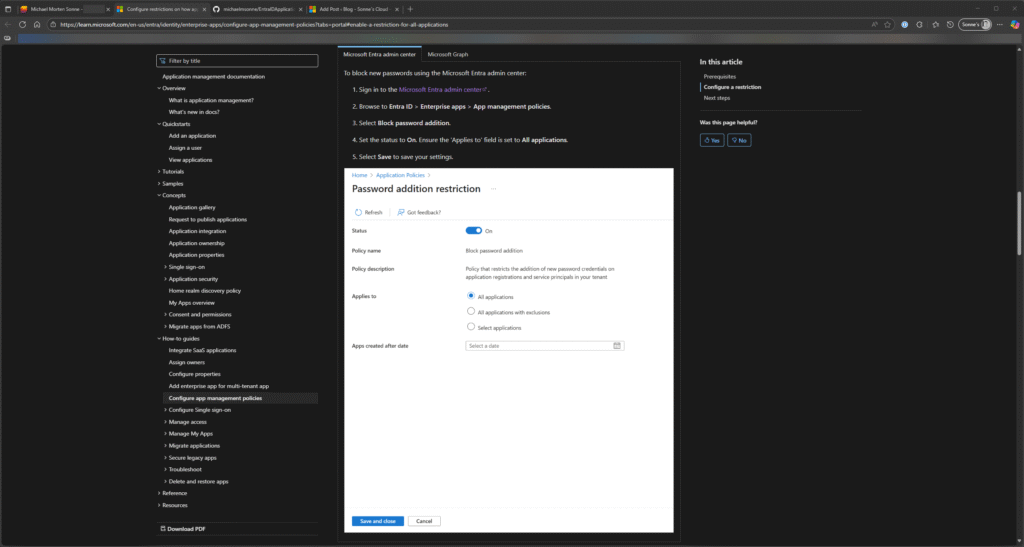
This is a very promising feature starting to show up in the Entra ID Portal (but there is some UI bugs, I hope it will be fixed soon), as this from a security posture perspective and as we have seen, not many using this feature (and the good is that it´s now free for all Entra ID plans! 💪)
| Capabilities | Description | Free | Premium |
|---|---|---|---|
| Authentication and authorization | |||
| Create, read, update, and delete workload identities | Create and update identities to secure service to service access | Yes | Yes |
| Access resources by authenticating workload identities and tokens | Use Microsoft Entra ID to protect resource access | Yes | Yes |
| Workload identities sign-in activity and audit trail | Monitor and track workload identity behavior | Yes | Yes |
| Managed identities | Use Microsoft Entra identities in Azure without handling credentials | Yes | Yes |
| Workload identity federation | To access Microsoft Entra protected resources, use workloads tested by external identity providers (IdPs) | Yes | Yes |
| Lifecycle management | |||
| Application management policies | IT admins can enforce best practices for how apps are configured | Yes | Yes |
| Access reviews for service provider-assigned privileged roles | Closely monitor workload identities with impactful permissions | Yes | |
| App Health Recommendations | Identify unused or inactive workload identities and their risk levels. Get remediation guidelines. | Yes | |
| Microsoft Entra Conditional Access | |||
| Conditional Access policies for workload identities | Define the condition for a workload to access a resource, such as an IP range. Doesn’t cover managed identities. | Yes | |
| Microsoft Entra ID Protection | |||
| ID Protection for workload identities | Detect and remediate compromised workload identities | Yes |
To see what you have of Workload identities, go to Workload identities – Microsoft Entra admin center – here you can also start a Microsoft Entra Workload ID free trial (The trial includes 200 licenses and will be active for 90 day as of this blog post is created) to enable the complete feature set across your tenant – that is nice! 👌💪
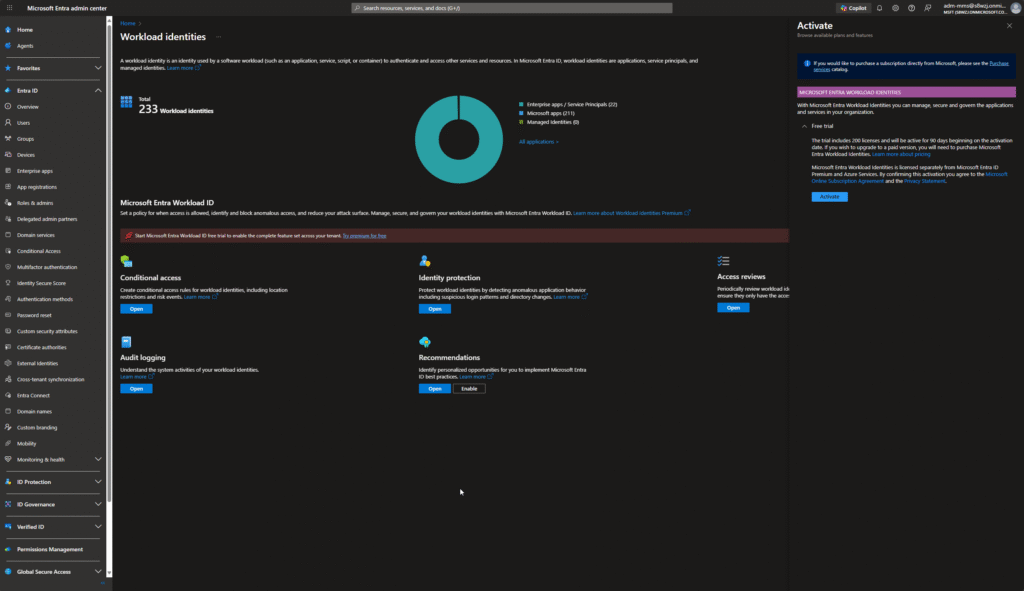
This helps enforce least-privilege, reduces attack surface from misconfigurations or long-lived credentials aka secrets, this gives admins and security teams more guardrails – this functionality doesn’t exist else in the Entra ID Portal; it’s only exposed through the Microsoft Graph API.
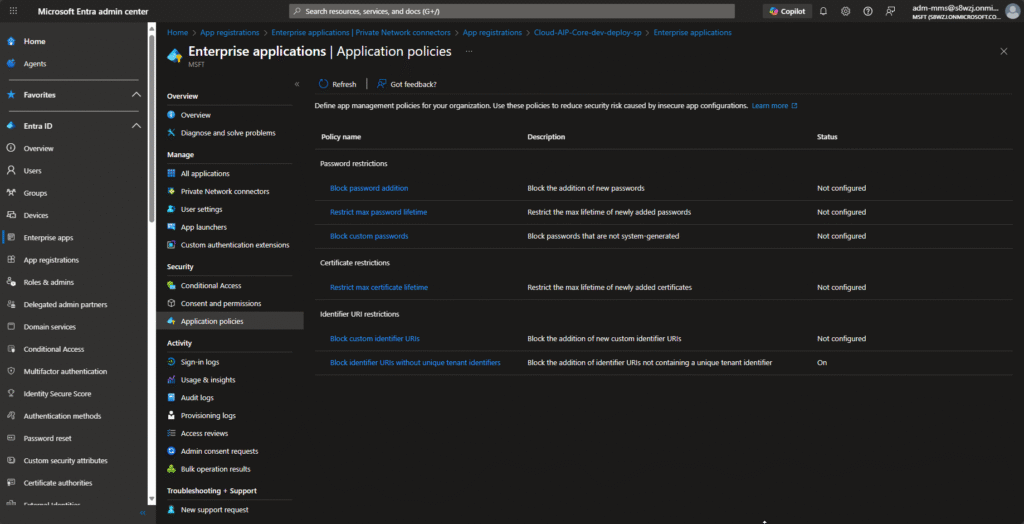
To a start (we hope it will be available for custom policies also), in this UI its only possible to manage the Global tenant wide policy – not custom and individual policies – you can see it yourself here: Enterprise applications – Microsoft Entra admin center
We are particularly excited because this aligns with some of the work I have started earlier this year via his EntraIDApplicationPolicyManager (on GitHub) tool. Back then, the idea was to help manage the enforcement of these kinds of configuration policies via PowerShell/Graph API in a nice UI like the tool he created to support a gab too for Managed Identities: michaelmsonne/ManagedIdentityPermissionManager: Azure Managed Identity Permissions Tool, a new PowerShell tool that simplifies and streamlines the management of Managed Identity permissions in Azure (Entra ID)
You can read more about the Managed Identity tool here on the blog and at GitHub – it´s nice and many loves it! ❤️
Prerequisites
To configure the app management policies in the UI (and via Microsoft Graph), you need the following:
- The Security Administrator role, and the Cloud App Administrator or Application Administrator role or the the Global Administrator role
- Licenses – yes, not a need for this one! 💪
Strengthening Application Security in Microsoft Entra ID with Configuration Restrictions
Managing how applications are configured in your Entra ID setup is a critical part of protecting your organization and your applications/API accesses in. This lets administrators and security teams define restrictions on how app owners and admins can configure apps and service principals.
These policies are designed to minimize security risks caused by insecure or overly permissive app configurations – such as weak credentials or risky audience settings.
Why these restrictions matter
Applications often serve as gateways into your sensitive resources and data. Without limits on configuration options, developers or admins might unintentionally create vulnerabilities – like long-lived credentials, custom passwords, or open audience URIs. Entra app management policies add governance and guardrails that ensure apps comply with your organization’s security standards.
Key restriction options
| Restriction | What it does | Why it matters | Where it’s configurable |
|---|---|---|---|
| asymmetricKeyLifetime | Limits how long a certificate (asymmetric key) can remain valid. | Reduces risk from long-lived credentials. | API + Entra admin center (“Restrict max certificate lifetime”). |
| audiences | Controls creation of apps based on signInAudience values. | Prevents unsanctioned multitenant or consumer-facing apps. | API only. |
| customPasswordAddition | Blocks adding custom app passwords. | Prevents weaker, user-created passwords. | API + admin center (“Block custom passwords”). |
| nonDefaultUriAddition | Blocks new identifier URIs that don’t follow default formats (api://{appId} or api://{tenantId}/{appId}). | Reduces risks from improper audience validation. | API + admin center (“Block custom identifier URIs”). |
| uriAdditionWithoutUniqueTenantIdentifier | Blocks URIs lacking a unique tenant identifier. | Prevents audience overlap between tenants. | API + admin center (“Block identifier URIs without unique tenant identifier”). |
| passwordAddition | Prevents adding new password secrets entirely. | Eliminates use of the most easily compromised credentials. | API + admin center (“Block password addition”). |
| passwordLifetime | Enforces a maximum password lifetime. | Reduces risk from long-lived secrets. | API + admin center (“Restrict max password lifetime”). |
| symmetricKeyAddition | Disallows symmetric keys on apps. | Prevents password-like credentials. | API + admin center (part of “Block password addition”). |
| symmetricKeyLifetime | Limits how long symmetric keys can be valid. | Reduces exposure from aging keys. | API + admin center (“Restrict max password lifetime”). |
| trustedCertificateAuthority | Blocks certificates from untrusted issuers. | Ensures only approved CAs are used. | API only. |
As you can see here (as of 17/10/2025) there is still stuff you need to manage via the Microsoft Graph API – you need to know how it works 😉
How to configure a restriction in the new UI
You can configure the app management policies in Entra ID using either the Microsoft Entra admin center or Microsoft Graph API.
Global policies
Enable a restriction for all applications
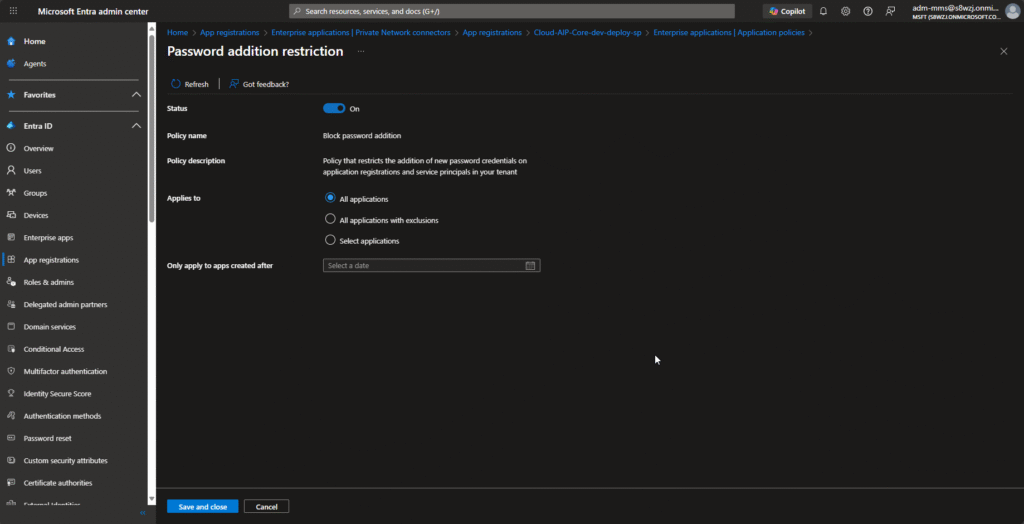
This example blocks the addition of new passwords for all applications and service principals in your organization. A similar process can be used to enable other restrictions globally 😉
- Sign in to the Microsoft Entra admin center portal.
- Go to the meny Entra ID > Enterprise apps > Application policies.
- Select Block password addition.
- Set the status to On. Ensure the ‘Applies to’ field is set to All applications.
- Select Save to save your settings.
For etc. the Restrict max password lifetime setting – when you go into an App Registration and try to add a new client secret you will see a restriction like this in the Entra ID Portal:
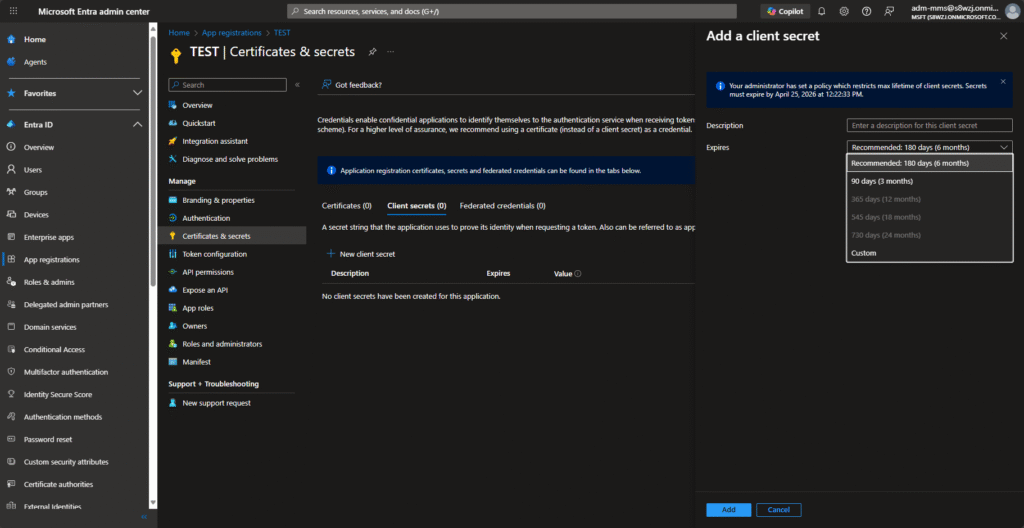
This is smart to restrict client secrets to etc. some developer apps where Federated Authentication is not in place yet, or the application it not yet support other types – then you can lock it down to a selected handful of Applications.
Apply a restriction to a specific application
Sometimes you aren’t ready to apply a set of restriction to your entire tenant (this is common), but you still want to apply the rules to a select set of security-sensitive applications. In this example we applies the restriction of blocking custom passwords to a single application. A similar process can be followed for other restrictions 😊
- Sign in to the Microsoft Entra admin center portal.
- Browse to Entra ID > Enterprise apps > Application policies.
- Select Block custom passwords.
- Ensure the status is On. Set the ‘Applies to’ field to Select applications.
- Select Add applications.
- Choose the application you’d like to apply the restriction to.
- Select Save to save your settings.
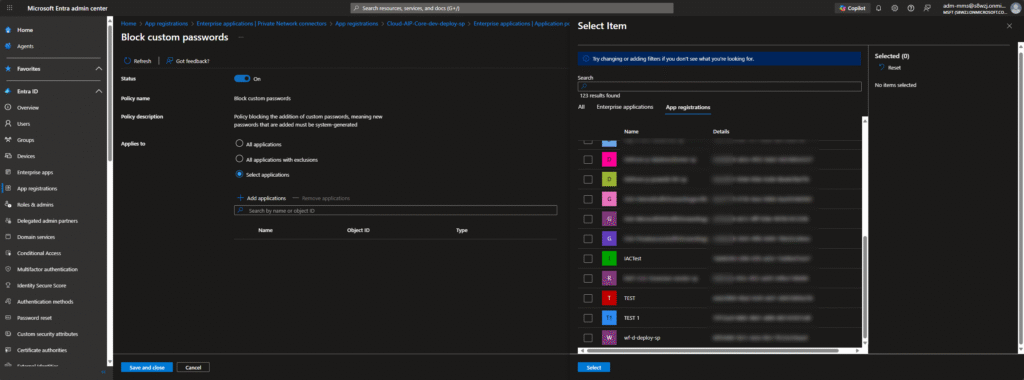
Grant an exception to an application in your global policy
Sometimes we need exceptions for some applications, as that is needed to be excluded from your tenant-wide rule. This example grants an app an exception to the restriction blocking custom identifier URIs, so you still can add custom URIs to it. A similar process can be followed for other restrictions like client secrets restrictions.
- Sign in to the Microsoft Entra admin center portal
- Browse to Entra ID > Enterprise apps > Application policies.
- Select Block custom identifier URIs.
- Ensure the status is On. Set the ‘Applies to’ field to All applications with exclusions.
- Under Excluded apps, select Add applications.
- Choose the application you’d like to exclude from the restriction.
- Select Save to save your settings.
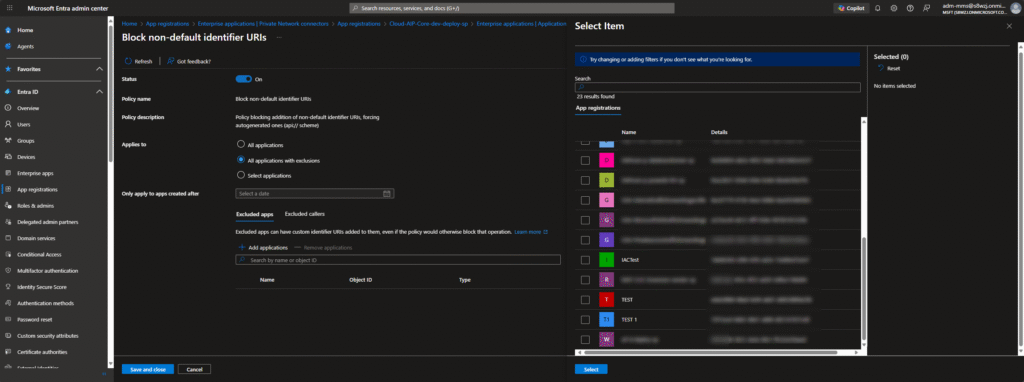
Grant an exception to a user or service principal
Sometimes you need exceptions to be granted to a special user or service principal creating or modifying your applications. For example, imagine an automated process in your organization periodically creates applications and sets passwords on it. You want to block the new passwords in your organization, but you don’t want to break this automated process while you’re working on updating it. Application exceptions wouldn’t work in this case, because the apps being created/updated don’t exist yet! Here, you can apply an exception to the process if needed.
This type of exception is configured using custom security attributes. Because of this, you need two additional roles for this scenario, in addition to the roles from prerequisites.
This example grants the service an exception to the restriction enforcing etc. a max lifetime on new certificates it adds to other applications and service principals. The service will be represented by its service principal. Find the service principal for a service by searching for it in Enterprise applications.
- Sign in to the Microsoft Entra admin center portal
- Browse to Entra ID > Enterprise apps > Application policies.
- Select Restrict max certificate lifetime.
- Ensure the status is On. Set the ‘Applies to’ field to All applications with exclusions.
- Under Excluded callers, select Add excluded callers.
- Choose the user or service principal whose calls to create/update apps you’d like to exclude from the restriction.
- Select Save to save your settings.
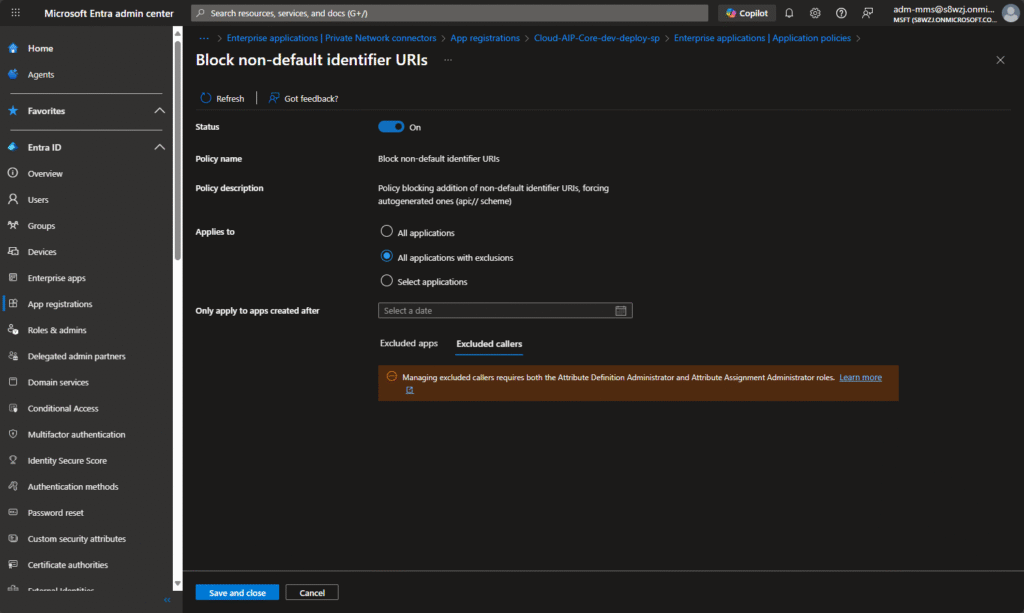
Custom policies
This is only possible to manage via Microsoft Graph as it´s not available in the Entra ID Portal at the moment – but for now this will not be covered in this post – is a big topic.
The custom policies are applied to specific applications or service principals. They’re used to override the tenant-wide configuration for a specific app. You can learn more about that here.
Because of this, the list of custom policies can’t be viewed directly in the Microsoft Entra admin center. But they can be viewed through Microsoft Graph from this endpoint:
GET https://graph.microsoft.com/beta/policies/appManagementPoliciesThe “original” tool
The EntraID Application Policy Manager is a custom-built tool that connects directly to Microsoft Graph and allows administrators to easily view, create, and manage App Management Policies for Entra ID applications.
Key capabilities:
- Lists all applications in the tenant for quick selection.
- Retrieves and displays assigned application policies.
- Supports both global tenant-wide policies and per-application individual policies (work in process).
- Lets you configure restrictions such as:
- Password and secret lifetimes
- Symmetric/asymmetric key restrictions
- Custom password additions
- Shows raw policy information for transparency and troubleshooting (working on a better view – sorry!)
- Logging panel for detailed insights into all operations.
The tool is designed to give admins better visibility and control over application configuration hygiene without look in raw JSON data, helping to enforce secure defaults even before the native Microsoft UI support was here.
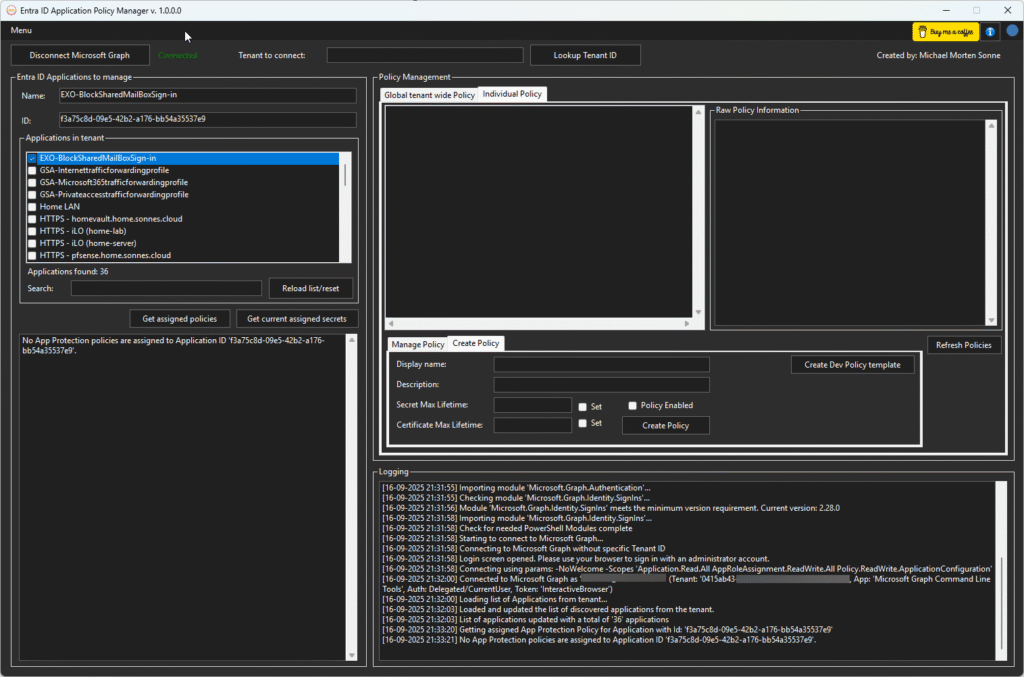
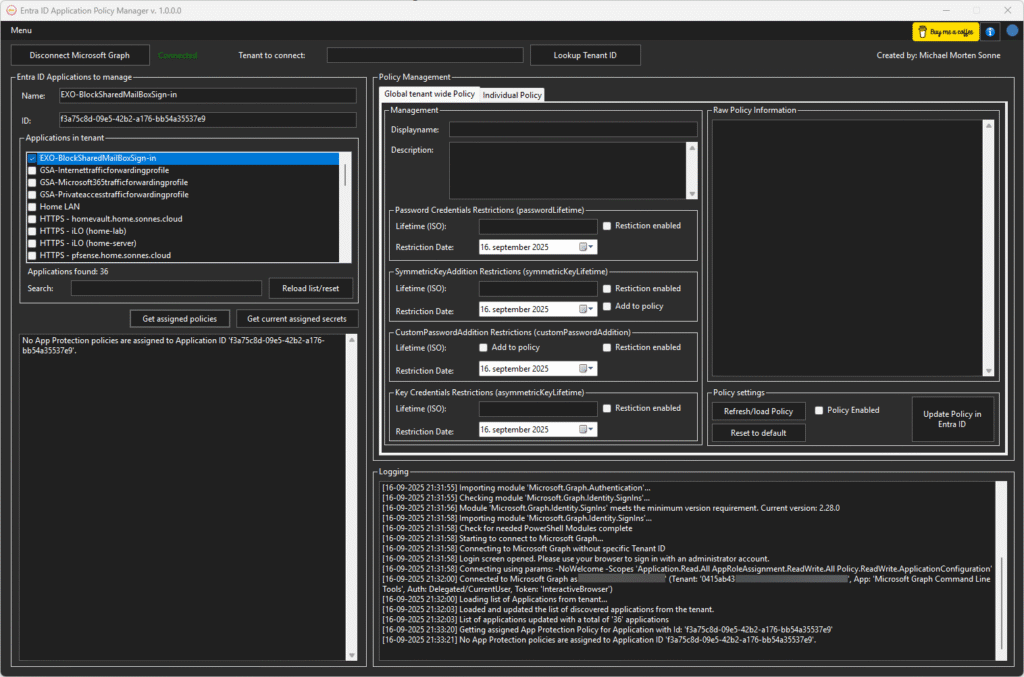
As you can see, there’s already some promising potential in this tool. It includes error handling and various management options, and at this point the project has grown to more than 3,500 lines of PowerShell code!
The goal is to make it both powerful and practical for administrators who want to manage and enforce Entra ID application policies more efficiently.
What are some of the core recommendations?
Yes, now to the nice and fun part where we can see we can make a difference – what should you go with? 😉
| Area | Best practices/rules | Why it matters |
|---|---|---|
| Identity type | Use a managed identity instead of a standalone app registration, when possible (this is etc. services there runs in Azure like Azure Arc devices, Azure Automation Accounts and so on there doesn’t need to sign in like “users”) | Managed identities reduce manual credential handling and attack surface. This is kind of a “pandang” for the good old Active Directory gMSA (Group Managed Service Account) account |
| Credentials (Certificates and Secrets) | • Prefer managed identity or external identity federation over certificates/secrets • If you must use a credential, prefer certificate-based credentials over password (secrets) credentials • Store certificates in a secure vault (e.g. Azure Key Vault) • Use certificates from a trusted CAs rather than self‐signed, where feasible • Configure policies to limit secret lifetimes/block secrets altogether • Don’t embed credentials in client apps; for “public client” apps, and done hardcode credentials in the app! • Regularly audit, rotate, and remove unused credentials • Use tools (e.g. credential scanners) to prevent credentials leaking into code/repos in Azure DevOps and GitHub (this is a common issue for development departments) | Weak or leaked credentials are a high-risk vector. Lifetime limits, rotation, and minimal use reduce the impact if you are “unlucky” |
| Redirect URIs | • Maintain control/ownership of all redirect URIs • Avoid wildcard or overly broad URIs or “localhost” • Only use secure schemes (HTTPS) – avoid plain HTTP or URNs for web apps • Keep the list minimal; remove unused ones • Periodically verify DNS ownership and configurations | An attacker controlling a redirect URI could intercept tokens/impersonate the app. |
| Implicit flow (Access tokens in redirect flows) | • Prefer Authorization Code flow (with Proof Key for Code Exchange (PKCE) if applicable – RFC 7636) over implicit flow • Only enable implicit flow if absolutely required • Disable “access tokens via implicit flow” if you don’t need it • For valid implicit flow scenarios, use separate app registrations and not reuse it in different applications/integrations | Implicit flow is more vulnerable to token exposure (e.g. via browser) |
| Application ID URI/Identifier URI | • For v1.0 tokens: stick to default formats (api://<appId> or api://<tenantId>/<appId>) and restrict custom URIs via policy if needed• For v2.0 tokens: use api:// or https:// URI schemes, avoid wildcards, use verified domains• Ensure the URI is globally unique and doesn’t end with “/” • Maintain an inventory of URIs in the organization | Correct configuration ensures token ‘aud’ checks are reliable and avoids collisions or spoofing |
| Access token version | • If app is a resource API (i.e. is the target/audience of tokens), prefer v2.0 access tokens (v1 uses HTTP Basic Authentication, v2 implements JSON Web Tokens (JWT) for enhanced security) • Ensure your token‐validation logic only accepts tokens whose aud matches your app id• Before switching, verify your service supports the new claim structure | v2.0 tokens bring improvements (claim consistency, etc.) and help compatibility with newer standards |
| App instance lock | • Enable “app instance lock” (configuration locking) so downstream tenants can’t override critical settings • Lock all sensitive properties • Especially important for multi-tenant apps | Prevents external tenants from injecting/configuring credentials or settings you didn’t expect |
| Permissions (APIs/scopes) | • Adhere to least privilege: request only what your app really needs • Prefer delegated permissions (user context) over app-only when possible • Periodically review the permissions your app uses, remove unused ones | Overprivileged apps expand the blast radius if compromised |
| App ownership | • Keep the list of app owners minimal • Regularly review and remove owners who no longer should manage the app (e.g. left the company) • Use access reviews where possible | Owners can change app config / credentials – limiting them reduces risk |
| Use Entra recommendations/monitoring | • Periodically review Microsoft Entra’s recommendations related to app configuration and unused apps • Use built-in security & health monitoring features | Helps catch misconfigurations or drifts |
What´s comming
With Microsoft now “building” this/or some functionality more natively into Entra ID, there is still some gaps needed to be covered.
I believe these policies will make a big difference for organizations wanting some more control over there app credential hygiene and reducing some risks.
Conclusion
With Microsoft now rolling out App Management Policies in Entra ID UI, organizations gain a powerful way to set guardrails for application configuration and credential management then before (as many not useing it – or not know it´s there “behind” the UI). This not only strengthens security but also reduces the risk of misconfigurations and long-lived secrets slipping through the cracks
For me, it’s exciting to see how these capabilities evolve – especially since I’ve been exploring similar concepts with my EntraID Application Policy Manager project. What started as a community tool to experiment with application policy enforcement is now becoming a native part of Entra ID, fully supported in the portal and Graph API (we can hope).
The journey doesn’t stop here: there’s still room to explore how these policies can be combined with automation, auditing, and exception handling to fit real-world needs. But one thing is clear – App Management Policies are a big step forward in making application security easier, more consistent, and more resilient.
And to follow along with what is happening of new features and so, check out Microsoft Entra releases and announcements – Microsoft Entra | Microsoft Learn to read it all!
And now a short message in Danish
Hos Mindcore elsker vi at dele viden, men det er vores Danske kunder der rent faktisk gør dette arbejde muligt. Hvis du er interesseret i hvad vi kan tilbyde i forhold til Microsoft 365 Governance og sikkerhed, Azure ARC, Intune eller nogen af de andre områder vi har skrevet om her på bloggen, så kontakt os på info@mindcore.dk eller telefon 51 91 44 10.
References
Configure restrictions on how applications can be configured – Microsoft Entra ID | Microsoft Learn
Microsoft Entra application management policy API overview – Microsoft Graph beta | Microsoft Learn
https://github.com/michaelmsonne/EntraIDApplicationPolicyManager








