
This week Microsoft is kicking off 2026 strong with a much-anticipated feature releasing into preview: Tenant Configuration Management (TCM) APIs.
Traditionally administrators have to make configuration changes either in the portals one at a time or in through Graph API using, for example, PowerShell. However, what if another administrator comes along and switches off a particular setting? The tenant configuration has now drifted away from the initial state it was configured in. Over time, this is inevitable and many changes will occur over the lifetime of a tenant.
The solution is some type of drift-control system that can be applied by administrators which can report on drifted settings based on a predefined configuration. Good drift-control systems will even autocorrect these drifts and keep the tenant in tip-top shape. Customers have been asking for this for years, and there are some third-party offerings available that promise to do this such as Senserva Drift Manager, or Inforcer. Unfortunately, they’re typically limited to the configuration settings available within the public Graph API, which we all know is not always aligned with what we see in the portal.
This is great news for anyone administrating tenants and needs better governance over changes being made in their environments. This is even better news for those running complex multi-tenant scenarios and require consistency across them.
So, what is TCM exactly?
It has major overlap with what we’ve already been able to do with Microsoft365DSC, a powerful solution in its own right, but with a few big differences:
- TCM is officially supported by Microsoft (unlike M365DSC which is a community-led project)
- No reliance on PowerShell
- No reliance on DSC’s LCM
The APIs are exposed through Microsoft Graph, making implementation a fairly easy for anyone already familiar with Graph.
While in preview, TCM can operate in two modes:
- Backup existing tenant configurations into JSON configuration templates
- Continuously monitor tenant configurations for unwanted configuration drifts
It’s expected that Microsoft will release the following awaited features in the near future:
- Deploy configuration changes (again, via JSON templates)
- Automatically remediate from detected configuration drift (auto-correct)
The current preview is also limited to the following list of tenant workloads:
- Defender (limited coverage)
- Entra ID
- Exchange Online
- Intune
- Purview
- Teams
With more workloads also expected to come in the future (notably missing are SharePoint Online/OneDrive and Copilot).
For a full list of exact supported resource types, you can reference the Microsoft documentation here.
Getting Started
Enough talking about what is, and let’s see what it actually looks like since an example is much more powerful than words.
Let’s take the simple task of checking which Conditional Access policies are in place.
Onboarding
As with most of Microsoft’s systems, we can either authenticate as a user with a privileged role or create a Service Principal with appropriate permissions.
When a monitor executes, it impersonates a UTCM-specified principal with the following app ID:
03b07b79-c5bc-4b5e-9bfa-13acf4a99998Note: During the public preview, we need to add this UTCM service principal to the tenant ourselves. I expect this to be rolled out automatically when Microsoft releases it.
For more details, reference Microsoft documentation.
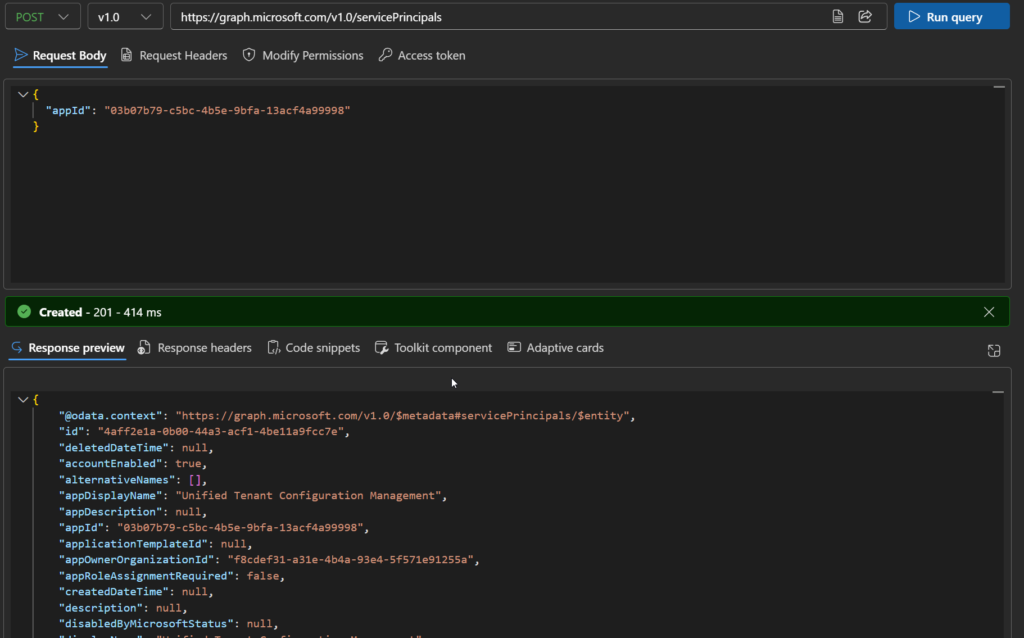
For this I simply used Graph Explorer signed in to my development tenant and made the following POST request:
POST https://graph.microsoft.com/v1.0/servicePrincipals
Content-Type: application/json

{
  "appId": "03b07b79-c5bc-4b5e-9bfa-13acf4a99998"
}
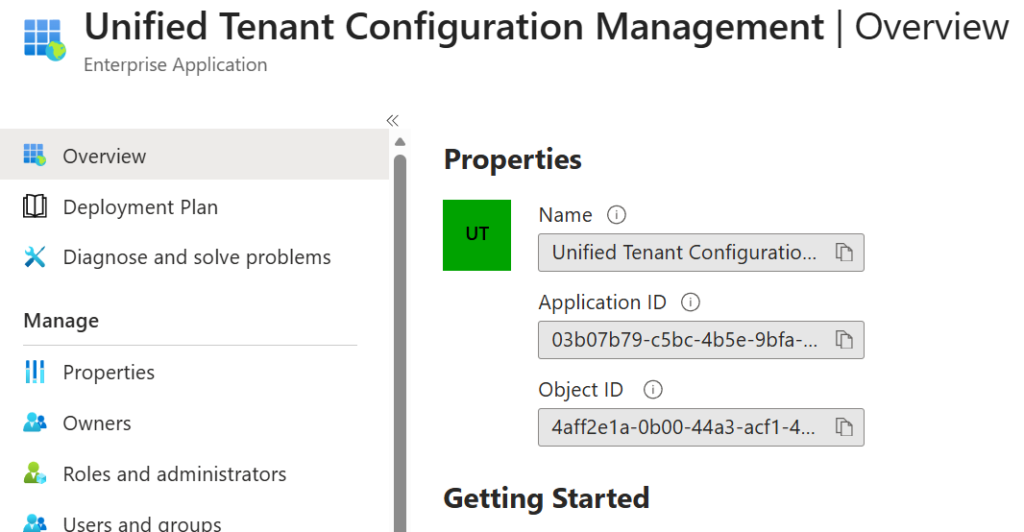
This creates the ‘Unified Tenant Configuration Management’ service principal within Entra ID:
But it does not assign the required permissions to it. To do so, I used the TCM-Utility PowerShell module which made it super easy to determine which permissions I needed to assign to the service principal for the specific configurations I wanted to be looking at.
For example, if I need to check Conditional Access Policies:
$result = Test-TCMConfigurationTemplate -ResourceNames @('microsoft.entra.conditionalaccesspolicy')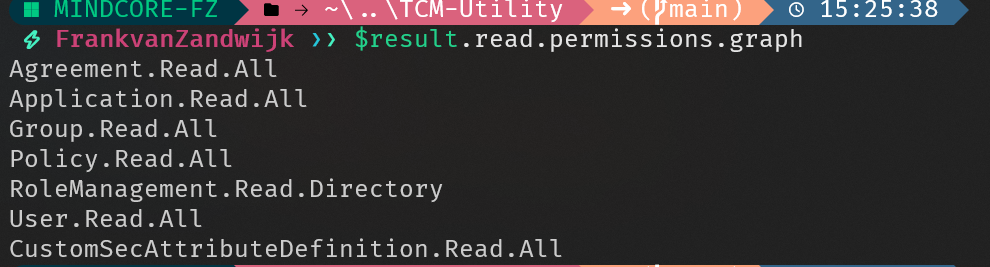
Now I know I need to assign one of these permissions to the service principal. This can also be simply done through the same PowerShell module:
Add-TCMServicePrincipalPermissions -Permissions $result.Read.Permissions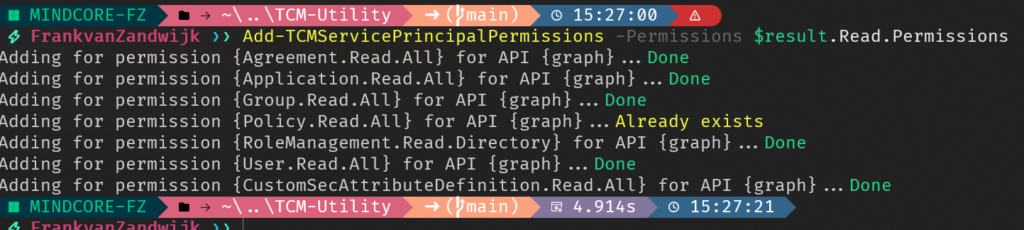
Note: Depending on the specific workload (e.g. Teams) the service principal may require an Entra ID role assigned too. Again, I’m really hoping that Microsoft will smooth this process out in the future and make it much easier for administrators to get this onboarded.
If the service principal does not have appropriate permissions assigned, the snapshot job will return a ‘Partially Successful’ status with some permissions errors, so you do need to make sure this is in place before starting.
Note: All the above steps are a one-time setup operation.
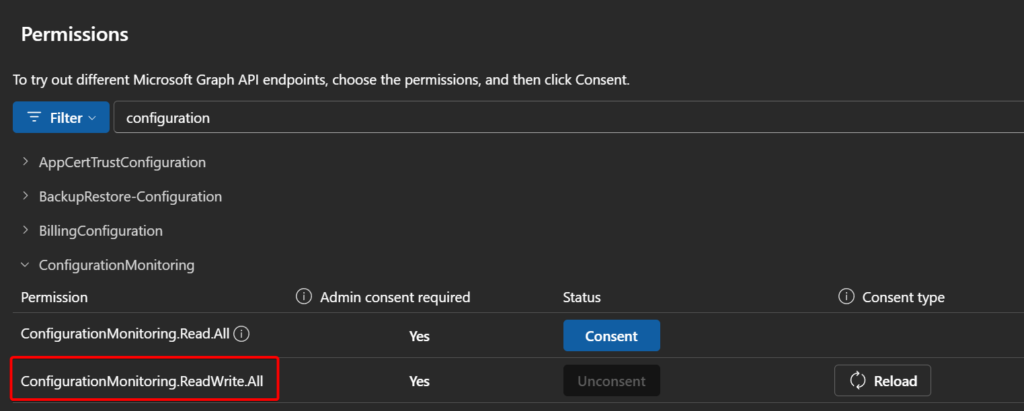
Next we can flip back to Graph Explorer to kick things off, be sure to grant yourself ConfigurationMonitoring.ReadWrite.All permissions so you can actually start:
Creating a Snapshot
Now we can make a POST request like so:
POST https://graph.microsoft.com/beta/admin/configurationManagement/configurationSnapshots/createSnapshot
{

    "displayName": "Snapshot Mindcore Blog",
    "description": "Snapshot Mindcore Blog Test",
    "resources":
    [
            "microsoft.entra.conditionalaccesspolicy"
    ]
}
The result should come back like so:
{
    "@odata.context": "https://graph.microsoft.com/beta/$metadata#microsoft.graph.configurationSnapshotJob",
    "id": "b0e548cb-689d-4de3-8690-413749573567",
    "displayName": "Snapshot Mindcore Blog",
    "description": "Snapshot Mindcore Blog Test",
    "tenantId": "8baa0c71-bfe5-4a07-9534-bfe796581eec",
    "status": "notStarted",
    "resources": [
        "microsoft.entra.conditionalaccesspolicy"
    ],
    "createdDateTime": "2026-01-28T14:32:50.7259792Z",
    "completedDateTime": "0001-01-01T00:00:00Z",
    "resourceLocation": "",
    "createdBy": {
        "user": {
            "id": "0b4a2451-9345-4eae-8f22-eef5e2abd5dc",
            "displayName": "Frank van Zandwijk"
        },
        "application": {
            "id": null,
            "displayName": null
        }
    }
}
Note that the status is “notStarted” meaning that the job will take some time to complete and you’ll need to retrieve the status using a GET request:
(Note: the ID of the SnapshotJob from the previous result is passed into the URL)
GET https://graph.microsoft.com/beta/admin/configurationManagement/configurationSnapshotJobs('b0e548cb-689d-4de3-8690-413749573567')Response:
{
    "@odata.context": "https://graph.microsoft.com/beta/$metadata#admin/configurationManagement/configurationSnapshotJobs/$entity",
    "@microsoft.graph.tips": "This request only returns a subset of the resource's properties. Your app will need to use $select to return non-default properties. To find out what other properties are available for this resource see https://learn.microsoft.com/graph/api/resources/configurationSnapshotJob",
    "id": "b0e548cb-689d-4de3-8690-413749573567",
    "displayName": "Snapshot Mindcore Blog",
    "description": "Snapshot Mindcore Blog Test",
    "tenantId": "8baa0c71-bfe5-4a07-9534-bfe796581eec",
    "status": "succeeded",
    "resources": [
        "microsoft.entra.conditionalaccesspolicy"
    ],
    "createdDateTime": "2026-01-28T14:32:50.7259792Z",
    "completedDateTime": "2026-01-28T14:34:29.016864Z",
    "resourceLocation": "https://graph.microsoft.com/beta/admin/configurationManagement/configurationSnapshots('5e23b2dd-0e23-43c8-b4eb-8bbe3c9c6534')",
    "createdBy": {
        "user": {
            "id": "0b4a2451-9345-4eae-8f22-eef5e2abd5dc",
            "displayName": "Frank van Zandwijk"
        },
        "application": {
            "id": null,
            "displayName": null
        }
    }
}
Now to actually obtain the results, pass the resourceLocation from the previous response into a GET request:
GET https://graph.microsoft.com/beta/admin/configurationManagement/configurationSnapshots('5e23b2dd-0e23-43c8-b4eb-8bbe3c9c6534'){
"@odata.context": "https://graph.microsoft.com/beta/$metadata#admin/configurationManagement/configurationSnapshots/$entity",
"@microsoft.graph.tips": "Use $select to choose only the properties your app needs, as this can lead to performance improvements. For example: GET admin/configurationManagement/configurationSnapshots('<guid>')?$select=description,displayName",
"id": "5e23b2dd-0e23-43c8-b4eb-8bbe3c9c6534",
"displayName": "Snapshot Mindcore Blog",
"description": "Snapshot Mindcore Blog Test",
"parameters": [],
"resources": [
{
"displayName": "AADConditionalAccessPolicy-Passthrough CA for App Control",
"resourceType": "microsoft.entra.conditionalaccesspolicy",
"properties": {
"ApplicationEnforcedRestrictionsIsEnabled": false,
"DisplayName": "Passthrough CA for App Control",
"State": "enabledForReportingButNotEnforced",
"ExcludeExternalTenantsMembershipKind": "",
"SignInFrequencyIsEnabled": false,
"CloudAppSecurityIsEnabled": true,
"CloudAppSecurityType": "mcasConfigured",
"PersistentBrowserIsEnabled": false,
"TransferMethods": "",
"SignInFrequencyType": "",
"PersistentBrowserMode": "",
"Id": "ea67a058-3e95-4327-a20c-82e13814fb69",
"DeviceFilterRule": "",
"Ensure": "Present",
"IncludeExternalTenantsMembershipKind": "",
"IncludeExternalTenantsMembers": [],
"BuiltInControls": [],
"IncludeUsers": [
"All"
],
"IncludeLocations": [],
"ExcludeLocations": [],
"ExcludePlatforms": [
"android",
"iOS",
"macOS",
"linux"
],
"ExcludeExternalTenantsMembers": [],
"IncludeUserActions": [],
"ExcludeUsers": [
"CIPPServiceAccount@thefrank.cloud"
],
"ExcludeApplications": [],
"CustomAuthenticationFactors": [],
"UserRiskLevels": [],
"IncludeApplications": [
"All"
],
"AuthenticationContexts": [],
"IncludeRoles": [],
"ClientAppTypes": [
"all"
],
"ExcludeGroups": [],
"SignInRiskLevels": [],
"ExcludeRoles": [],
"IncludePlatforms": [
"all"
],
"IncludeGroups": []
}
},
{
"displayName": "AADConditionalAccessPolicy-MFA on High Risk Apps by SecAttr",
"resourceType": "microsoft.entra.conditionalaccesspolicy",
"properties": {
"ApplicationEnforcedRestrictionsIsEnabled": false,
"AuthenticationStrength": "Passwordless MFA",
"ApplicationsFilterMode": "include",
"DisplayName": "MFA on High Risk Apps by SecAttr",
"State": "enabledForReportingButNotEnforced",
"ExcludeExternalTenantsMembershipKind": "",
"SignInFrequencyIsEnabled": true,
"CloudAppSecurityIsEnabled": false,
"CloudAppSecurityType": "",
"ApplicationsFilter": "CustomSecurityAttribute.Security_SecurityLevel -eq \"High\"",
"PersistentBrowserIsEnabled": false,
"SignInFrequencyInterval": "everyTime",
"IncludeExternalTenantsMembershipKind": "",
"TransferMethods": "",
"SignInFrequencyType": "",
"PersistentBrowserMode": "",
"GrantControlOperator": "OR",
"DeviceFilterRule": "",
"Ensure": "Present",
"Id": "487f93ca-051d-49ce-ad16-1944f48eaa93",
"IncludeExternalTenantsMembers": [],
"BuiltInControls": [],
"IncludeUsers": [
"All"
],
"IncludeLocations": [],
"ExcludeLocations": [],
"ExcludePlatforms": [],
"ExcludeExternalTenantsMembers": [],
"IncludeUserActions": [],
"ExcludeUsers": [],
"ExcludeApplications": [],
"CustomAuthenticationFactors": [],
"UserRiskLevels": [],
"IncludeApplications": [],
"AuthenticationContexts": [],
"IncludeRoles": [],
"ClientAppTypes": [
"all"
],
"ExcludeGroups": [],
"SignInRiskLevels": [],
"ExcludeRoles": [],
"IncludePlatforms": [],
"IncludeGroups": []
}
},
{
"displayName": "AADConditionalAccessPolicy-Microsoft-managed: Require phishing-resistant multifactor authentication for admins",
"resourceType": "microsoft.entra.conditionalaccesspolicy",
"properties": {
"ApplicationEnforcedRestrictionsIsEnabled": false,
"AuthenticationStrength": "Phishing-resistant MFA",
"DisplayName": "Microsoft-managed: Require phishing-resistant multifactor authentication for admins",
"State": "disabled",
"ExcludeExternalTenantsMembershipKind": "",
"SignInFrequencyIsEnabled": false,
"CloudAppSecurityIsEnabled": false,
"CloudAppSecurityType": "",
"PersistentBrowserIsEnabled": false,
"IncludeExternalTenantsMembershipKind": "",
"TransferMethods": "",
"SignInFrequencyType": "",
"PersistentBrowserMode": "",
"GrantControlOperator": "OR",
"DeviceFilterRule": "",
"Ensure": "Present",
"Id": "b11853bf-1e50-4bdc-8579-01186d67a774",
"IncludeExternalTenantsMembers": [],
"BuiltInControls": [],
"IncludeUsers": [],
"IncludeLocations": [],
"ExcludeLocations": [],
"ExcludePlatforms": [],
"ExcludeExternalTenantsMembers": [],
"IncludeUserActions": [],
"ExcludeUsers": [
"Frank@thefrank.cloud"
],
"ExcludeApplications": [],
"CustomAuthenticationFactors": [],
"UserRiskLevels": [],
"IncludeApplications": [
"All"
],
"AuthenticationContexts": [],
"IncludeRoles": [
"Global Administrator",
"Security Administrator",
"SharePoint Administrator",
"Exchange Administrator",
"Conditional Access Administrator",
"Helpdesk Administrator",
"Billing Administrator",
"User Administrator",
"Authentication Administrator",
"Application Administrator",
"Cloud Application Administrator",
"Password Administrator",
"Privileged Authentication Administrator",
"Privileged Role Administrator",
"Compliance Administrator",
"Compliance Data Administrator",
"Intune Administrator",
"Dynamics 365 Administrator",
"Power Platform Administrator"
],
"ClientAppTypes": [
"all"
],
"ExcludeGroups": [],
"SignInRiskLevels": [],
"ExcludeRoles": [],
"IncludePlatforms": [],
"IncludeGroups": []
}
},
{
"displayName": "AADConditionalAccessPolicy-Microsoft-managed: Block legacy authentication",
"resourceType": "microsoft.entra.conditionalaccesspolicy",
"properties": {
"ApplicationEnforcedRestrictionsIsEnabled": false,
"DisplayName": "Microsoft-managed: Block legacy authentication",
"State": "enabled",
"ExcludeExternalTenantsMembershipKind": "",
"SignInFrequencyIsEnabled": false,
"CloudAppSecurityIsEnabled": false,
"CloudAppSecurityType": "",
"PersistentBrowserIsEnabled": false,
"TransferMethods": "",
"SignInFrequencyType": "",
"PersistentBrowserMode": "",
"Id": "91976b82-16dc-475f-b40b-8bf17ff97837",
"GrantControlOperator": "OR",
"DeviceFilterRule": "",
"Ensure": "Present",
"IncludeExternalTenantsMembershipKind": "",
"IncludeExternalTenantsMembers": [],
"BuiltInControls": [
"block"
],
"IncludeUsers": [
"All"
],
"IncludeLocations": [],
"ExcludeLocations": [],
"ExcludePlatforms": [],
"ExcludeExternalTenantsMembers": [],
"IncludeUserActions": [],
"ExcludeUsers": [
"Frank@thefrank.cloud"
],
"ExcludeApplications": [],
"CustomAuthenticationFactors": [],
"UserRiskLevels": [],
"IncludeApplications": [
"All"
],
"AuthenticationContexts": [],
"IncludeRoles": [],
"ClientAppTypes": [
"exchangeActiveSync",
"other"
],
"ExcludeGroups": [],
"SignInRiskLevels": [],
"ExcludeRoles": [],
"IncludePlatforms": [],
"IncludeGroups": []
}
},
{
"displayName": "AADConditionalAccessPolicy-Sharepoint Access | Guest Users",
"resourceType": "microsoft.entra.conditionalaccesspolicy",
"properties": {
"ApplicationEnforcedRestrictionsIsEnabled": false,
"DisplayName": "Sharepoint Access | Guest Users",
"State": "enabledForReportingButNotEnforced",
"ExcludeExternalTenantsMembershipKind": "",
"SignInFrequencyIsEnabled": false,
"CloudAppSecurityIsEnabled": false,
"CloudAppSecurityType": "",
"PersistentBrowserIsEnabled": false,
"IncludeExternalTenantsMembershipKind": "all",
"TransferMethods": "",
"SignInFrequencyType": "",
"PersistentBrowserMode": "",
"GrantControlOperator": "OR",
"DeviceFilterRule": "",
"Ensure": "Present",
"Id": "913b41c2-24a2-443f-918c-7680a71ed7a2",
"IncludeGuestOrExternalUserTypes": [
"internalGuest",
"b2bCollaborationGuest",
"b2bCollaborationMember",
"b2bDirectConnectUser",
"otherExternalUser",
"serviceProvider"
],
"IncludeExternalTenantsMembers": [],
"BuiltInControls": [
"mfa"
],
"IncludeUsers": [],
"IncludeLocations": [],
"ExcludeLocations": [],
"ExcludePlatforms": [
"android",
"iOS",
"macOS",
"linux"
],
"ExcludeExternalTenantsMembers": [],
"IncludeUserActions": [],
"ExcludeUsers": [],
"ExcludeApplications": [],
"CustomAuthenticationFactors": [],
"UserRiskLevels": [],
"IncludeApplications": [
"Office365"
],
"AuthenticationContexts": [],
"IncludeRoles": [],
"ClientAppTypes": [
"exchangeActiveSync",
"browser",
"mobileAppsAndDesktopClients",
"other"
],
"ExcludeGroups": [],
"SignInRiskLevels": [],
"ExcludeRoles": [],
"IncludePlatforms": [
"all"
],
"IncludeGroups": []
}
},
{
"displayName": "AADConditionalAccessPolicy-CIPP service acct",
"resourceType": "microsoft.entra.conditionalaccesspolicy",
"properties": {
"ApplicationEnforcedRestrictionsIsEnabled": false,
"DisplayName": "CIPP service acct",
"State": "enabled",
"ExcludeExternalTenantsMembershipKind": "",
"SignInFrequencyIsEnabled": true,
"CloudAppSecurityIsEnabled": false,
"CloudAppSecurityType": "",
"PersistentBrowserIsEnabled": false,
"SignInFrequencyInterval": "everyTime",
"IncludeExternalTenantsMembershipKind": "",
"TransferMethods": "",
"SignInFrequencyType": "",
"PersistentBrowserMode": "",
"GrantControlOperator": "OR",
"DeviceFilterRule": "",
"Ensure": "Present",
"Id": "ac8b033c-ae4c-495e-b0cf-a5200d5a9c06",
"IncludeExternalTenantsMembers": [],
"BuiltInControls": [
"mfa"
],
"IncludeUsers": [
"CIPPServiceAccount@thefrank.cloud"
],
"IncludeLocations": [],
"ExcludeLocations": [],
"ExcludePlatforms": [],
"ExcludeExternalTenantsMembers": [],
"IncludeUserActions": [],
"ExcludeUsers": [],
"ExcludeApplications": [],
"CustomAuthenticationFactors": [],
"UserRiskLevels": [],
"IncludeApplications": [
"All"
],
"AuthenticationContexts": [],
"IncludeRoles": [],
"ClientAppTypes": [
"all"
],
"ExcludeGroups": [],
"SignInRiskLevels": [],
"ExcludeRoles": [],
"IncludePlatforms": [],
"IncludeGroups": []
}
}
]
}As shown, this now outputs the called for configuration in a JSON format. The above shows CA policies configured in my developer tenant.
Microsoft leaves it up to you to actually keep track of these snapshots over the long term since these snapshots expire after 7 days. This is why it might be prudent to perform these actions within a pipeline and automatically commit the resulting JSON output into a Git repository for much easier change tracking over time.
There’s more to cover here with the monitoring capabilities already enabled as part of the preview too but that can be another blogpost.
Conclusion
Off course, this is early days for TCM and I’m not expecting many organizations to implement this using the direct Graph calls like shown above. This is ripe for someone to develop a higher-order tool on top of (similar to DSCv3), preferably something backed to a Git repository for change tracking of the JSON configuration templates. Maybe even with some Audit log magic sprinkled over it to get similar results to Ondrey’s pipeline where it also tracks authors of changes made in the portal by parsing audit logs.
I’m secretly hoping that the folks over at CyberDrain can figure out a way to implement some of this into their CIPP product since I’ve been playing around with that and it would make for a great addition/enhancement to their already existing drift controls.
In any case, I sense this is the writing on the wall for M365DSC considering Nik Charlebois (the principal Microsoft engineer leading the project) posted a blog very shortly after the preview release for the API titled ‘Moving from Micrososft365DSC to Tenant Configuration Management APIs’. He also included a PowerShell module to convert M365DSC configurations into JSON configuration formats required by Graph.
If you’re heavily invested in M365DSC, I don’t see a reason to move to TCM quite yet considering its in preview and missing the auto remediation options, but if you’re just starting to look into it, maybe give TCM a try first and see if it meets your needs.








