
Introduction
Microsoft has begun the rollout of a new and powerful reporting capability to Windows Autopatch customers: Common Vulnerabilities and Exposures (CVE)/KB Reporting.
While still in preview and it’s subject to change before GA, this feature is already proving to be one of the most valuable additions to the Autopatch reporting suite – especially for organizations striving for stronger security posture, better patch transparency, and easier compliance.
In this post, I’ll walk through what the new report is, why it matters, and how it helps IT and security teams make better decisions faster.
Before diving into the new reporting capabilities, it’s also worth highlighting what Windows Autopatch is designed to deliver 😉
Windows Autopatch is a cloud service that automates the process of keeping Windows devices up to date with the latest security patches, quality updates, Microsoft 365 Apps updates, and Windows feature releases. Instead of IT teams manually coordinating patch cycles, Autopatch manages the entire update lifecycle – using ring-based deployments, rollback protections, and continuous monitoring to reduce risk and improve reliability.
In other words, Autopatch takes care of the operational heavy lifting, allowing organizations to stay secure and compliant while freeing IT teams to focus on higher-value work.
Why it matters – The missing link between Patch Management and Security Insight
Traditionally, Windows update reporting has focused on deployment status – what percentage of devices installed yesterday’s update, how many are pending reboot, etc. But security teams often need something more granular:
- Which CVEs did this update actually fix?
- How severe are those vulnerabilities?
- Were any of them publicly exploited? (or more, known exploited 😏)
- Which devices are still vulnerable because they’re missing the update?
This information is critically important for risk assessment and patch prioritization – but it previously required bouncing between MSRC pages, KB articles, different exports, security tools, and Intune… and that needed some work and maybe more than one screen on your desk 😂
That gap is exactly what the new CVE/KB Report fills! 👌🥳
What the new CVE/KB Report is
The CVE/KB Report lives under: Intune Admin Center > Reports > Windows Autopatch > Windows Quality Updates > “Common Vulnerabilities and Exposures (CVEs)”
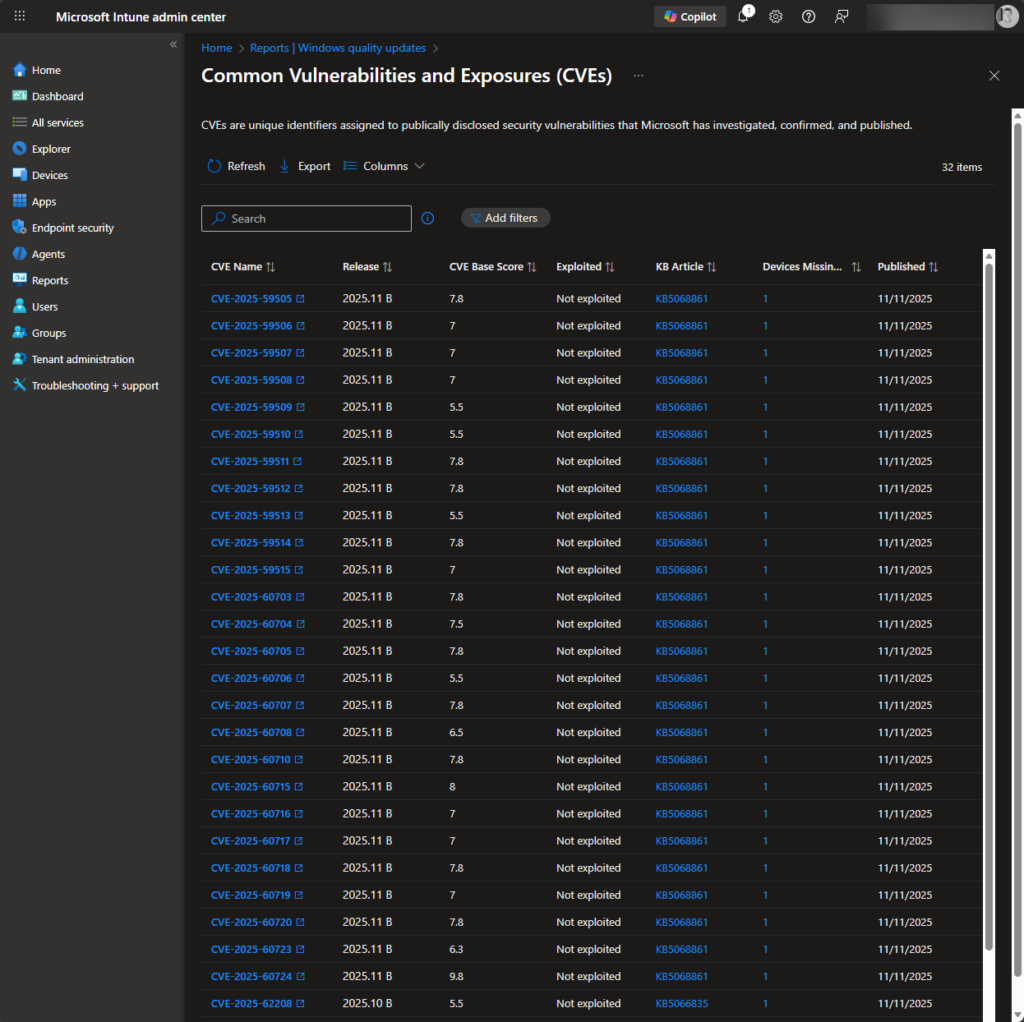
Once opened, you’re presented with a clean, filterable table showing all Windows OS CVEs fixed in the last 90 days – typically the last three Patch Tuesdays.
For each vulnerability, you get:
- CVE ID (linking to the MSRC post)
- A short description
- Release (e.g., 2025.11B)
- KB article (direct link to Microsoft Support)
- Published date
- CVSS base score (severity at a glance)
- Actively exploited? (Yes/No)
- Devices missing the update (your vulnerable devices count 🥳)
This is the exact information many customers have been asking for: security detail, patch impact, and device exposure – all in one place.
What the report isn’t
To set expectations clearly:
- It currently covers Windows OS security updates only.
- It does not show Office updates, driver updates, or firmware fixes.
- It only displays the last 90 days of CVEs to keep the data actionable.
- It does not perform vulnerability scanning – the data is based on Windows Update catalog + Autopatch intelligence.
But within that scope, it provides exactly the insight modern IT teams need to align patching and security efforts.
The real Value for customers
Prioritize Patching based on actual risk
CVSS scores + exploited status give immediate clarity:
- Critical 9.8 CVE?
- Actively exploited in the wild?
- Devices still missing the fix?
You instantly know what needs urgent attention and where.
This helps IT move from “patch everything now” to “patch what matters first.”
Better alignment between IT and Security teams
Security teams want to know exactly which vulnerabilities an update addresses.
IT teams want to know if there are devices still exposed.
The CVE/KB Report becomes a common language shared between them.
No more copy/paste lists from MSRC or long explanations in meetings.
Clear audit and Compliance evidence
Need to demonstrate patching effectiveness?
You can quickly export:
- List of CVEs fixed this month
- Their severity
- Whether they were exploited
- How many devices have installed the fix
Great for internal audits, external compliance, or leadership reporting if needed – you can get all the data in a CSV file you can use for whatever report you need! 👌
Identify vulnerable devices instantly
The Devices missing update column is a game changer. From here you immediately see:
“These 12 machines are still vulnerable to CVE-2025-12345.”
💡 Game changer
Instead of manually mapping KBs to CVEs, you get an immediate answer to a critical question:
“Which machines are still vulnerable right now?”
This is miles better than checking KB installation status manually or guessing which patch fixed what vulnerability.
Make Patch Tuesday understandable
Instead of digging through massive release notes, threat analytics report from Microsoft 365 Defender or MSRC reports itself, the report highlights exactly what was fixed and how widespread the risk was.
- Admins get clarity
- Security gets visibility
- Leadership gets confidence
Now a quick look at how it works
You can access the report in seconds:
- Go to Reports in the Intune admin center.
- Select Windows Autopatch.
- Choose Windows Quality Updates.
- Open Common Vulnerabilities and Exposures (CVEs).
You’ll see a sortable, filterable table where you can:
- Search for a specific CVE
- Filter by severity
- Identify exploited vulnerabilities
- Zero in on devices lacking important security updates
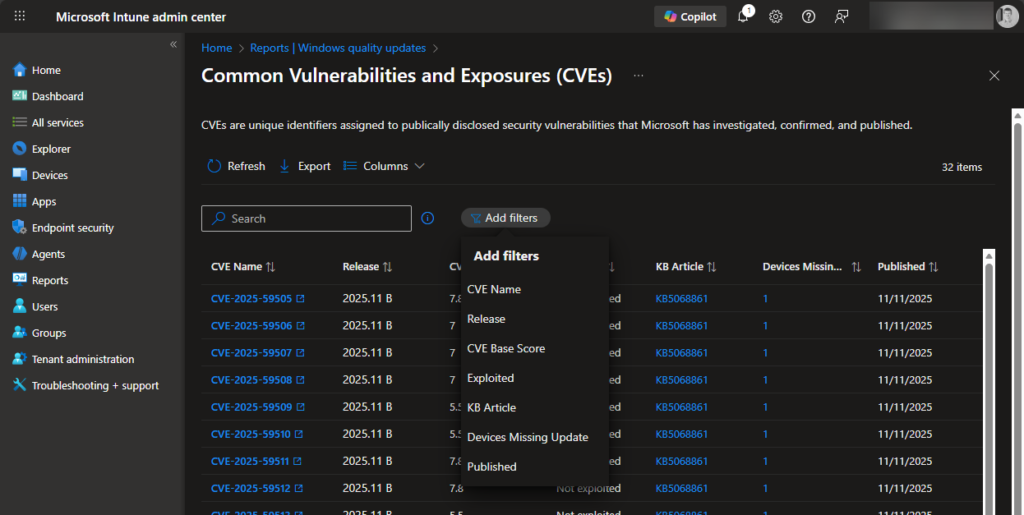
The different filters on the report, where you can select all of them and get an overview fast:
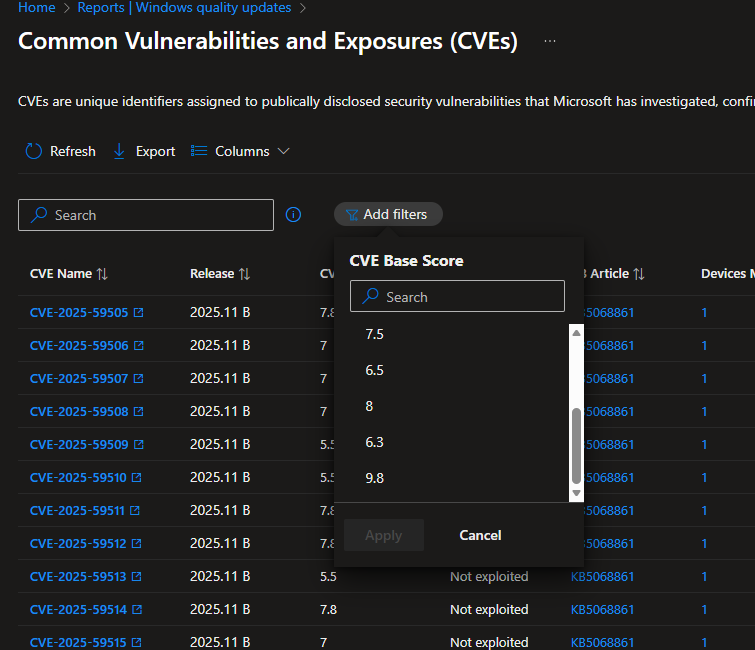
Now lets see what options we have for the CVE Base Score filter – here we see the different CVE scores in the report to filter on – we then get a fast overview of etc. a CVE´s scored to 9,8 if that is the case:
And here we have the filter applied – we see it here, and an overview of affected devices and so.
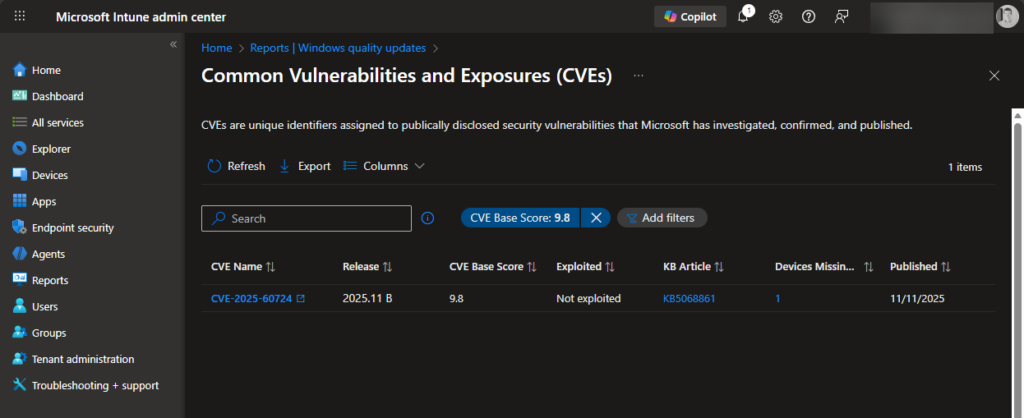
The CVE IDs and KB articles are clickable, giving you instant access to deeper detail.
Conclusion
The new Autopatch CVE/KB Reporting feature is a welcome and much-needed improvement for customers running Windows updates at scale. It closes the knowledge gap between patch deployment and security impact, giving IT admins actionable insights right where they manage updates.
If your organization is using Windows Autopatch, this is definitely a feature worth exploring as soon as it becomes available in your tenant.








