
Introduction
In 2026, it’s easy to overlook the security features that have been protecting Windows devices for years. Secure Boot is one of them. Introduced with Windows 8, it changed how PCs defend themselves during startup by blocking an entire class of pre-boot attacks—before the operating system even loads.
Today, Secure Boot isn’t a “nice to have.” It’s a baseline control for modern Windows devices – whether you manage them manually, via Configuration Manager, or through Intune. Yet it’s still often misunderstood, disabled for convenience, or treated as a one-time checkbox rather than a continuing chain of trust.
This post revisits Secure Boot: what it is, why it matters in 2026, and what to know about upcoming certificate changes.
What is Secure Boot?
Secure Boot is a critical security feature built into modern PCs using UEFI (Unified Extensible Firmware Interface) firmware. Its primary purpose is to ensure that only trusted, digitally signed software can run during your device’s boot sequence. This is achieved by validating the digital signature of each piece of boot software against a set of trusted digital keys stored in the UEFI firmware.
As an industry standard, Secure Boot outlines protocols for managing certificates, authenticating firmware, and establishing the interface between the operating system (OS) and the verification process. Trust and authenticity within Secure Boot rely on a Public-Key Infrastructure (PKI) model, where Certificate Authorities (CAs) such as Microsoft and Original Equipment Manufacturers (OEMs) issue and manage the digital certificates that form the foundation of system trust.
Threats Secure Boot helps prevent
Secure Boot is designed to mitigate several types of attacks that target the boot process, including:
- Bootkits and Rootkits: Malware that attempts to compromise the bootloader or kernel during startup.
- Firmware Attacks: Attempts to tamper with or replace UEFI firmware.
- Code Injection: Unauthorized code injected into the boot process.
- Unauthorized Kernel Modules: Loading of unsigned or tampered kernel modules.
- Exploitation of Boot-Time Vulnerabilities: Attacks that target vulnerabilities in the boot sequence itself.
By verifying the integrity and authenticity of each stage in the boot process, Secure Boot helps prevent these threats from compromising your system before the operating system even loads.
How Secure Boot works
Secure Boot was first introduced with Windows 8 as a defense against the emerging threat of pre-boot malware, coined as Bootkits. It is now a core part of Microsoft’s Trusted Boot security architecture. During platform initialization, Secure Boot authenticates various modules – including UEFI firmware drivers, bootloaders, applications, and option ROMs – by checking their digital signatures.
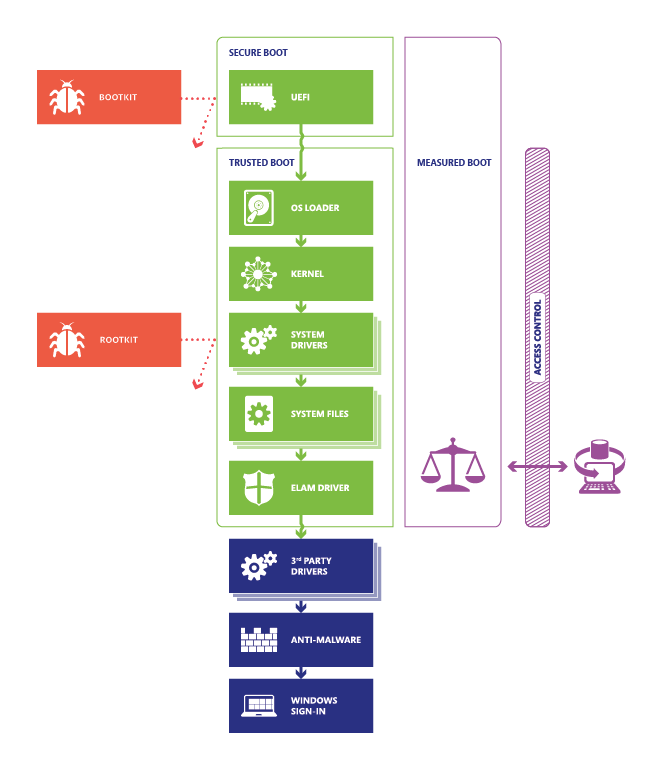
In the final step of the Secure Boot process, the firmware verifies the trustworthiness of the Windows boot loader. Once authenticated, control is passed to the boot loader, which then verifies, loads, and launches Windows. This multi-layered process ensures that only verified code is executed before Windows starts, effectively preventing attackers from exploiting the boot path as an attack vector.
Note: While Secure Boot is highly effective at mitigating boot-time threats, no security measure is entirely fool-proof. Keeping your system updated and following best security practices remain an essential task for any and all Windows devices.
Why are Secure boot Certificates expiring?
When Secure Boot was introduced with Windows 8, Microsoft and OEMs provisioned devices with a set of certificates (CAs) that define what code is trusted at boot. These certificates are stored in your device’s firmware and are used to validate updates and boot components.
However, the original Microsoft Secure Boot certificates from 2011 are expiring in 2026 (valid for 15 years). If your device still relies on these certificates, it will no longer be able to receive Secure Boot updates or security fixes for pre-boot components after expiration. This could leave your device vulnerable to new threats.
What’s changing?
Microsoft has issued new Secure Boot certificates (2023 versions) to replace the expiring 2011 certificates. These new certificates ensure your device continues to receive updates and remains protected. The update process involves adding the new certificates to your device’s firmware databases (KEK and DB).
| Expiring Certificate | Expiration | New Certificate | Purpose |
|---|---|---|---|
| Microsoft Corporation KEK CA 2011 | June 2026 | Microsoft Corporation KEK CA 2023 | Signs updates to DB and DBX |
| Microsoft Windows Production PCA 2011 | Oct 2026 | Windows UEFI CA 2023 | Signs the Windows boot loader |
| Microsoft UEFI CA 2011 | June 2026 | Microsoft UEFI CA 2023 | Signs third-party boot loaders and EFI apps |
| Microsoft UEFI CA 2011 | June 2026 | Microsoft Option ROM CA 2023 | Signs third-party option ROMs |
Note: After the 2011 CAs expire, devices without the new 2023 certificates will not receive Secure Boot security updates.
Preparing Your Environment for the Windows Secure Boot Certificate Update
Microsoft is rolling out updates to the Secure Boot Allowed Signature Database (DB) and related UEFI variables to transition devices to the Windows UEFI CA 2023 certificate. This is a significant change that affects how early-boot components are trusted, and it requires careful preparation in enterprise environments.
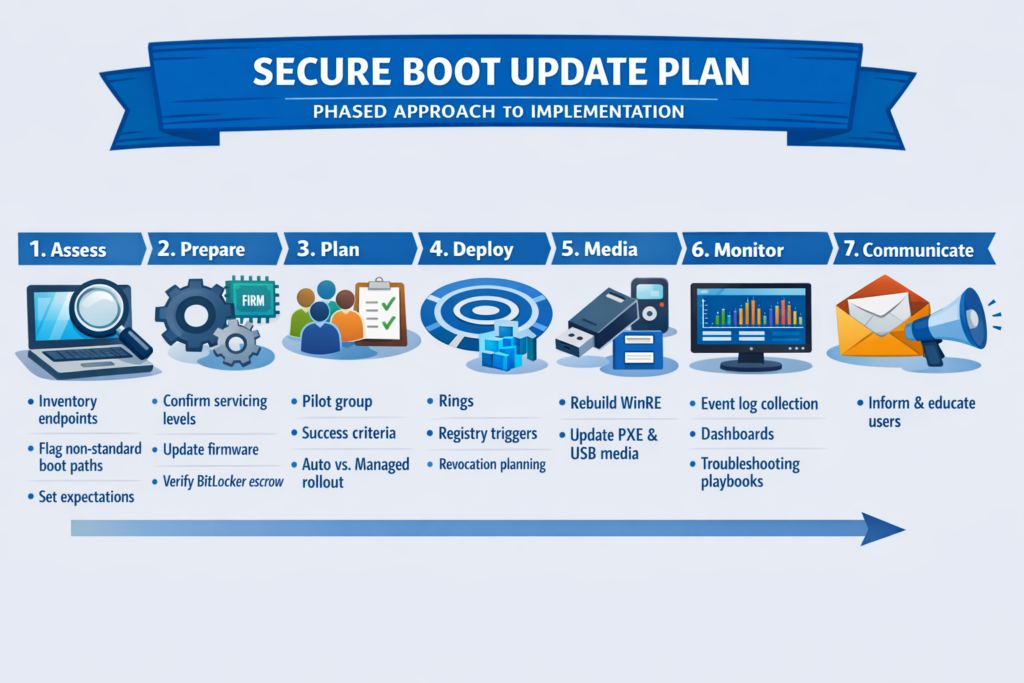
1. Assess Your Current State
Inventory All Windows Endpoints and Firmware Models
Before you touch anything, you need to know what you have. For every managed endpoint, capture:
- OEM and model
- BIOS/UEFI firmware version
- Windows version and build number
- Secure Boot state (enabled/disabled, current DB/DBX contents)
- BitLocker state and protector type
- Management method (Intune, SCCM, WSUS, standalone)
Some outcomes depend directly on firmware capability and OEM key provisioning. Microsoft explicitly notes that certain devices will need OEM firmware updates before the Secure Boot DB update can complete.
Identify Devices with Non-Standard Boot Paths
Flag any device that uses:
- Custom Secure Boot keys (non-default PK, KEK, DB, or DBX entries)
- Dual boot configurations (Linux, alternative bootloaders)
- PXE boot or bootable media used in production workflows
- Offline or air-gapped devices that do not receive Windows Update servicing
These devices are more likely to require manual planning. Secure Boot updates can be blocked by customized keys or non-standard boot manager conditions, and automated rollout signals may not apply.
Set Expectations: What Happens If You Do Nothing?
Devices will generally continue booting and receiving normal Windows updates. However, they will not receive new early-boot protections — boot manager updates, DB/DBX revocations, and mitigations for future boot-level vulnerabilities — if they do not receive the new certificates.
2. Prepare the Platform
Confirm Supported Servicing Levels
Windows updates released on or after February 13, 2024 include the ability to apply the Windows UEFI CA 2023 certificate to the Secure Boot DB. Ensure your devices are current on cumulative updates. In enterprise environments, the certificate installation is not always automatic.
Update OEM Firmware Proactively
Firmware limitations and OEM-specific key provisioning can block the update entirely. Microsoft’s guidance explicitly identifies cases where firmware issues or a missing PK-signed KEK prevent the DB update from completing.
Practical step: establish an OEM firmware update program with defined rings, validation, and change windows — ideally ahead of the Secure Boot rollout.
Verify BitLocker Readiness
Secure Boot variable updates can trigger BitLocker recovery in certain configurations. Microsoft recommends temporarily suspending BitLocker when indicated during the update process.
Preparation tasks:
- Confirm recovery keys are escrowed (Entra ID, AD DS, MBAM, or your established process)
- Document a standard BitLocker suspend-and-resume workflow that can be applied per ring
- Validate that your helpdesk can retrieve recovery keys quickly if needed
3. Build a Controlled Rollout Plan
Create a Representative Pilot Group
Select test devices that cover each major hardware and firmware combination in your environment. Microsoft explicitly recommends controlled validation on representative devices due to known compatibility issues with DB updates.
Define Success Criteria
Before deploying to any ring, agree on what “success” looks like:
- Devices boot normally after certificate and DB updates are applied
- BitLocker does not enter recovery unexpectedly
- PXE boot and recovery media workflows remain functional
- No user-facing impact beyond planned reboots
You can validate success via the Windows Secure Boot event logs (covered in the monitoring section below).
Decide: Auto-Rollout or Managed Rollout?
Microsoft began phased automatic updates for eligible devices starting with the January 2026 cumulative updates, gated by “high confidence” device signals. In enterprise environments, you may prefer explicit control through defined rings and change windows especially if you have custom Secure Boot keys, non-standard boot flows, or strict change management requirements.
Read it here: January 13, 2026—KB5074109 (OS Builds 26200.7623 and 26100.7623) – Microsoft Support
4. Prepare Your Deployment Mechanics
Configure Deployment Rings
Microsoft’s enterprise guidance describes enabling the DB update via a controlled mechanism, including a registry-based trigger, after validation. Set up your tooling accordingly:
- Ring 0 — Pilot: IT and representative hardware, manual validation
- Ring 1 — Broad: General population, monitored rollout
- Ring 2 — Critical: Sensitive or high-availability systems, final wave
You can create more rings if needed. Align reboot windows with your change management process. Some updates require a restart, and in certain scenarios more than one reboot is needed.
Plan for Secure Boot Revocations Separately
If you are also planning to apply Secure Boot boot manager revocations (for example, CVE-related mitigations), be aware that Microsoft warns some of these changes are non-reversible while Secure Boot remains enabled. Test these thoroughly and treat them as a separate change with their own validation and rollback considerations.
5. Update Recovery and Deployment Media
This step is commonly missed.
Secure Boot trust changes affect system recovery media, PXE boot applications, and other boot-time components especially once revocations and new signing chains are active.
Preparation tasks:
- Rebuild and validate WinRE (Windows Recovery Environment) images
- Update USB recovery media creation processes
- Test PXE boot images against pilot devices that have already received the DB update
- Verify that any custom boot applications are signed with certificates that will remain trusted
6. Implement Monitoring and Operational Readiness
Collect and Monitor Secure Boot Event Logs
Microsoft documents detailed event IDs for Secure Boot update outcomes, including success, deferrals, blocks, and cases requiring manual remediation (such as firmware blocks or missing PK-signed KEK).
Set up:
- Central log collection via Microsoft Sentinel, Defender for Endpoint, Log Analytics, or your SIEM
- Dashboards that surface key states: success, blocked, deferred, action required
Pre-Stage Troubleshooting Playbooks
Build runbooks for the most common scenarios based on Microsoft’s published guidance:
| Scenario | Action |
|---|---|
| BitLocker-related deferral | Suspend BitLocker, reboot, allow update to apply, confirm BitLocker resumes |
| Firmware known-issue block | Apply the required OEM BIOS/UEFI update, then retry |
| Missing PK-signed KEK | Engage the OEM for provisioning guidance specific to the device model |
7. Communication and User Impact Management
Prepare Internal Communications
Write a short notice for both your helpdesk team and end users that covers:
- Expected reboots: When and how many, aligned to your ring schedule
- BitLocker recovery prompt: What to do if prompted, and where to find the recovery key
- Escalation path: Who to contact if a device does not boot normally
Microsoft notes that devices generally keep working throughout this process, but some will require administrator action for firmware readiness or BitLocker considerations. Setting expectations upfront reduces support volume significantly.
Summary
| Phase | Key Action |
|---|---|
| 1. Assess | Inventory endpoints, flag non-standard boot paths, set expectations |
| 2. Prepare | Confirm servicing levels, update firmware, verify BitLocker escrow |
| 3. Plan | Pilot group, success criteria, auto vs. managed rollout decision |
| 4. Deploy | Rings, registry triggers, separate revocation planning |
| 5. Media | Rebuild WinRE, update PXE and USB media |
| 6. Monitor | Event log collection, dashboards, troubleshooting playbooks |
| 7. Communicate | Helpdesk briefing, user notice, escalation path |
Taking the time to work through these steps before the update reaches your devices will save you from reactive firefighting. The Secure Boot certificate transition is not optional long-term it is the foundation for future boot-level security but it is absolutely something you can control the pace of in your environment.
Conclusion
15 years after its introduction, Secure Boot remains a foundational component of Windows platform security. What began as a response to early bootkit threats has evolved into a trusted, industry-standard mechanism that protects devices at their most vulnerable stage – before the operating system even loads!
In 2026, Secure Boot should be considered a default expectation rather than an optional feature. Whether devices are managed through SCCM, Intune, or a hybrid approach, you need to ensure Secure Boot is enabled and properly configured – this helps maintain platform integrity, supports modern security features, and reduces exposure to low-level attacks that are otherwise difficult to detect or remediate.
Secure Boot may operate quietly in the background, but its role in establishing trust at startup is as relevant today as it was when it first shipped – and it remains a critical part of a secure Windows deployment!
There are plenty of things you can do, but you must start now! In the next post we will demonstrate how this is updated and how real environments will handle this way of updating your device estate.
References
Act now: Secure Boot certificates expire in June 2026 – Windows IT Pro Blog
Secure the Windows boot process | Microsoft Learn
Windows Secure Boot certificate expiration and CA updates – Microsoft Support
Specifications | Unified Extensible Firmware Interface Forum (uefi.org)
Windows Secure Boot Key Creation and Management Guidance | Microsoft Learn
microsoft/secureboot_objects: Secure boot objects recommended by Microsoft.
Secure Boot DB and DBX variable update events – Microsoft Support









