What is Granular Delegated Administrative Privileges (GDAP)
GDAP is a special Microsoft Partner Center feature, that allows Managed Service Providers (MSPs) and Microsoft partners to access customer tenants with least-privilege, time-limited, and role-specific permissions – and with this, we are replacing the older Delegated Administrative Privileges (DAP) model used before.
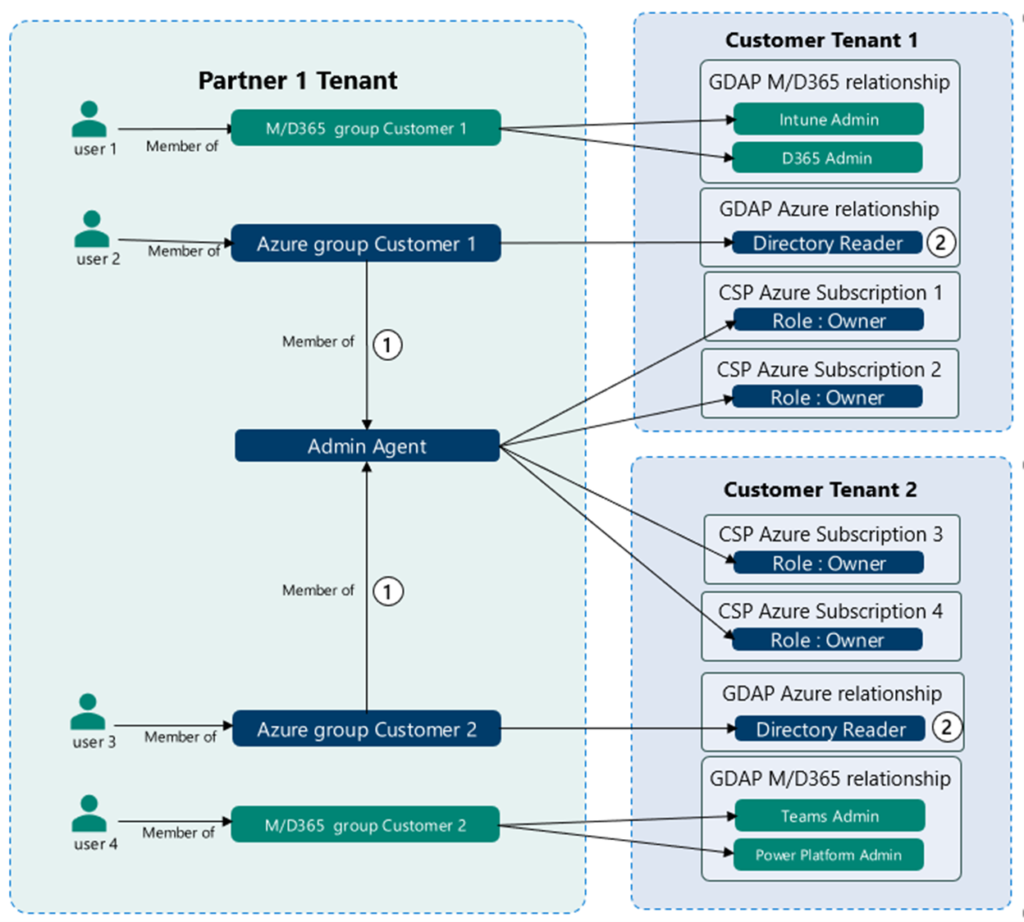
Here is a simple take on it, how you can manage your customers tenants from a “master” tenant:
Why GDAP?
Granular Delegated Admin Privileges (GDAP) allows a partner to manage a customer’s Microsoft cloud environment with role-based access. Instead of giving partner users broad, permanent administrator permissions, GDAP enables access to be limited to specific security groups, administrative roles, customer tenants, and workloads.
This supports the principle of least privilege: users receive only the permissions they need to perform their responsibilities. For example, one group may receive Intune Administrator and other Exchange Administrator roles, and another receives Azure Reader or Owner access for specific subscriptions…
GDAP is especially useful for CSP partners managing multiple customer environments. It provide etc.
- Clear separation of administrative responsibilities
- Easier onboarding and offboarding of partner administrators and tenants
- Centralized access management through security groups
- Improved visibility and auditability (full logs now vs. DAP 🤣)
- More controlled access to Azure subscriptions and Microsoft 365 services
- A scalable way to manage permissions across several customer tenants
The overview over here, illustrates that model. Partner users become members of some dedicated security groups. These groups are then associated with specific GDAP relationships and Azure subscription roles in the relevant customer tenants. Access can therefore be managed by changing group membership, without assigning individual permissions directly to every user.
What is DAP?
Delegated Admin Privileges (DAP) allows a partner to access and manage a customer’s Microsoft cloud services on the customer’s behalf. Unlike GDAP, DAP provides broad, less granular administrator permissions, which can create bigger security risks. The roles was limited, and many just assigned Global Administrator to customers…
GDAP is the more secure and flexible replacement because it allows access to be limited by role, user group, customer, and duration.
The old problem with the DAP model
DAP gave partners permanent Global Administrator access to customer tenants by default – yes, permanent, broad, and unaudited. This was a significant attack risk (e.g., if a partner was compromised, all customer tenants were exposed)! 🫣
GDAP vs DAP
| DAP (legacy) | GDAP | |
|---|---|---|
| Default role | Global Administrator | Specific roles only |
| Duration | Permanent | Time-limited |
| Customer consent | Implicit | Explicit approval required |
| Least privilege | ❌ | ✅ |
| Auditable | Limited | Full sign-in logs in customer tenant |
| Status | Deprecated | Required going forward |
What GDAP provides
| Feature | Description |
|---|---|
| Granular roles | Partner assigns specific Entra ID roles (e.g., Helpdesk Admin, Exchange Admin) instead of Global Admin |
| Time-limited access | Relationships expire – configurable duration (max 730 days) |
| Customer approval | Customer need to approve the GDAP relationship request before access is granted |
| Per-relationship roles | Different role sets can be granted for different purposes/teams |
| Security group mapping | Partner maps Entra security groups to the delegated roles – controls who at the partner can access what |
So – what about Conditional Access in my Entra ID setup – there is a lot of FAQ´s here, as of the currently stands from Microsoft: GDAP frequently asked questions – Partner Center | Microsoft Learn
Where are the rough edges?
GDAP works well in many scenarios, but there are still some rough edges here and there. Recently we’ve found several cases across Entra ID, Microsoft Intune and other Microsoft 365 services, where the functionality is unsupported, partially supported or simply doesn’t behave as expected. Here are some of our recent findings.
We’re also pretty sure this isn’t the complete list. If you’ve found other GDAP rough edges, strange behavior, or things that simply don’t work as expected, let us know in the comments!
Let’s dive into it
Entra ID
“WhatIf” in Entra ID Conditional Access Evaluation
Info: Guest users can´t be validated against the API, and only 1 identity at a time!
When attempting to validate the outcome for Conditional Access policies, through GDAP access, the request fails with the following error:
Unable to complete due to service connection error. Please try again later.
Now, let´s test the feature and see what will happen 😊
Here, we are testing it in a GDAP enabled tenant:
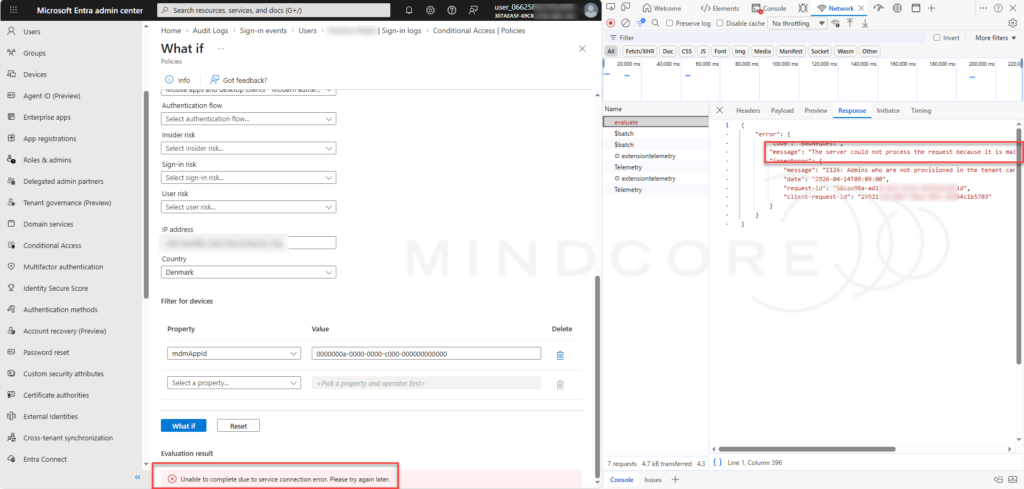
But as we can see here, the request is sent to the Microsoft Graph beta endpoint: https://graph.microsoft.com/beta/identity/conditionalAccess/evaluate
using the POST method. The service returns HTTP status code 400 Bad Request, with the following message:
Admins who are not provisioned in the tenant cannot create or update policies with dynamic filters.
This indicates that the request itself reaches the service, but the operation is rejected during authorization and validation. The issue is not caused by an unavailable service or an incorrectly formatted Graph request. Instead, the administrator’s identity type affects whether the operation is permitted.
The operation works successfully when performed in a tenant where the administrator has a native identity. However, it fails when the same type of action is performed through GDAP access. GDAP administrators are treated as external or “remote principals”, and they are not provisioned, like real users” in the customers tenants in the same way as native member accounts…
As a result, the service does not currently allow GDAP administrators to create or update Conditional Access policies that use dynamic filters, even when the administrator has otherwise appropriate delegated permissions.
Response:
{
    "error":            {"        code": "BadRequest",        "message": "The server could not process the request because it is malformed or incorrect.",        "innerError":
             {                  "message": "1126: Admins who are not provisioned in the tenant cannot create or update policies with dynamic filters.",
                  "date": "2026-04-14T09:09:00",
                  "request-id": "58caa98a-xxxx-xxxx-xxxx-2dfbfea3a51d",
                  "client-request-id": "29921c3a-xxxx-xxxx-xxxx-65654c1b5703"}}}
So, the Conditional Access service is functioning as expected, but we are limited to this specific authorization model used for GDAP administrators and other identities, as they are not provisioned as members of the customers tenant.
For the operation to succeed, it must currently be performed by an administrator with a native Member identity in the relevant tenant, or by another supported identity type that is provisioned in the tenant.
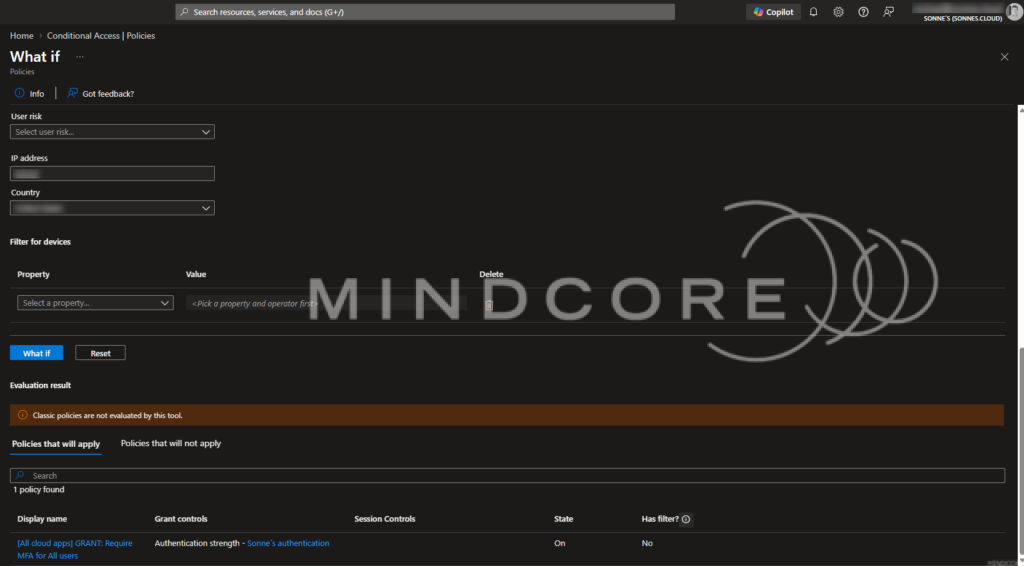
Read more at: The Conditional Access What If tool – Microsoft Entra ID | Microsoft Learn and the Microsoft Graph API itself here: What If evaluation – Microsoft Graph v1.0 | Microsoft Learn
Entra ID > Users
Administrative Role Access via GDAP
One more interesting examples can be found under the etc. Roles blade on an individual user’s profile. The portal displays the user’s assigned and eligible Entra ID roles like Intune Administrator, Global Reader, Authentication Administrator and more, but with GDAP, the delegated administrator may not actually have sufficient permissions to retrieve the data behind the view.
The Entra administrative roles page was tested with GDAP using Intune Administrator, Global Reader, and Authentication Administrator roles.
The related Microsoft Graph and Azure RBAC endpoints were also queried to retrieve active and eligible role assignments, including expired assignment audit details. All requests returned 401 UnauthorizedAccessException, indicating that these role-management operations are not available through the tested GDAP access path, even when the delegated administrator has one of the listed roles.
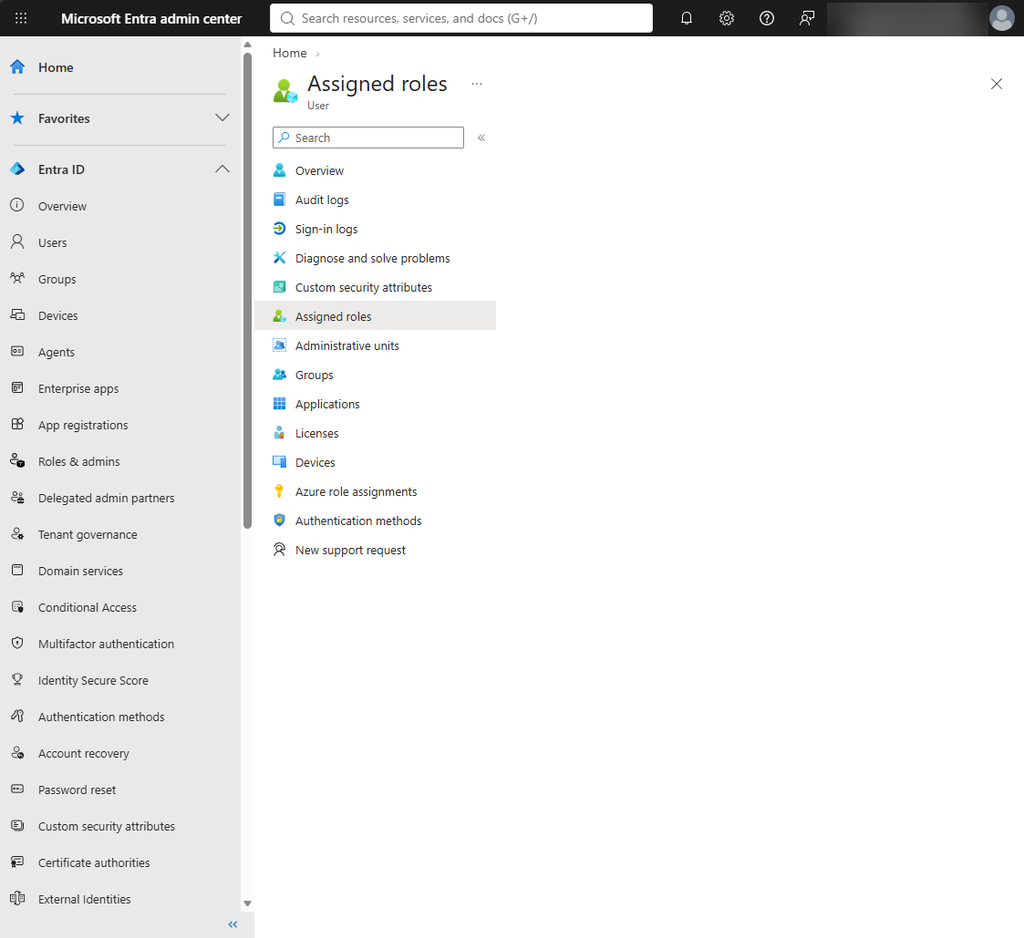
In other words, the portal can show us the door, but the API behind it doesn’t necessarily let us through 😄
Portal URL:
https://entra.microsoft.com/#view/Microsoft_AAD_UsersAndTenants/UserProfileMenuBlade/~/AdministrativeRole/userId/%guid%/hidePreviewBanner~/trueRoles via GDAP tested with: Intune Admin, Global Reader, Authentication Administrator mm.
Endpoint request:
https://graph.microsoft.com/beta/roleManagement/directory/roleAssignmentScheduleInstances?$expand=activatedUsing,principal,roleDefinition,directoryScope&$filter=principalId%20eq%20%xxxxxxxxxxxxxxxxxxxxxxxxxxxxxxxx%27&$top=15&$count=truehttps://graph.microsoft.com/beta/roleManagement/directory/roleEligibilityScheduleInstances?$expand=principal,roleDefinition,directoryScope&$filter=principalId%20eq%20%xxxxxxxxxxxxxxxxxxxxxxxxxxxxxx%27&$top=15&$count=truehttps://api.azrbac.mspim.azure.com/api/v2/privilegedAccess/aadroles/activities/getExpiredAssignmentAudits(roleAssignmentLevel='Eligible',resourceId='',subjectId='xxxxxxxxxxxxxxxxxxxxxxxxxxx')?$expand=requestor,originalRequestor,subject,target,resource,scopedResource&$top=15&$count=trueEndpoint response:
{
    "error": {
        "code": "UnauthorizedAccessException",
        "message": "Attempted to perform an unauthorized operation.",
        "innerError": {
            "date": "2026-06-03T08:24:03",
            "request-id": "b25c22fd-xxxx-xxxx-xxxx-d9b439c6598d",
            "client-request-id": "b25c22fd-xxxx-xxxx-xxxx-d9b439c6598d"
        }
    }
}
User Overview via GDAP
The user overview in the Entra portal shows a similar limitation when accessed through GDAP. As part of loading the page, the portal attempts to retrieve the current user’s profile photo through Microsoft Graph.
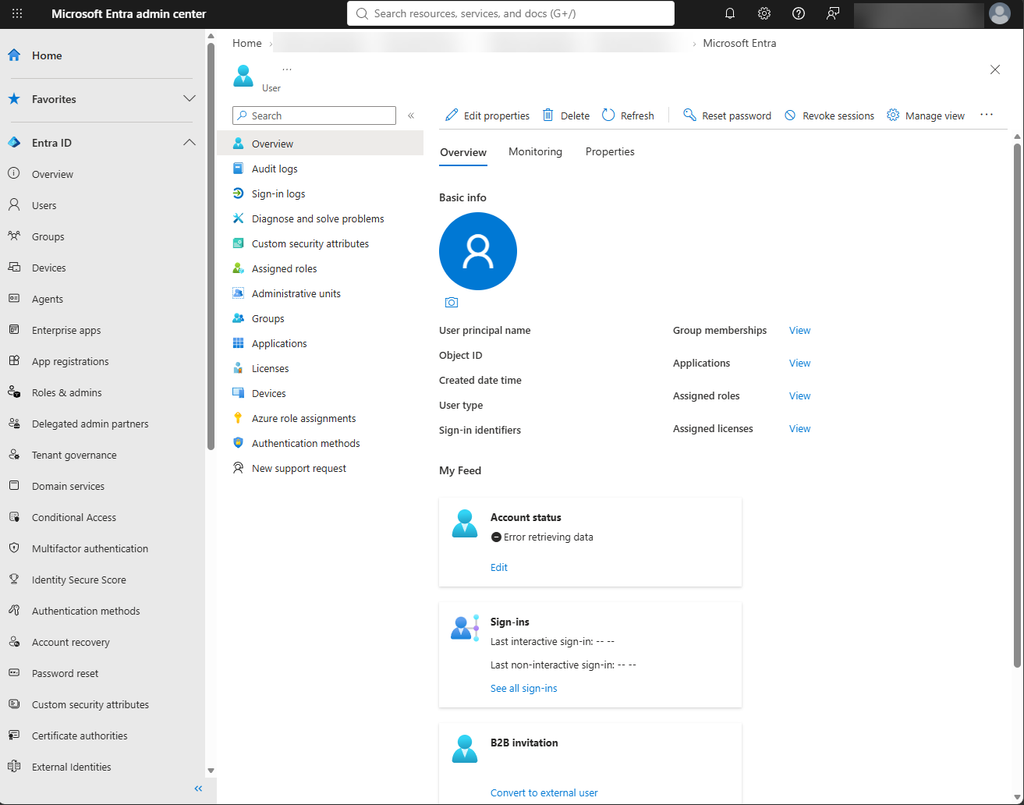
The request is sent as a Microsoft Graph batch request to, and in this example, the request is generated with an empty user ID.
The operation returns HTTP status code 400 Bad Request. This prevents the profile photo from being loaded and contributes to the incomplete or erroneous user overview.
This appears to be another example of the portal making a request that is not fully supported for the current GDAP or remote-principal context. The failure affects the portal experience, even though it does not necessarily indicate a problem with the user account itself.
Payload:
{"requests":[{"id":"22754eac-xxxx-xxxx-xxxx-7ab0c7ba71ac","method":"GET","url":"/users//photo/$value","headers":{"x-ms-command-name":"Shared - GetUserPhoto","x-ms-client-request-id":"804b7030-xxxx-xxxx-xxxx-f9ceb18daf4d","client-request-id":"804b7030-xxxx-xxxx-xxxx-f9ceb18daf4d","x-ms-client-session-id":"8ef7660xxxx7491896xxxx50543xxxxc"}}]}Endpoint response:
{
    "responses": [
        {
            "id": "22754eac-xxxx-xxxx-xxxx-7ab0c7ba71ac",
            "status": 400,
            "headers": {
                "Cache-Control": "no-cache",
                "Content-Type": "application/json"
            },
            "body": "eyJlcnJvciI6eyJjb2RlI..........jIn19fQ=="
        }
    ]
}
Entra ID Portal home > My role assignments
The My role assignments view in the Entra ID portal provides another example of how the portal behaves when accessed by a GDAP user.
When the page loads, it attempts to retrieve the current user’s direct role assignments. However, the request is sent without a valid principalId:
$filter=principalId eq ''Microsoft Graph consequently rejects the request with:
Request_BadRequest
Invalid GUID: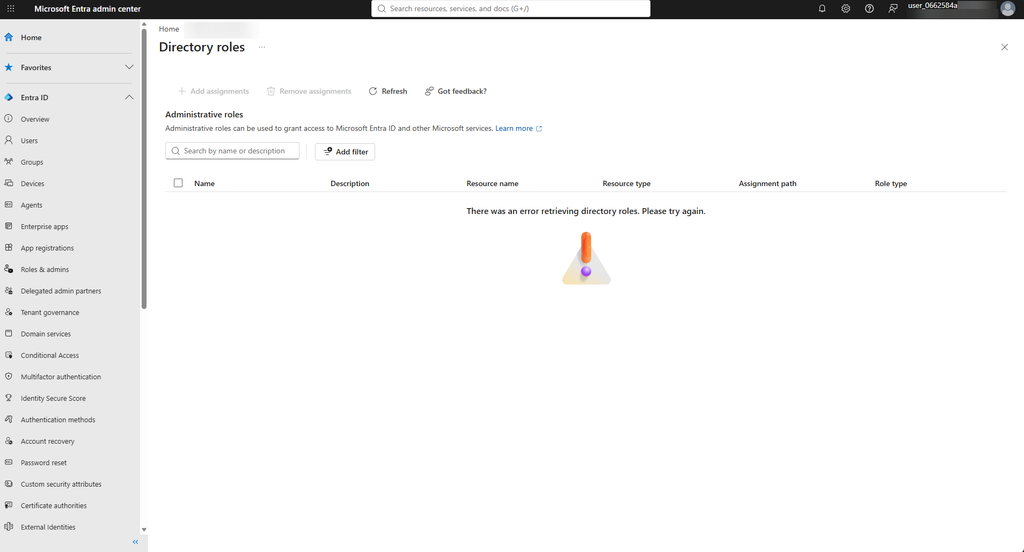
The issue is visible in the request payload, where the principalId value is empty. This means the portal cannot identify the current user when constructing the request. As a result, the role assignment information cannot be loaded correctly.
This appears to be another portal limitation in the GDAP context. The same experience may work for users who are natively provisioned in the customer tenant, but the portal does not currently handle the GDAP user context correctly for this request.
Payload:
{"requests":[{"id":"97ad58e4-xxxx-4bd0-xxxx-a8729cc8xxxx","method":"GET","url":"/roleManagement/directory/roleAssignments?$top=999&$filter=principalId eq ''","headers":{"x-ms-command-name":"RoleManagement - GetDirectRoleAssignments","x-ms-client-request-id":"588bxxxx-e321-xxxx-xxxx-9f5c424exxxx","client-request-id":"588b941c-xxxx-xxxx-9f80-xxxx424e7cda","x-ms-client-session-id":"xxxx9d54bed9xxxxacdcxxxxc708xxxx"}}]}Endpoint response:
{
    "responses": [
        {
            "id": "97ad58e4-xxxx-xxxx-xxxx-a8729cc876bb",
            "status": 400,
            "headers": {
                "Cache-Control": "no-cache",
                "x-ms-resource-unit": "1",
                "Content-Type": "application/json"
            },
            "body": {
                "error": {
                    "code": "Request_BadRequest",
                    "message": "Invalid GUID:",
                    "innerError": {
                        "date": "2026-06-17T08:53:50",
                        "request-id": "c244361b-xxxx-xxxx-xxxx-efae8c6ad2ca",
                        "client-request-id": "cfe1f450-xxxx-xxxx-xxxx-1898a8b8d1c4"
                    }
                }
            }
        }
    ]
}
GDAP + B2B: When identity contexts collide – When users become “Remote Principals”
There is another interesting behavior when the same person exists in the customer tenant as a B2B guest while also accessing the tenant through GDAP.
In our testing, we created a scenario where the partner user:
- Signs in using a B2B guest account in the customer tenant
- Also has access to the same customer tenant through a GDAP relationship
- Uses the same UPN/email address for both contexts
- Is assigned delegated administrative permissions through GDAP
This creates an interesting identity situation: the user can potentially be represented both as a B2B guest in the customer tenant and as a remote principal through GDAP.
What we wanted to achieve
The goal was straightforward.
A partner user from the partner’s home tenant should be able to access the customer tenant through GDAP and receive a custom Intune RBAC role with only the permissions required for the job.
This should allow the partner user to perform the relevant Intune administrative tasks without having to grant a broad Entra administrator role such as Global Administrator.
What happens
Based on our tests, the affected user is an external user from tenant X who accesses tenant Y through GDAP, while also being invited as a B2B guest in the customer tenant.
The B2B invitation is important in this scenario because it allows us to select the corresponding impersonated user account from the partner’s home tenant.
With both identity paths in place, the authentication and authorization context does not always behave as expected…
Our test user has been assigned a custom Intune RBAC role containing some Remote Task permissions, some permissions do not appear under My permissions, and the corresponding actions remain unavailable in the Intune admin portal.
The behavior was particularly visible when using a less privileged Entra role such as Intune Administrator, rather than Global Administrator.
Instead of consistently operating against the expected B2B or GDAP identity, parts of the portal appear to use the impersonated remote user context, represented with a user_xxxxx-style identity.
Microsoft documents this user_xxxxx representation as expected when a CSP accesses a customer’s portal through GDAP.
The result is that authentication can succeed, the GDAP relationship can be valid, and the delegated role can be correctly assigned – while the authorization context used by the workload is still different from the identity context we expected.
Interestingly, assigning Global Administrator to the user changed the behavior in our testing and allowed the tested scenarios to work. When the administrator role was reduced again, the original behavior could be reproduced.
However, this should not be considered a recommended solution. Granting Global Administrator simply to make the scenario work would defeat the purpose of using GDAP and least-privileged administration!
Microsoft Engineering investigation
We investigated the Intune RBAC behavior with Microsoft Engineering.
The investigation showed that GDAP and cross-tenant users are identified as remote principals. Intune uses a different authorization path for these users than it does for native users or directly invited B2B guest accounts.
For remote principals, Intune derives permissions from supported Microsoft Entra directory roles.
Custom Intune RBAC role assignments are currently not evaluated when Intune calculates effective permissions for these users.
As a result, only the permissions granted through the directory-role authorization path are available. The Remote Task permissions included in the custom Intune RBAC role are not included, which is why the related actions remain unavailable in the portal.
Assigning an appropriate Microsoft Entra directory role, such as Intune Administrator, successfully enabled the expected access in our validation. Removing that role restored the original behavior.
The important distinction here is that this is not a problem with the custom Intune RBAC role itself. Microsoft Engineering confirmed that the limitation is related to the authorization model used for GDAP/cross-tenant remote principals.
So, what is the workaround?
There are actually two related considerations here.
First, simply assigning a higher-privileged Entra role can make the Intune operations work, but that is not really a workaround we would recommend. It introduces significantly more privilege than the original custom Intune RBAC design.
Second, Microsoft documents that partner users cannot have both GDAP roles and a guest account. The supported approach is therefore to keep the two identity purposes separate rather than trying to make one identity work through both models.
For example:
| Use case | Account model |
|---|---|
| Normal collaboration/B2B access | user@mindcore.dk as a B2B guest |
| Partner administration | admin.user@mindcore.dk through GDAP |
| Workload requiring a customer-tenant user object | Dedicated B2B/customer account, excluded from the GDAP administration path |
This also aligns with Microsoft’s CSP security guidance, which recommends separate, dedicated user accounts for privileged Partner Center users.
In other words:
Don’t try to make one account be both the B2B user and the GDAP administrator.
It may look attractive from an account-management perspective, but our testing indicates that combining the two identity paths can result in confusing authorization behavior across Microsoft portals and workloads.
Why this matters
This becomes particularly important when designing a partner administration model where the same person needs both:
- B2B access for normal collaboration or direct access to the customer tenant, and
- GDAP access for delegated administration.
The two models represent different identity and authorization paths. The fact that the same UPN or email address is used does not necessarily mean that the backend service evaluates the request as the same identity.
Our testing indicates that the authentication path and identity type matter, not just the UPN/email address.
For this reason, we would recommend designing the two use cases as separate identities rather than relying on a single account to switch between B2B and GDAP contexts.
Note: The specific B2B + GDAP identity interaction described here is based on our testing. We have not established that every observed behavior represents a documented Microsoft limitation across all services. The custom Intune RBAC limitation for GDAP/remote principals, however, was confirmed by Microsoft Engineering.
The outcome is therefore that this is not a service issue or a misconfiguration of the custom Intune RBAC role. It is a current limitation in the GDAP/cross-tenant authorization model: custom Intune RBAC permissions are not evaluated for remote principals.
Intune
Cloud PKI Setup
A similar issue occurs during the final step of the Cloud PKI setup when using Bring Your Own Certificate Authority (BYOCA).
This step is used to upload the signed issuing certificate when the organisation uses an external root CA, for example, an internal PKI or CA server. The request is sent when updating the issuing CA configuration described in Bring your own certificate authority with Cloud PKI.
The expected result is that the signed certificate is uploaded and the Cloud PKI issuing CA is enabled. However, when the operation is performed through the tested GDAP access, the request fails with an HTTP 500 Internal Service Error.
Endpoint: /beta/deviceManagement/cloudCertificationAuthority
Endpoint request:
{
    "commonName": "test",
    "displayName": "test",
    "cloudCertificationAuthorityType": "issuingCertificationAuthorityWithExternalRoot",
    "certificationAuthorityIssuerId": null,
    "validityPeriodInYears": 0,
    "certificateKeySize": "rsa4096",
    "roleScopeTagIds": [
        "0"
    ],
    "extendedKeyUsages": [
        {
            "name": "Client auth",
            "objectIdentifier": "1.3.6.1.5.5.7.3.2"
        }
    ]
}
Endpoint response:
{
    "error": {
        "code": "500",
        "message": "Internal Service Error",
        "innerError": {
            "date": "2026-05-13T06:55:47",
            "request-id": "57c67d52-xxxx-xxxx-xxxx-6482c8c8cd8b",
            "client-request-id": "56300085-xxxx-xxxx-xxxx-b3941df7f03b"
        }
    }
}
The response does not provide a specific validation or permission error, as it only indicates that the service failed while processing the request. This makes it difficult to determine whether the failure is caused by the request content, the Cloud PKI API, or the authorization context used by the GDAP administrator.
The same operation is tested with a native administrator in the customer tenant. Here it succeeds with a native user, but it fails through GDAP, and this would further indicate a limitation in the way the Cloud PKI service handles GDAP or remote-principal authorization for this operation (not it also related to Intune).
Endpoint Security: The report endpoint says no
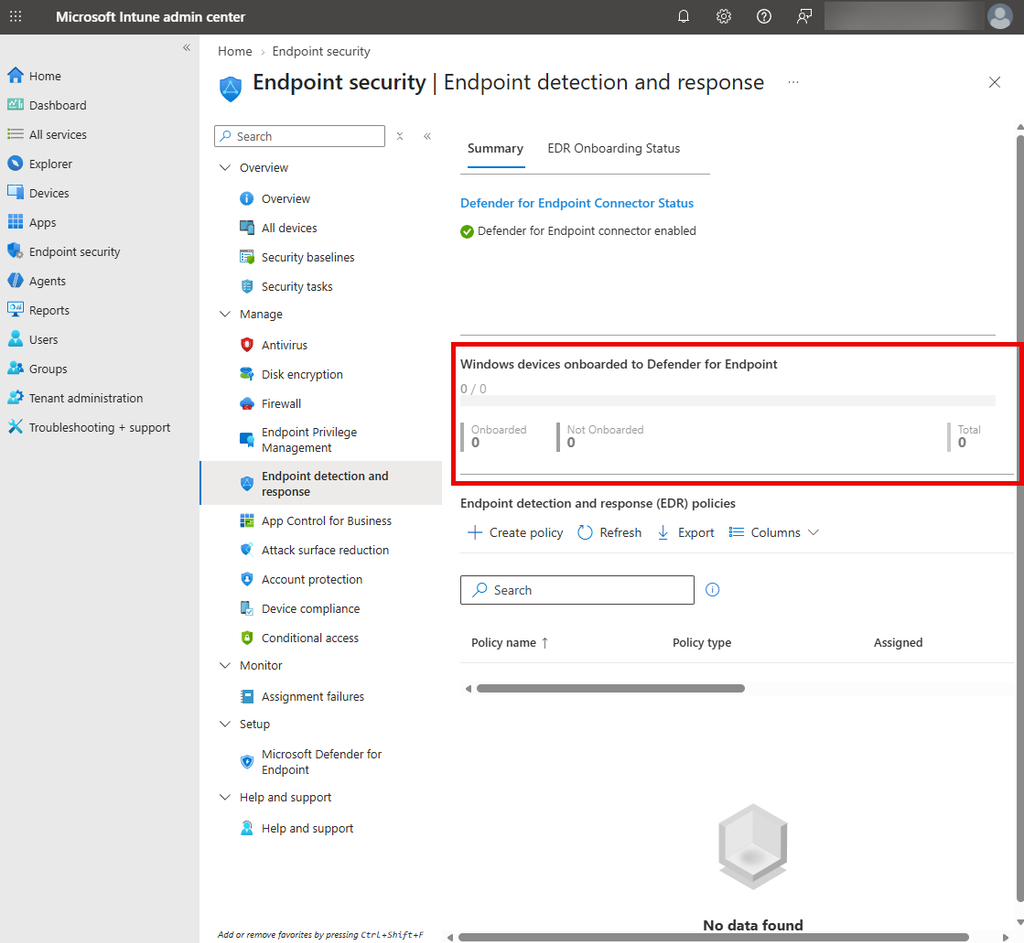
The Endpoint Security overview is another place where the portal is accessible through GDAP, but some of the underlying API calls do not return the expected data…
Here, the page loads successfully for the delegated administrator. However, parts of the overview depend on the Microsoft Graph report endpoints in the backend. In this case, the portal attempts to retrieve the DefenderAgents report, but the request fails with an HTTP 400 Bad Request.
As a result, the related report data cannot be displayed in the Endpoint Security overview. The error does not indicate that the entire portal is unavailable; it affects the specific report request used to populate part of the page.
Portal: https://intune.microsoft.com/#view/Microsoft_Intune_Workflows/SecurityManagementMenu/~/overview
Endpoint request:
Endpoint response:
{
    "error": {
        "code": "BadRequest",
        "message": "Bad client request: HTTP Status = BadRequest, ErrorCode = BadRequest",
        "details": [],
        "innerError": {
            "date": "2026-06-23T08:49:21",
            "request-id": "192fc5ae-xxxx-xxxx-xxxx-b6f5167831a6",
            "client-request-id": "e245571d-xxxx-xxxx-xxxx-bf491df06dbc"
        }
    }
}
This is another example of a partially working portal experience: the Endpoint Security page is available, but the data shown depends on API operations that may not currently behave as expected for GDAP administrators.
Devices > Monitor > Security update status
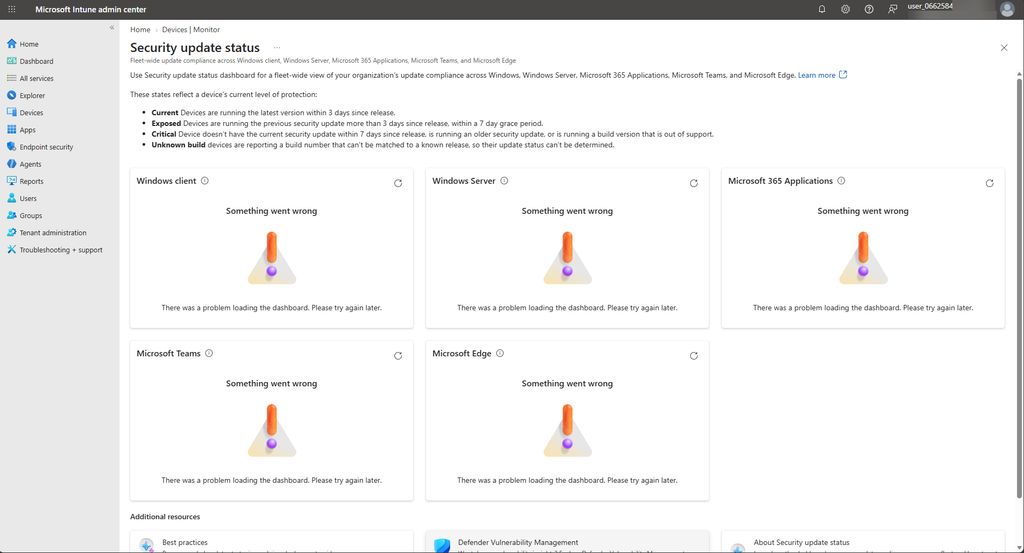
Another example can be found under Devices > Monitor > Security update status. The portal page is available to the delegated administrator, but the underlying report query cannot be executed through the tested GDAP access.
The page uses the managedDeviceResourceQuery endpoint to analyse discovered Microsoft 365 Apps versions on managed devices. The query compares installed versions against defined version thresholds and classifies devices as Green, Yellow, Red, or No recent telemetry.
When tested with both Intune Administrator and Global Reader, the request fails before the query is executed. The endpoint returns:
“MissingUserId
A user identity is required to run this query.”
The interesting part is that the query itself is clearly scoped to the device data needed to calculate the Microsoft 365 Apps update status. The failure occurs before the query is executed, because the API requires an additional user context that is not available in this GDAP scenario.
Consequently, the portal can display the report page, but it cannot retrieve the data needed to calculate the Microsoft 365 Apps update status.
Portal: https://intune.microsoft.com/#view/Microsoft_Intune_ManagedDevices/SecurityUpdateStatus.ReactView
Endpoint: https://graph.microsoft.com/beta/deviceManagement/managedDeviceResourceQuery/initiateQuery
Endpoint request:
DiscoveredApp\n| where AppName startswith "Microsoft 365 Apps" and Publisher startswith "Microsoft"\n| project DiscoveredAppId, AppVersion\n| join kind=inner (\n DeviceToDiscoveredApp\n) on DiscoveredAppId\n| summarize arg_max(AppVersion, LastModifiedDateTime) by DeviceId\n| extend AppPV = parse_version(AppVersion)\n| extend Status = case(\n // Green (family-scoped, >= threshold only)\n (AppPV >= parse_version("16.0.19822.20288")), "Green",\n (AppVersion startswith "16.0.19725." and AppPV >= parse_version("16.0.19725.20346")), "Green",\n (AppVersion startswith "16.0.19530." and AppPV >= parse_version("16.0.19530.20282")), "Green",\n (AppVersion startswith "16.0.19127." and AppPV >= parse_version("16.0.19127.20730")), "Green",\n (AppVersion startswith "16.0.17932." and AppPV >= parse_version("16.0.17932.20842")), "Green",\n (AppVersion startswith "16.0.14334." and AppPV >= parse_version("16.0.14334.20806")), "Green",\n (AppVersion startswith "16.0.10417." and AppPV >= parse_version("16.0.10417.20176")), "Green",\n // Yellow (exact)\n AppPV == parse_version("16.0.19822.20254")\n or AppPV == parse_version("16.0.19725.20320")\n or AppPV == parse_version("16.0.19530.20260")\n or AppPV == parse_version("16.0.19127.20678")\n or AppPV == parse_version("16.0.17932.20790")\n or AppPV == parse_version("16.0.14334.20756")\n or AppPV == parse_version("16.0.10417.20153"), "Yellow",\n // Unknown before Red\n LastModifiedDateTime < ago(90d), "NoRecentTelemetryDeviceCount",\n "Red"\n)\n| summarize\n CriticallyOutOfDateDeviceCount= countif(Status == "Red"),\n OutOfDateDeviceCount= countif(Status == "Yellow"),\n UpToDateDeviceCount = countif(Status == "Green"),\n NoRecentTelemetryDeviceCount= countif(Status == "NoRecentTelemetryDeviceCount"),\n TotalCount= count(),\n LastRefreshedDatetime = max(LastModifiedDateTime)\n| extend ProductCategory ="M365 applications"'Endpoint response:
{
    "error": {
        "code": "MissingUserId",
        "message": "A user identity is required to run this query.",
        "details": [],
        "innerError": {
            "date": "2026-09-01T09:19:29",
            "request-id": "abb8b960-xxxx-xxxx-xxxx-2bc4f4c6e657",
            "client-request-id": "abb8b960-xxxx-xxxx-xxxx-2bc4f4c6e657"
        }
    }
}
This is another example of a partially working portal experience: the delegated administrator can access the page, but the report endpoint requires identity information that is not supplied or recognised in the GDAP context.
Teams Admin Center > Teams
The Teams Admin Center provides yet another example of a portal experience that doesn’t fully translate when accessed through GDAP.
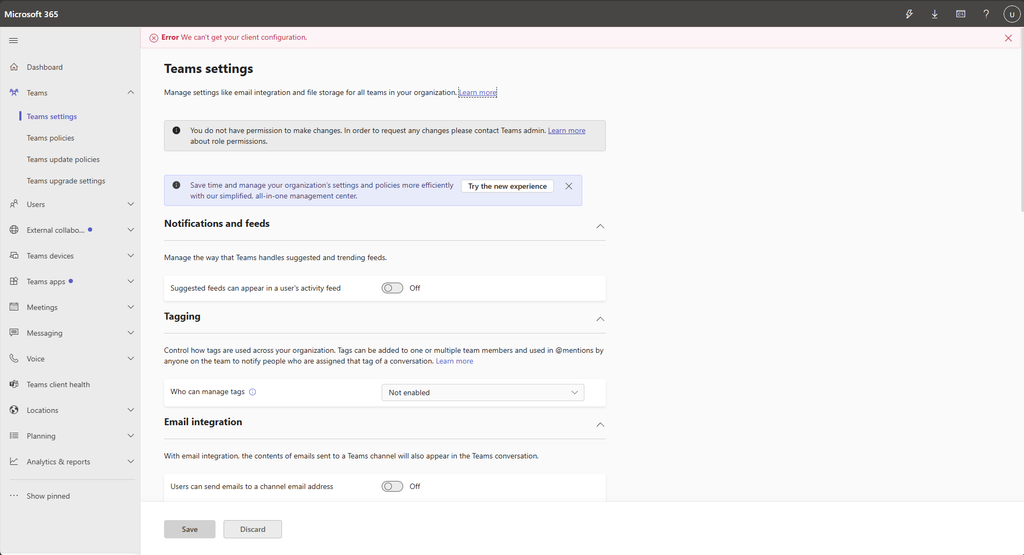
When opening the Teams section like Teams Settings, the portal attempts to retrieve the tenant’s shared channel settings through an internal Teams endpoint. But the request is rejected with a 401 Unauthorized response.
Endpoint: https://teams.microsoft.com/api/mt/part/emea-02/beta/admin/tenantSharedChannelsSettings
Result: 401 Unauthorized
Another case where the portal is happy to show us the page, but the API behind it isn’t quite as welcoming.
Microsoft 365
config.office.com
We have also seen some limitations when accessing config.office.com through GDAP. The portal itself may be accessible, but some of the functionality behind it does not behave as expected when using delegated administration.
Another case where the portal and the underlying authorization don’t quite seem to agree.
Microsoft 365 admin center > Integrated Apps
We haven’t been able to reproduce this one ourselves, but we’ve received reports that the Integrated Apps section in the Microsoft 365 admin center also has issues when accessed through GDAP.
So this one is based on reported behavior rather than our own testing – but it may be another rough edge worth being aware of. 😊
Community reported places where there is a gab also
Under here, we have some areas where other from the community have reported to us, as we can´t test it all – so nice, thanks for the contributions here! 🙌
Security Baseline Mode
The menu never shows up in the Microsoft 365 Admin Center of the costumer, also tested with assign Global Administrator role.
Admin centers shotcuts
Some of the admin centers dosen’t shows up in the Microsoft Admin Center (only 5 of 10 shown), although deeplinks are funktional (Partnernet, Partner Lighthouse)
Conclusion
While the new GDAP is a major improvement over the old DAP model, there are still plenty of rough edges across the different portals.
Based on our testing together with a customer, this shows some fun “places” where the portal is accessible through GDAP, but does not necessarily mean that all of the functionality and options behind it is supported by the backend. In several cases, the underlying APIs do not handle the GDAP or remote-principal context correctly, resulting in incomplete pages, errors, or missing permissions…
For partner administrators, the important lesson is simple: test the actual workloads and operations you depend on – not just whether the portal opens and shows you content!
And this is certainly not the complete list. If you have discovered other GDAP limitations or strange behavior, let us know in the comment!
References
Granular delegated admin privileges (GDAP) introduction – Partner Center | Microsoft Learn
https://learn.microsoft.com/en-us/entra/external-id/user-properties
https://learn.microsoft.com/en-us/partner-center/security/csp-security-best-practices