Microsoft Windows Server has two primary release channels: the Long-Term Servicing Channel (LTSC) and the Annual Channel (AC). LTSC provides a longer-term option focusing on a traditional lifecycle of security and quality updates, where the AC provides more frequent releases, focusing on containers and microservices, so you can take advantage of innovation more quickly.
Windows Server 2025 is the current LTSC release, with Availability date 1/11/2024 – yes we know its some time ago, but it’s more normal now to update, when the majority of most “known” issues is fixed and risk of teething trouble is lower.
On top of this, Windows Server version 23H2 is the latest AC release. The focus on virtualization, container, and microservice innovation continues with Azure Stack HCI, Windows containers, and AKS on Azure Stack HCI (the new name is Azure Local).
As of now, we have mainstream support end date in 2029 and extended support to 2034!
This “What’s new in Windows Server 2025” blog post, we would approach this as a technical overview of the major changes compared to Windows Server 2022, rather than simply listing every new feature…
The most interesting areas to cover in this blog post are:
- Licensing, editions and upgrade considerations
- Active Directory Domain Services (AD DS) and identity security
- Security improvements, including SMB, LDAP and Kerberos
- Hyper-V and virtualization
- Storage performance and ReFS
- Hotpatching and Azure Arc integration
- Networking and Software-Defined Networking
- Windows Server management and user experience
Lets dive into it!
Active Directory Domain Services – some major improvements
This is one of the most interesting sections for an infrastructure and security-focused post, where we see a lot of new features compared to the last Forrest update – with not so much new.
New and improved capabilities:
- 32K database page size: AD DS can optionally use 32K database pages instead of the legacy 8K format. This removes some historical database limitations and increases the capacity of multi-valued attributes.
- New forest and domain functional levels: Windows Server 2025 introduces functional level 10, required for the new 32K database format
- Improved LDAP security: New AD deployments require LDAP signing by default for SASL-bound LDAP client communication
- LDAP channel binding auditing: New audit events (3074 and 3075) help identify clients that don’t support or fail channel binding
- Improved Kerberos security: RC4 is no longer used by KDC when issuing Ticket Granting Tickets.
- Improved machine account security: New AD deployments use randomly generated default computer account passwords, and Server 2025 domain controllers block the use of the computer account name as its password
- LDAP over TLS 1.3: Support for TLS 1.3 improves the security of LDAP over TLS connections.
- Improved AD scalability: AD DS can take advantage of NUMA hardware and CPUs across processor groups, including systems with more than 64 cores.
- Active Directory object repair: New functionality allows enterprise administrators to repair certain objects with missing core attributes!
Important migration consideration: The 32K database format is optional and requires all domain controllers in the forest to support it. Upgrading an existing domain controller does not automatically convert its database to 32K!
Source: What’s new in Windows Server 2025 | Windows Server Summit 2024
Security enhancements
Windows Server 2025 introduces several new security improvements, and many of them are enabled by default (finally)!
| Feature | What’s new |
|---|---|
| Credential Guard | Enabled by default on supported hardware. |
| SMB signing | Required by default for all outbound SMB connections. |
| SMB encryption | Enforced for all outbound SMB client connections. |
| SMB NTLM blocking | SMB clients can block outbound NTLM authentication. |
| SMB authentication rate limiter | Helps protect against brute-force authentication attempts. |
| TLS | Minimum RSA key length of 2,048 bits for TLS server authentication. |
| VBS key protection | Protects cryptographic keys using virtualization-based security. |
| Security baseline | OSConfig provides more than 350 predefined security settings. |
| OpenSSH | SSH server components is installed by default. |
SMB over QUIC
One particularly interesting improvement is that SMB over QUIC is no longer limited to the Azure Edition. It is available in both Standard and Datacenter editions as well! 🔥
This enables encrypted SMB connectivity over untrusted networks without requiring traditional VPN connectivity.
Additional improvements include:
- Certificate-based client access control
- SMB connection auditing
- Alternative SMB ports
- Improved firewall rules
RRAS hardening
New Routing and Remote Access Services installations no longer accept PPTP and L2TP VPN connections by default. SSTP and IKEv2 remain available.
Existing installations retain their previous configuration during an in-place upgrade.
Source: Microsoft Learn – Advanced multilayer security
Hyper-V and virtualization
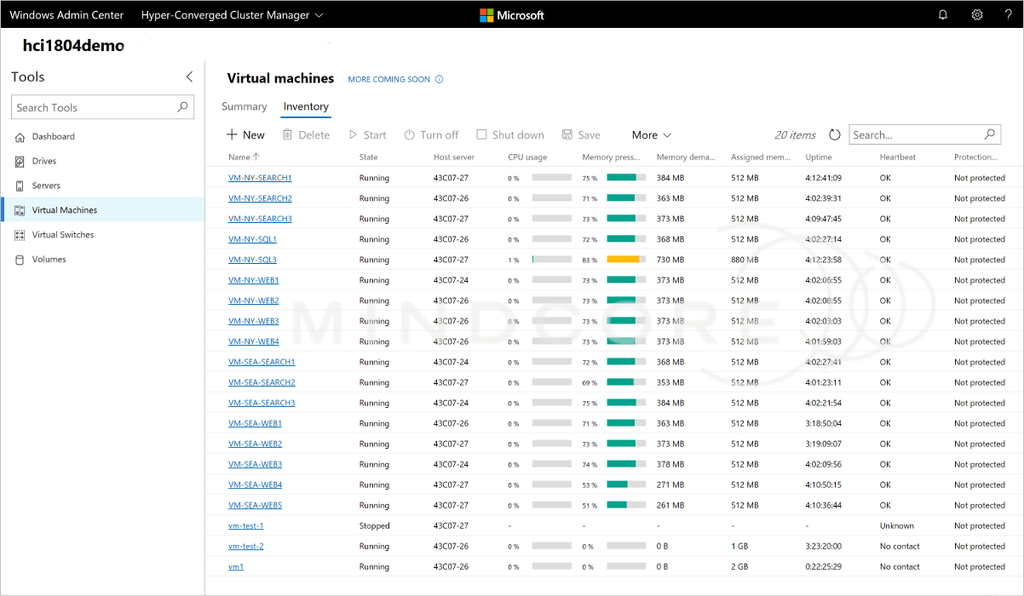
On top, Windows Server 2025 brings several new improvements into Hyper-V, particularly around scalability, networking and GPU workloads.
- Increased scalability: Hyper-V supports up to 4 PB of memory and 2,048 logical processors per host
- Generation 2 VMs by default: The Hyper-V Manager wizard now selects Generation 2 when creating new virtual machines
- GPU partitioning (GPU-P): Physical GPUs can be shared between multiple virtual machines
- GPU-P Live Migration: GPU-partitioned VMs can be migrated between hosts
- GPU-P high availability: GPU-partitioned VMs can be restarted on another cluster node following unplanned downtime
- Dynamic processor compatibility: Improved processor compatibility across different CPU generations in a cluster
- Workgroup clusters: Hyper-V failover clusters can be deployed without traditional Active Directory domain membership!
- Accelerated Networking: SR-IOV-based networking improvements reduce latency, jitter and CPU utilization. This feature is documented as preview in Microsoft’s overview
Another interesting addition is Network ATC, which simplifies host network configuration through an intent-based approach. Administrators can then define whether network adapters are used for management, compute or storage, and the configuration is deployed consistently across the cluster – this is more easy to mange now!
Source: Microsoft Learn – Hyper-V, AI and performance
Storage improvements
Storage is another area receiving some improvements!
| Feature | Description |
|---|---|
| Native NVMe | Improved NVMe performance, IOPS and CPU utilization. |
| ReFS block cloning | More efficient file copying through metadata operations. |
| ReFS deduplication | Native deduplication and compression support. |
| Storage Replica compression | Reduces network traffic during replication. |
| Storage Replica Enhanced Log | Improves block replication performance. |
| Dev Drive | ReFS-based storage optimized for developer workloads – know from Windows too! |
The improvements are particularly relevant for virtualization environments, file servers and storage-intensive workloads.
One important distinction is that the ReFS features should not be confused with traditional NTFS deduplication. They are different capabilities with different use cases.
Source: Microsoft Learn
Hotpatching and Azure Arc – THIS IS HOT!
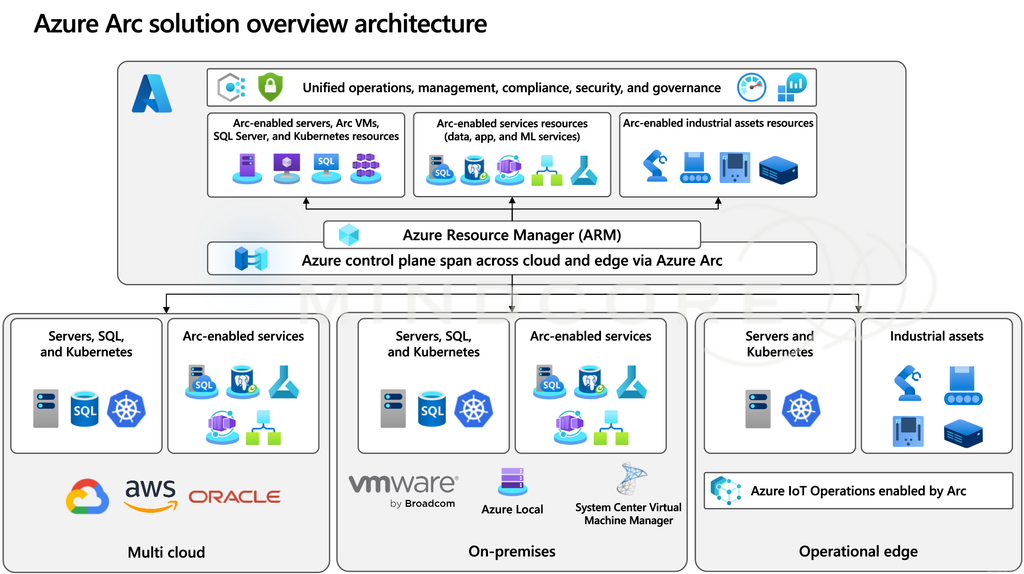
In relation to our other blog posts on our blog, we see this is a new feature moved to On-Prem from the Azure Only Edition – this is nice! ❤️
Hotpatching is an interesting feature for organizations looking to reduce maintenance windows and server downtime.
Windows Server 2025 supports Azure Arc-enabled Hotpatching, allowing security updates to be installed without restarting the operating system.
The key points:
- Security updates can be installed without a reboot
- Reduces planned downtime and maintenance windows
- Integrated with Azure Arc
- Requires the appropriate Azure configuration and subscription/eligibility
An important detail for the blog: Microsoft documents Azure Arc-enabled Hotpatching as a preview in its Windows Server 2025 feature overview. Check the current service availability before describing it as generally available.
Source: Microsoft Learn – Hotpatch
Networking improvements
There are also some networking improvements worth mentioning:
- Network ATC: Intent-based configuration of cluster networking
- Software-Defined Networking: Improvements to Network Controller deployment and management – a feature there takes parts of the one we know from VMware vCenter/vCloud
- Tag-based segmentation: Use service tags to associate network security groups with virtual machines – a new feature on top of the VM Groups we know from before – that is possible via my new Community tool https://hvtools.app/
- Default network policies: Improved network security for newly deployed workloads
- SDN Multisite: Native Layer 2 and Layer 3 connectivity across two locations
- IPsec: Changes to the default keying protocol sequence for machine certificate authentication
These improvements are particularly relevant for larger Hyper-V and Software-Defined Networking deployments.
Source: Microsoft Learn
Administration and the user experience
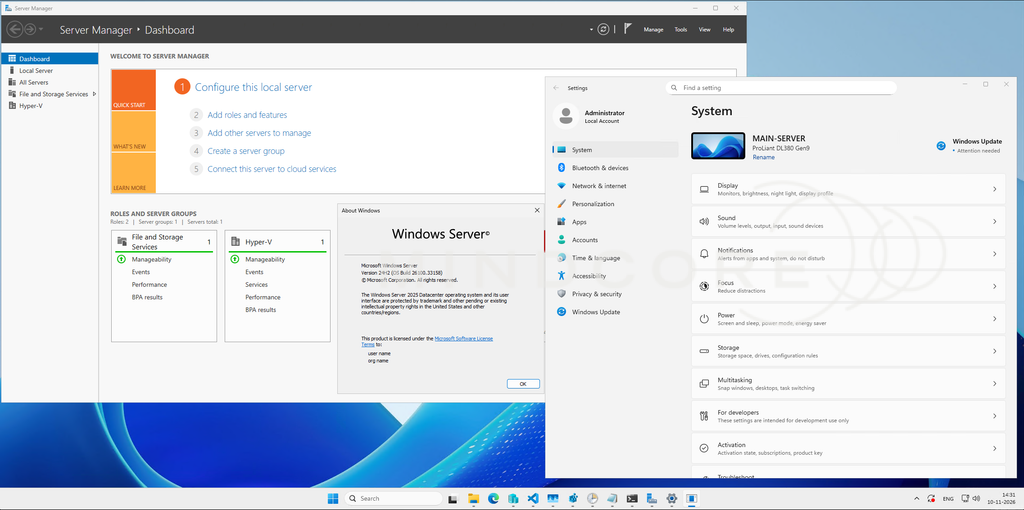
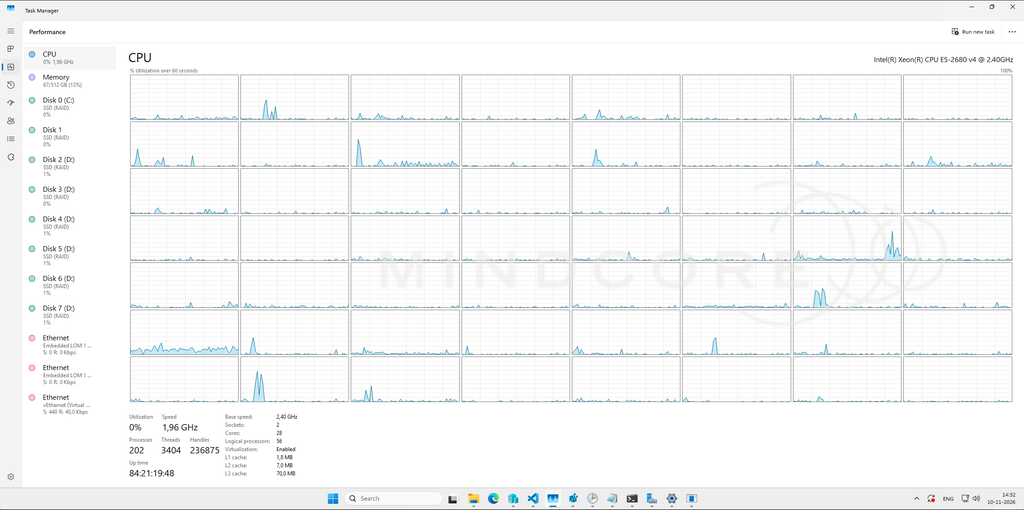
Windows Server 2025 also received several administrative and usability improvements – but we still have some good old MMC views around, but more is coming. Some highlights is:
- Windows 11-styled desktop experience
- Modern Task Manager
- Windows Terminal included
- WinGet installed by default
- Improved Windows Settings
- Microsoft Entra ID, Microsoft accounts and work or school accounts can be added through Settings
- Built-in DTrace for performance troubleshooting
- Bluetooth support – like in the old days we got USB Support haha 😅
- Wireless LAN Service installed by default
- ZIP, 7z and TAR compression support directly in File Explorer – yes, no more 3 party tools here!
These are not necessarily major infrastructure changes, but they make the operating system more familiar and convenient to use.
Source: Microsoft Learn
Windows LAPS improvements
Windows Server 2025 introduces improvements to Windows Local Administrator Password Solution (LAPS), like we know from recent Windows 11 releases:
- Automatic account management
- Improved password complexity options
- Passphrase support
- Improved password readability
- Additional post-authentication actions
- Ability to terminate remaining processes running under a managed local account after password rotation
The post-authentication action improvements are particularly interesting: LAPS can now terminate remaining processes belonging to the managed account, rather than only resetting the password and logging off the account.
Source: Microsoft Learn – Windows LAPS
Editions and upgrade paths
Windows Server 2025 is available in three main editions:
| Edition | Typical use |
|---|---|
| Standard | Physical servers and environments with limited virtualization requirements |
| Datacenter | Highly virtualized environments and datacenters |
| Datacenter: Azure Edition | Azure and hybrid cloud scenarios |
Microsoft also supports direct in-place upgrades from Windows Server 2012 R2 and later, subject to the applicable upgrade requirements.
To see the full list, check it here at Microsoft: Comparison of Windows Server editions | Microsoft Learn
Security improvements – and what they mean for existing environments!
To dive more into the interesting angles isn’t just what Microsoft have added of new features – It’s what happens when these security improvements meet a real-world Active Directory environment with legacy applications, service accounts, devices and older infrastructure!
Below is some technical reasoning, potential impact and what we would investigate or test.
- LDAP signing by default
- Why this matter:
LDAP signing protects the integrity and authenticity of LDAP communication. Without signing or encryption, LDAP traffic can be manipulated in transit, potentially allowing man-in-the-middle attacks against directory communication.
Windows Server 2025 changes the default behavior for new Active Directory deployments: LDAP signing is enforced by default. However, an important distinction:- New Windows Server 2025 AD deployments enforce LDAP signing by default
- Existing environments upgraded to Windows Server 2025 retain their existing LDAP signing policies
- If no server-side signing policy was previously configured, the new default behavior applies
- What could break?:
Some applications and devices that perform LDAP authentication or directory lookups without supporting LDAP signing or encryption could stop working. Examples include:- Older Linux-based applications using LDAP authentication
- Network devices such as printers, firewalls or VPN appliances
- NAS devices using Active Directory integration
- Legacy applications using simple LDAP binds over unencrypted connections
- Applications using outdated LDAP libraries
One important distinction: LDAP signing and LDAPS are not the same thing. LDAP signing protects integrity, whereas TLS also provides confidentiality. Simple LDAP binds require TLS to protect credentials in transit.
- What should you investigate?:
- Identify applications using unsigned LDAP binds
- Check LDAP events 2886, 2887, 2888 and 2889
- Enable diagnostic logging to identify individual clients
- Validate LDAP integrations before enforcing signing
- Review LDAP channel binding separately, particularly for TLS-based connections
- Recommendation: This is a particularly important change to investigate before upgrading domain controllers or deploying a new Windows Server 2025 forest!
Microsoft reference: LDAP signing overview
- Why this matter:
- Kerberos RC4 removal – ref.: Active Directory support for RC4 encryption ends July 2026 – Mindcore Techblog
- Why it matters:
RC4-HMAC is an outdated encryption algorithm that has historically been used in Kerberos authentication. But my colleage have a nice blog post about that above, check it out!
This is particularly relevant in environments with older service accounts, legacy applications and devices that don’t support modern Kerberos encryption types.
Windows Server 2025 introduces an important change: its Kerberos KDC no longer issues Ticket Granting Tickets (TGTs) using RC4 encryption.
INFO: This is not the same as saying that every possible use of RC4 in Kerberos has disappeared! - What could break?:
Potential issues include:- Legacy service accounts without AES keys
- Older appliances and applications relying on RC4
- Applications with hardcoded Kerberos encryption requirements
- Older operating systems that don’t support AES Kerberos encryption
- Service accounts with outdated password-derived encryption keys
A particularly interesting scenario is an old service account that has never had its password changed since AES support became available. It might not have the necessary AES keys.
- What should administrators investigate?:
- See it all in Active Directory support for RC4 encryption ends July 2026 – Mindcore Techblog and Microsoft reference: Detect and Remediate RC4 Usage in Kerberos
- Recommendation: Don’t simply disable RC4 across the environment without first understanding where it is being used. Audit and remediate dependencies first.
- Why it matters:
- SMB signing by default
- Why it matters:
SMB signing protects the SMB communication itself against tampering and certain man-in-the-middle and relay attacks – Windows Server 2025 requires SMB signing by default for outbound SMB connections.
This is an important distinction: Windows Server 2025 requires outbound signing by default, whereas inbound signing requirements are configurable. - What could break?:
The most obvious compatibility concern is older third-party SMB implementations. Examples are:- Older NAS devices and Linux/Samba implementations
- Workgroup file servers
- Devices relying on guest authentication
- Older SMB implementations without signing support
If the remote SMB server doesn’t support signing, the connection can fail and guest access is another important consideration because requiring signing also prevents guest fallback.
- Could it affect performance?:
Yes, potentially as SMB signing introduces cryptographic processing overhead. This can be relevant in high-throughput storage environments, particularly with SMB Direct/RDMA and Storage Spaces Direct. The impact depends on the workload, hardware, SMB implementation and network configuration. - What should administrators investigate?:
- Identify non-Windows SMB servers
- Validate signing support on NAS and storage appliances
- Check guest-based file-sharing dependencies
- Test file-transfer performance
- Test Storage Spaces Direct and SMB Direct workloads
- Monitor SMB client and server connectivity
- Recommendation: Test storage connectivity and performance before deploying Windows Server 2025 in environments with extensive NAS or SMB-based storage. My colleague Matthias have a tool here, to test it
Microsoft reference: Control SMB signing behavior
- Why it matters:
- NTLM blocking for SMB
- Why it matters:
NTLM remains a common authentication mechanism in older Windows environments, especially where Kerberos cannot be negotiated. Windows Server 2025 introduces the ability to block outbound NTLM authentication specifically for SMB client connections.
This is interesting because organizations can start reducing NTLM usage without having to disable NTLM authentication across the entire environment. - What could break?:
Consider a scenario where a server connects to a remote file share using an IP address instead of a hostname. Kerberos normally relies on service identities and SPNs to identify the destination service. If the connection cannot establish Kerberos authentication, Windows might fall back to NTLM. If NTLM is blocked, the SMB connection can fail. Other scenarios may include:- Workgroup file servers.
- NAS devices without proper AD/Kerberos integration.
- Applications using IP addresses for SMB connections.
- Missing or incorrect CIFS SPNs.
- Cross-domain or cross-forest authentication configurations.
- What should administrators investigate?:
- Identify SMB connections using NTLM
- Review file-server access using IP addresses
- Validate CIFS SPNs
- Ensure Kerberos authentication works across domains and forests
- Test applications that access remote file shares
- Introduce NTLM blocking gradually
- Recommendation:
This is a good test towards reducing your NTLM dependency without immediately implementing a domain-wide NTLM restriction. with one important detail: NTLM blocking for SMB is a configurable capability, not a blanket default NTLM prohibition in Windows Server 2025.
Microsoft reference: Block NTLM connections on SMB
- Why it matters:
- Credential Guard enabled by default
- Why it matters:
Credential Guard uses Virtualization-Based Security (VBS) to isolate sensitive data from the normal operating system. It helps to protect:- NTLM password hashes
- Kerberos Ticket Granting Tickets
- Domain credentials stored by applications
The idea is to make it significantly harder for attackers with administrative privileges on a compromised server to extract credentials from memory. Windows Server 2025 enables Credential Guard by default on supported, domain-joined systems that meet the requirements, with an important exception: Domain Controllers are excluded from this default enablement.
Hardware and platform requirements are:- The main requirements and considerations include:
- Hardware and firmware supporting VBS.
- Secure Boot.
- TPM 1.2 or 2.0 is recommended for additional protection.
- UEFI lock is recommended to prevent unauthorized disabling of Credential Guard.
- Hyper-V Generation 2 VMs are supported, provided the host has an IOMMU.
Secure Boot is a documented requirement for Credential Guard, although it isn’t a hard prerequisite for VBS itself to run.
- What could break?:
This is where things get interesting. Some applications rely on authentication capabilities that Credential Guard restricts, and other a potential compatibility issues include:- Applications requiring Kerberos unconstrained delegation
- Applications attempting to extract Kerberos TGTs
- Applications relying on NTLMv1
- Applications requiring Kerberos DES encryption
- Legacy applications using credential delegation or CredSSP
On top, Microsoft explicitly warns that some applications might stop working when Credential Guard is enabled. Also worth noting: Microsoft doesn’t recommend enabling Credential Guard on Domain Controllers, and it isn’t supported on Exchange Servers too!
- What should administrators investigate?:
- Check whether existing servers meet the hardware requirements
- Identify applications relying on unconstrained delegation
- Test backup, monitoring and management agents
- Validate remote administration and authentication workflows
- Check Credential Guard status after upgrading to Windows Server 2025
- Useful PowerShell check:
- Why it matters:
Get-CimInstance -ClassName Win32_DeviceGuard -Namespace root\Microsoft\Windows\DeviceGuard | Select-Object VirtualizationBasedSecurityStatus, SecurityServicesConfigured, SecurityServicesRunning- Recommendation: Don’t assume that enabling Credential Guard is entirely transparent. Test application compatibility, particularly on servers running legacy business applications.
Microsoft reference: Credential Guard overview
- Active Directory 32K database pages
- Why it matters:
This is probably one of the most interesting Active Directory improvements in Windows Server 2025.
Since Windows 2000 (yes!), Active Directory has used an 8K page database format based on the Extensible Storage Engine (ESE). Windows Server 2025 introduces support for a 32K database page format, and the improvements include:- Increased Active Directory scalability
- 64-bit Long Value IDs (LIDs)
- Multi-valued attributes supporting approximately 3,200 values instead of the previous limitations
This is particularly interesting for large and complex Active Directory environments
- An important distinction
Installing a new Windows Server 2025 Domain Controller doesn’t necessarily mean that you’re immediately using 32K database pages. New AD installations use a 32K-capable database, but initially operate in 8K simulation mode for compatibility.
Existing Domain Controllers upgraded in-place retain their existing 8K database format. - What should administrators consider?
Before enabling the optional 32K database feature:- All Domain Controllers must run Windows Server 2025 or later
- All Domain Controllers must have a 32K-capable database
- Forest and domain functional levels must be Windows Server 2025
- AD replication must be healthy
- Backup and restore solutions must support the new database format
- Memory consumption and performance should be evaluated
The really important part: Irreversible operation
Once the 32K database feature is enabled, you cannot revert to the previous 8K simulation mode.
Additionally, backups created using the old 8K database format can no longer be used for a normal restore after enabling the feature. A complete authoritative forest recovery would be required to recover using those old backups. That makes backup validation particularly important before enabling this feature.
- Recommendation: Don’t enable 32K pages just because you’re upgrading to Windows Server 2025!. Evaluate whether the scalability improvements are actually needed, and validate the entire backup and recovery process first (and test it twice!)
- Microsoft reference: Database 32k pages for Active Directory
- Why it matters:
- Windows LAPS – improved post-authentication actions
- Why it matters
Windows LAPS already provides automatic management and rotation of local administrator passwords. Windows Server 2025 introduces additional capabilities that make it possible to manage what happens after a managed account has been used for authentication. This is particularly interesting from a security perspective.
Consider the following scenario: An administrator retrieves a local administrator password from Windows LAPS and uses it to troubleshoot a server. The administrator finishes the task, but the session remains active. Processes may still be running under the managed administrator account, and the password might still be valid. This creates an unnecessary exposure window.
Windows Server 2025 introduces an additional post-authentication action that can:- Reset the managed account password.
- Sign out interactive sessions using that account.
- Delete SMB sessions using that account.
- Terminate remaining processes running under that account.
The relevant setting isPostAuthenticationActions, with value11.
- What should administrators consider?
- Configure the appropriate post-authentication delay.
- Determine whether existing administrative processes can safely be terminated.
- Consider the impact on running applications and scripts.
- Test the behavior with privileged support accounts.
- Ensure that administrators understand the session termination behavior.
There is an important operational consideration: terminating processes can cause data loss or interrupt ongoing administrative tasks.
Also, this isn’t a guarantee against a malicious administrator. Someone who has already acquired administrative privileges can potentially interfere with or circumvent the mechanism.
- Recommendation: This is a very useful improvement for environments using Windows LAPS to manage local administrator accounts across servers and workstations.
Microsoft reference: Configure Policy Settings for Windows LAPS
- Why it matters
Windows Server 2025 is not just introducing new security features. It is also changing existing security defaults and removing some of the backward compatibility that many organizations have relied on for years.
Parts there is removed/no longer in development from Windows Server 2025 and later is listed here at Microsoft: Features Removed or No Longer Developed in Windows Server | Microsoft Learn
The list here is probably the most important message for administrators there is planning an upgrade.
An environment might work perfectly running Windows Server 2022, but may encounter unexpected issues when moving to Windows Server 2025, particularly when it relies on older applications, authentication protocols or third-party/older infrastructure.
We would therefore recommend treating the upgrade as an opportunity to review existing dependencies rather than simply performing an operating system upgrade.
Yes, there are still a few rough edges!
Windows Server 2025 introduces plenty of new features and security improvements, but that doesn’t mean everything is perfect from day one 😊
During my testing and overall use, I came across an interesting little detail in the Active Directory Users and Computers (ADUC) UI when selecting a domain controller using the Change Directory Server dialog, the DC Version is displayed as Unknown, even though the domain controller is online and working as expected.
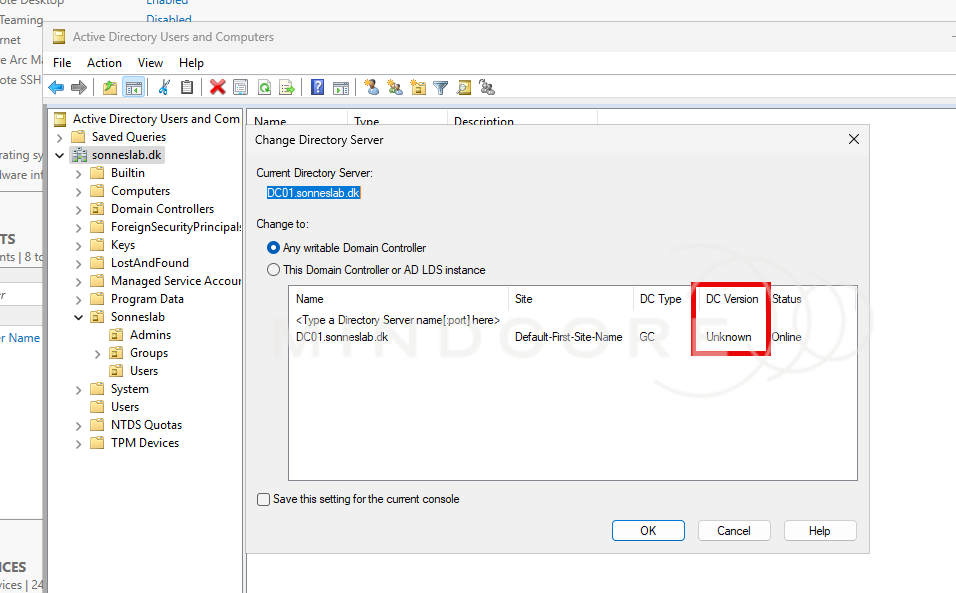
It’s a relatively harmless bug, but a fun reminder that even after a new Windows Server release, some of the administrative tools and experiences may need a little catching up. I’ve recently reported this behavior to Microsoft, so let’s see where that goes 😉
And with that out of the way, this is what’s actually new in Windows Server 2025!
References
What’s new in Windows Server 2025 | Windows Server Summit 2024
Comparison of Windows Server editions | Microsoft Learn