
In 2022 we wrote a post about SharePoint and OneDrive integration with Microsoft Entra B2B.
As of 2025, the information in this post remains relevant for tenants created before June 2023; tenants provisioned after that date have Entra B2B integration enabled by default.
Now, only one command is needed instead of two as before.
Set-SPOTenant -EnableAzureADB2BIntegration $trueAn additional update since the original post is that, with SharePoint integration enabled for Entra B2B, users will be required to reshare files, folders, and sites with external collaborators beginning July 1, 2025.
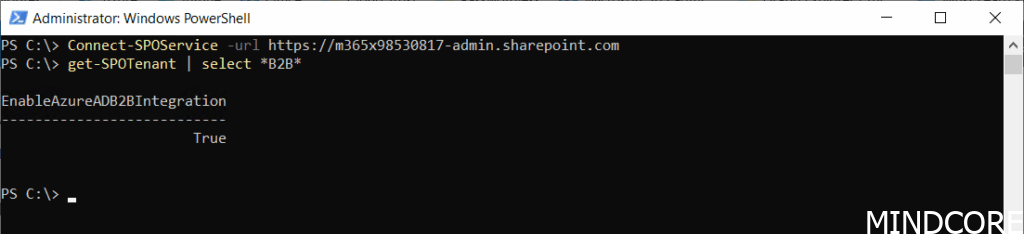
This change remains crucial for older tenants, and should always be verified when talking Microsoft 365 governance. To check your status, use the commands.
Connect-SPOService -url https://tenant-admin.sharepoint.com
get-SPOTenant | select *B2B*
The status should indicate that EnableAzureADB2BIntegration has a value of True.
Various settings in SharePoint, Microsoft 365 Groups, and Teams can affect users’ experiences with Microsoft 365 and Teams. In our Governance workshops, the process begins with a governance data collector that gathers details about the current Microsoft 365 configuration and identifies areas where different approaches may be evaluated. For instance, the question about SharePoint and OneDrive integration with Microsoft Entra B2B is one very important setting that we monitor.
The key governance concern with SharePoint and OneDrive integration with Microsoft Entra B2B is uncontrolled information flow, which can compromise security, compliance, and information management.
And now a short message in Danish
Hos Mindcore elsker vi at dele viden, men det er vores Danske kunder der rent faktisk gør dette arbejde muligt. Hvis du er interesseret i hvad vi kan tilbyde i forhold til Microsoft 365 Governance og sikkerhed, Azure ARC, Intune eller nogen af de andre områder vi har skrevet om her på bloggen, så kontakt os på info@mindcore.dk eller telefon 51 91 44 10.








