
In this final blogpost on onboarding, I want to cover a way to automate some common post-deployment configuration tasks. When a machine is Arc onboarded, by default, it won’t really have much installed and it’s not particularly useful until you start deploying extensions.
Azure Arc VM Onboarding blog mini-series overview:
1. Azure Arc VM Onboarding Pt.1 – Introduction
2. Azure Arc VM Onboarding Pt.2 – GPO Deep-Dive & Deployment Monitoring Workbooks
3. Azure Arc VM Onboarding Pt.3 – Automating Post-Deployment Configurations (This blog post)
Also be sure to check out our other Azure Arc blogposts in our Modern Server Management series!
Common post-deployment tasks
The goal for this automation was to provide a flexible system that will trigger whenever a new Arc onboarded VM is detected and perform a set number of tasks:
- Tag the machine as ‘onboarding’
- Install the OpenSSH extension
- Deploy a public SSH key (using a Run command)
- Configure SSH Arc Proxy endpoints
- Enable Azure Benefits
- Tag the machine as ‘onboarded’ with completion date/time
However, this is by no means an exhaustive list. For example, some organizations may choose to add tasks such as:
- Automatic tagging based on hostname or other criteria
- Moving VM resource to another Resource Group based on hostname or other criteria
- Onboarding to Azure Update Manager (including Hotpatching for Server 2025)
- Onboarding to Defender for Cloud and tag them
- Deploy other extensions (such as Windows Admin Center or the Hybrid Worker Extension)
- Onboarding to Extended Security Updates (ESU)
- Adding the Managed Identity to a group (to assign permissions)
- Onboarding to Log Analytics
- …
The list can be as long as required and customized to suit any requirement.
Architecture Diagram
The core of the solution is an Azure Function App that is triggered by an Event Hub Subscription which monitors for successful creation events in a specified onboarding resource group. Once a new Arc machine is onboarded, the Azure Function App is triggered and completes the required tasks.

Showcase
Below is a screenshot of a machine I’ve just freshly Arc-onboarded using the classic script method (since this is just a lab environment:

Within seconds of the machine being created within Azure, Event Grid has sent a notification to the Function App which parses the result, identifies the new machine, tags it, and begins installing the SSH extension:

Within Azure, this can be seen with the temporary onboarding tag (also note that Azure benefits have not yet been activated):

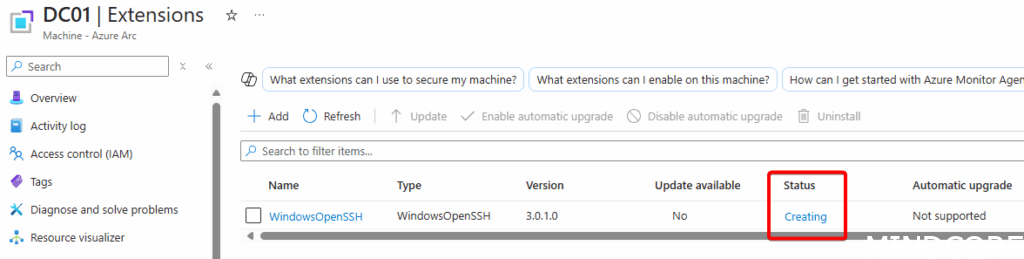
Under extensions, the WindowsOpenSSH status shows it is being installed (this can take a few minutes; hence a durable function is best to use here):
After the completion of the Azure Function run, the machine now shows the completed tags and Azure benefits have been activated:

On the machine itself we can verify that a public SSH key has been installed:

To test we can now manage this machine through Ansible using the SSH key (off course, I get prompted to verify the key fingerprint for the first time connecting:

Security Considerations
As outlined in the previous blogposts regarding the Arc Onboarding service principal, if that is compromised, a threat actor could onboard their own machine and triggering the automation. This means care should be taken in both protecting and rotating the secret of the Service Principal but also ensuring that the automation doesn’t deploy additional secret information. For example, the public SSH key does not ever contain the private key.
Conclusion
Automating post-deployment tasks for Arc using other Azure services showcases the power and flexibility the cloud can provide even for systems not natively in Azure. I hope this inspires more automations related to hybrid infrastructure and utilizing Azure’s control plane.
If you’re interested in deploying this solution, please reach out!








