Here is a very important update in the relation to the upcoming Microsoft Boot Manager updates also – and Windows itself in the April 14 updates!
Microsoft also states in the release notes that this update address an issue there could set a device to enter BitLocker Recovery after Secure Boot updates (see ref. to our other blogs in the botton of this blog post).
This happens for devices with an unrecommended BitLocker Policy configuration and you might be required to enter the BitLocker recovery key on the first restart after installing the April 2026 Windows security updates (the Originating KBs listed belowe), or a later update.
This issue only affects to systems in which ALL of the following conditions are true (as of reports):
- BitLocker is enabled on the OS drive.
- A Policy there set “Configure TPM platform validation profile for native UEFI firmware configurations” is configured, and PCR7 is included in the validation profile (or the equivalent registry key is set manually) (and this is not possible to set via Microsoft Intune native).
- System Information (msinfo32.exe) reports PCR7 Configuration as “Binding Not Possible“.
- The Windows UEFI CA 2023 certificate is present in the device’s Secure Boot Signature Database (DB), making the device eligible for the 2023‑signed Windows Boot Manager to be made the default.
- The device is not already running the 2023-signed Windows Boot Manager
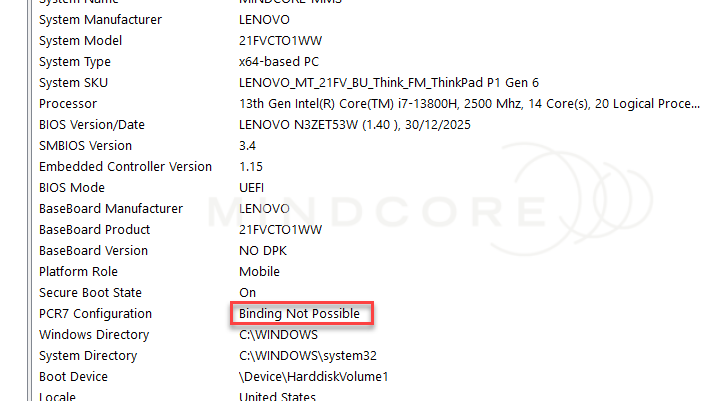
And in this scenario, the BitLocker recovery key only needs to be entered once – other (and following) restarts will not trigger the BitLocker recovery screen, as long as the policy configuration remains unchanged.
For help finding your BitLocker recovery key, see the article, Find your BitLocker recovery key or ask your IT Department 😊
In reference to Microsofts’ provided information, this issue occurs because, beginning with the April 2026 Windows security update (the Originating KBs listed below), systems with the Windows UEFI CA 2023 certificate present in the Secure Boot DB switches the default boot manager to the 2023-signed Windows Boot Manager. This boot manager change results in a PCR7 measurement change. When PCR7 is explicitly included in the BitLocker validation profile through group policy – even though binding is reported as “Not Possible” – BitLocker detects a platform integrity change and requires recovery-key.
Under the default behavior (when the Policy is not configured), Windows automatically choses an appropriate PCR validation profile that is suitable for the hardware, which avoids this issue. When PCR 7 binding is reported as “Binding Not Possible”, BitLocker switches to the PCR 0,2,4,11 validation profile instead of PCR 7,11.
This will seriously alert companies if all their devices will prompt for the BitLocker Recovery key at once. Many tend to do expedite patch because of some module that needs to be patched ASAP or CVE´s – but you still need to validate it before broad deployment!
Currently, the problem is if you configured a strict policies with BitLocker to bound to TPM, (As anyone care about security should do), this patch will alter the PCR7 configuration and this leads to a triggered BitLocker promt.
Affected platforms
| Client versions | Message ID (Microsoft Admin Center) | Originating KB | Resolved KB (as of 15-04-2026) |
| Windows 11, version 25H2 | WI1280135 | KB5083769 | N/A |
| Windows 11, version 24H2 | WI1280137 | KB5083769 | N/A |
| Windows 11, version 23H2 | WI1280140 | KB5082052 | N/A |
| Windows 10, version 22H2 | WI1280142 | KB5082200 | N/A |
| Windows 10, version 21H2 | WI1280143 | KB5082200 | N/A |
| Windows Server versions | Message ID | Originating KB | Resolved KB (as of 15-04-2026) |
| Windows Server 2025 | WI1280139 | KB5082063 | N/A |
| Windows Server 2022 | WI1280141 | KB5082142 | N/A |
Recommendations
While awaiting a complete solution, check the following configurations:
While Microsoft says the April 14 updates address the needed issue faced in regards to this, organizations should still patch with open eyes. The Secure Boot certificate servicing changes are real boot-chain changes in UEFI layer, and Microsoft’s Secure Boot troubleshooting guide explains that Windows applies these updates through the Secure-Boot-Update task and may later install the Windows UEFI CA 2023-signed boot manager as part of the servicing sequence for your machines.
And just to highlight an important part: The issues here does not appear to be a general problem for every Windows device.
You can read more about the policy itself here: GPS: Configure TPM platform validation profile for native UEFI firmware configurations
Enterprises are recommended to audit their BitLocker group policies for explicit PCR7 inclusion and check msinfo32.exe for their PCR7 binding status before installing the April 2026 Windows security update. Details about this group policy are shown below.
As we read it, it is the Secure Boot certificate chain update that triggers the PCR7, and the April patch will help on devices NOT doing BitLocker prompts – what is your experience with it, if you have installed the April update? 🤔
Manual workaround – not recommended!!
For Group Policy:
- Policy Name: Configure TPM platform validation profile for native UEFI firmware configurations
- Policy Path: Computer Configuration > Administrative Templates > Windows Components > BitLocker Drive Encryption > Operating System Drives
Registry data:
- Registry Path: HKLM\SOFTWARE\Policies\Microsoft\FVE
- Registry Value: OSPlatformValidation_UEFI
For Intune:
- Options is not available – only via GPO and a script
Warning: Microsoft does not recommend configuring this policy manually. Changing the default platform validation profile affects device security and manageability. Setting this policy might prompt a BitLocker recovery when firmware is updated. If this policy is set to include PCR0, suspend BitLocker prior to applying firmware updates.
If you are using Microsoft Intune, the policy in Endpoint security > Disk encryption > BitLocker profile is based on the BitLocker CSP/Settings Catalog model, and Microsoft notes that not all BitLocker settings exist in both CSP and Group Policy. So this means that your IT teams should not assume that every Intune-managed device is affected, but they should check whether custom ADMX-backed settings, OMA-URI policies, scripts, co-management settings or direct registry changes have introduced the OSPlatformValidation_UEFI configuration on any managed devices!
Workarounds
Note: We have 3 workarounds, but we recommend Nr. 3.
Option 1: Remove the Group Policy configuration before installing the update
- Open Group Policy Editor (gpedit.msc) or your Group Policy Management Console.
- Navigate to: Computer Configuration > Administrative Templates > Windows Components > BitLocker Drive Encryption > Operating System Drives.
- Set “Configure TPM platform validation profile for native UEFI firmware configurations” to “Not Configured“.
- Run the following command on affected devices to propagate the policy change: gpupdate /force
- Run the following command to suspend BitLocker (where BitLocker is enabled on the C: drive): manage-bde -protectors -disable C:
- Run the following command to resume BitLocker (where BitLocker is enabled on the C: drive): manage-bde -protectors -enable C:
- This updates the BitLocker bindings to use the Windows-selected default PCR profile.
Option 2: Apply the Known Issue Rollback (KIR) before installing the update
A Known Issue Rollback (KIR) is available for customers who cannot remove the PCR7 group policy before deploying the April 2026 Windows security update (the Originating KBs listed above). The KIR prevents the automatic switch to the 2023 Boot Manager, avoiding the BitLocker recovery trigger. The KIR should be deployed before installing the update on affected devices. Contact Microsoft’s Support for business to obtain this KIR.
Option 3: Be sure are are already updated to the new Secure Boot Certificate chain and all is set correctly!
We have 2 blog post about this topic here, and it´s recommended to take a look! 😎
June 2026: Secure Boot Certificates are expiring – Help is on the way – Mindcore Techblog
Secure Boot Certificate Update – Making It Happen with Intune Remediations – Mindcore Techblog
Next Steps
A permanent resolution for this issue is planned in a future Windows update by Microsoft as of now – we will provide more information when it is available!
And again – please update your Secure Boot Certificate chain before June 2026!